
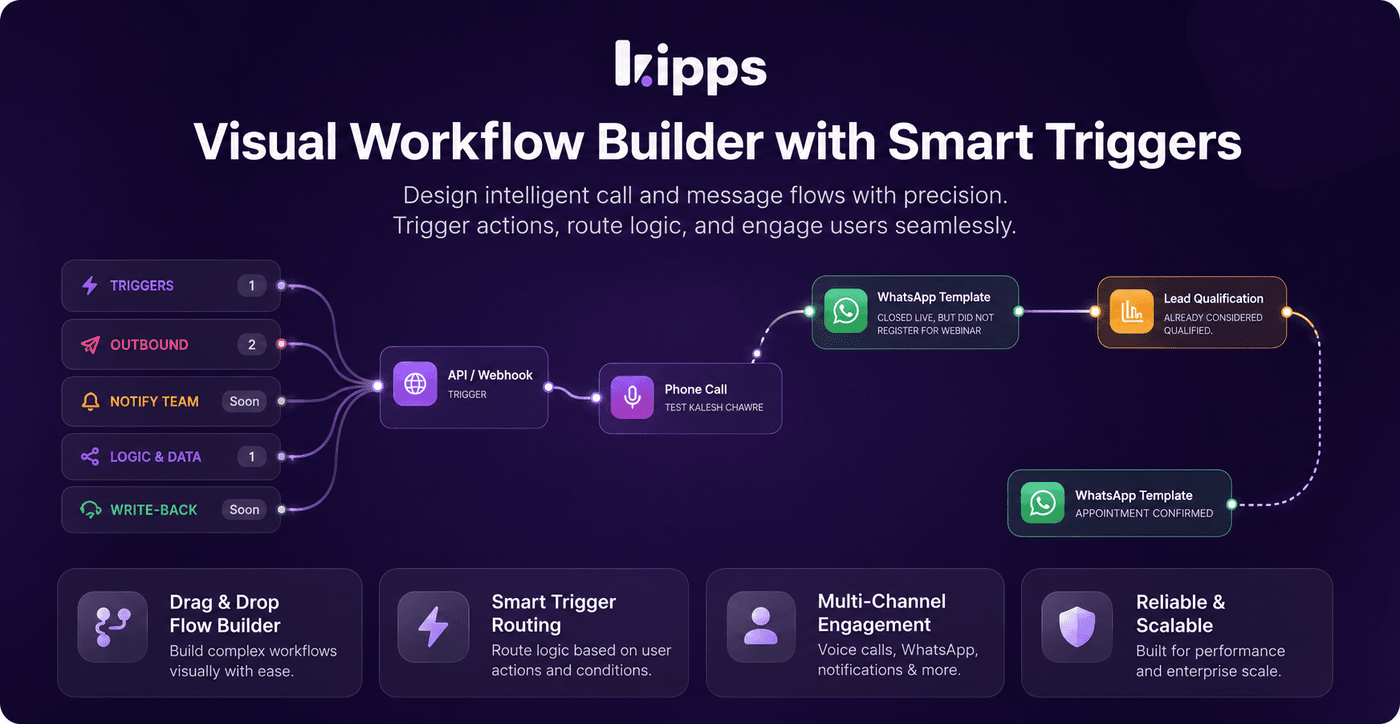
Lead Qualification & Webhook Triggers for Campaign Workflows

Introduction
We're excited to introduce powerful new capabilities to your campaign workflows: automated lead qualification and webhook triggers. This update allows you to automatically score every lead based on conversation content and seamlessly integrate external lead sources directly into your campaigns, eliminating manual data entry and accelerating your sales cycle.
Feature Highlights
- Automated Lead Qualification: Automatically classify leads as Hot, Warm, Cold, or Unknown after a Call or WhatsApp step, based on custom criteria or AI-generated suggestions.
- Webhook Triggers: Initiate campaign workflows with leads from any external system (CRMs, landing pages, ad platforms) by simply sending data to a unique webhook URL.
- Dynamic Workflow Branching: Tailor follow-up actions based on a lead's qualification score, ensuring that your most promising leads receive immediate, targeted attention.
How to Use
- Open an existing campaign or create a new one, then navigate to the Workflow tab.
- To integrate external lead sources, drag a Webhook Trigger node onto the canvas to start your workflow. Map incoming fields (e.g., phone, name, email, custom fields) to your contact record, then copy the generated webhook URL into your CRM, form, or ad platform.
- After a Call or WhatsApp step, drag a Lead Qualification node onto the canvas and connect it.
- Define your qualification criteria in plain language or click Auto-generate to have criteria drafted based on the preceding step. Select which data points to extract (e.g., lead score, sentiment, budget).
- Save the workflow. From this point, every lead reaching that node will be automatically analyzed against the conversation transcript, tagged with a qualification (Hot/Warm/Cold/Unknown), and extracted details saved to their record.
- Branch your workflow based on the qualification result (e.g., send Hot leads a WhatsApp follow-up, route Cold leads to a nurture sequence).
Benefits
- Automated Lead Prioritization: Eliminate the need for manual review of call/WhatsApp transcripts, as qualification happens automatically for every lead, every time.
- Seamless External Integrations: Onboard leads from any external source (website forms, Meta/Google lead ads, CRMs) directly into a campaign workflow the moment they arrive, bypassing manual CSV imports.
- Optimized Follow-Up: Branch workflows based on real qualification signals (Hot/Warm/Cold), ensuring that follow-up actions are precisely matched to each lead's potential.
Example Workflow
Imagine a user running a lead generation campaign on Meta. They configure a Webhook Trigger node in their campaign workflow, copying the unique URL into their Meta Lead Ad form. As soon as a new lead submits the form, it's instantly added to the campaign. After an automated WhatsApp conversation, a Lead Qualification node analyzes the transcript. If the lead expresses high interest and mentions a specific budget, they are automatically tagged "Hot." The workflow then branches, immediately sending a personalized WhatsApp message from a sales agent to the "Hot" lead, while "Warm" leads are routed to a nurture sequence.
Result
You can now build more intelligent and responsive campaign workflows that automatically qualify leads and integrate seamlessly with your entire marketing and sales tech stack. This means faster lead processing, more targeted follow-ups, and ultimately, higher conversion rates.
See Also
- Campaign Workflow Builder
- Contacts & Audience
- WhatsApp Agent
- Voice Agent (Call Node)
Ready to try these new features?
Experience the latest improvements and see how they can enhance your workflow. Get started today or learn more about what's coming next.
More Changelog Updates
Related Blog Posts
AI-Powered WhatsApp Campaigns | Boost Engagement | Kipps.AI
Run interactive, personalized WhatsApp campaigns using AI agents. Learn how Kipps.AI helps you automate outreach and increase conversions.
Read more
HR's Guide to Employee Retirement Plan Communication
Struggling with 401k questions? This guide helps HR teams simplify employee retirement plan communication. Learn strategies to explain mutual funds, boost participation, and reduce repetitive work.
Read more
Beyond the First Message: A Guide to Smarter Chatbot Lead Forms
Learn how to configure your chatbot's lead form frequency to reduce visitor fatigue, improve conversation flow, and capture higher-quality leads. A complete guide to the new settings and best practices.
Read more