
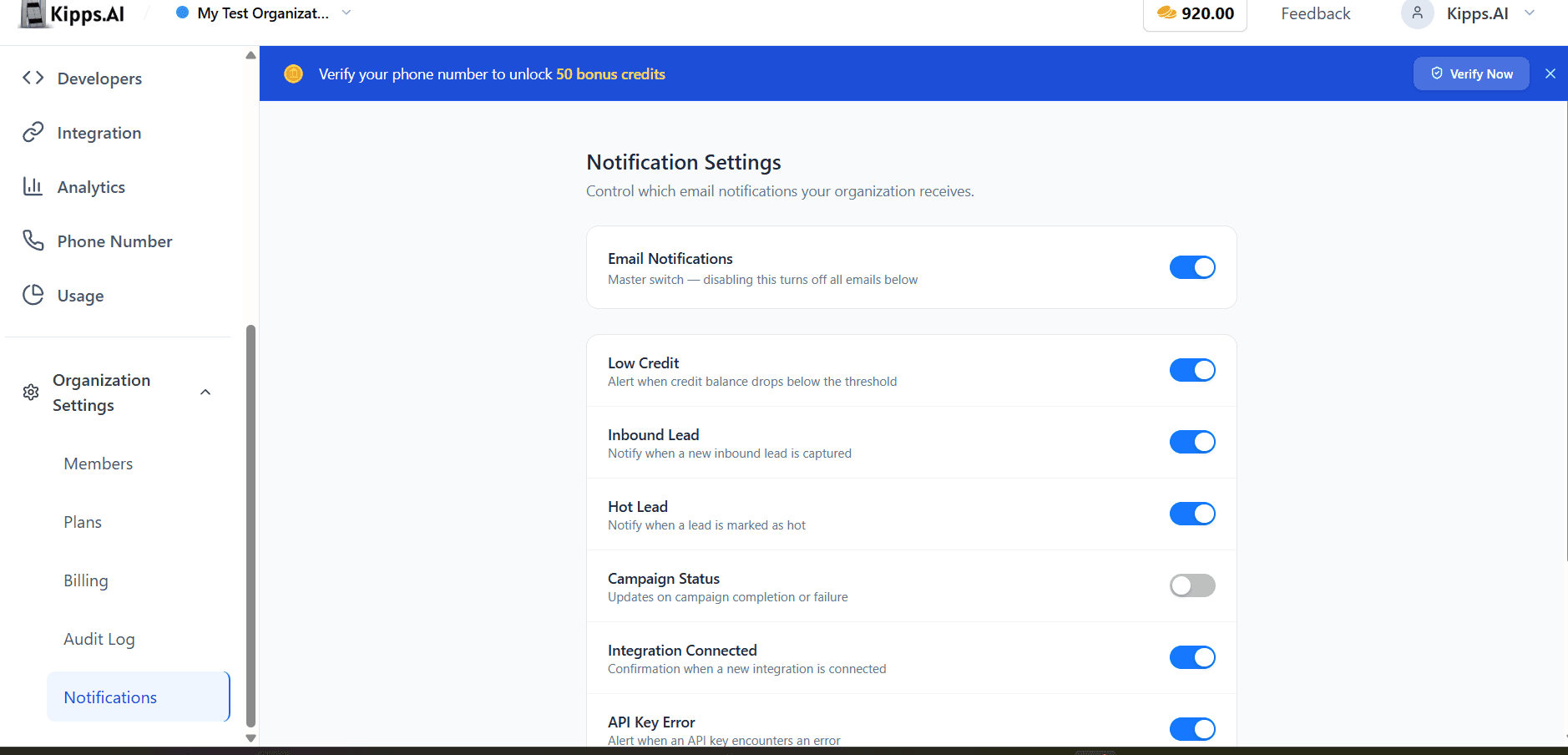
Organization Notification Settings

Introduction
We're excited to announce a new centralized notification settings panel designed to give organization administrators complete control over their organization's email notification preferences. This feature addresses the need for a unified management interface, allowing for more efficient and tailored communication within your organization.
Feature Highlights
- Master Toggle for All Notifications: Instantly enable or disable all organization-wide email notifications with a single click, providing immediate control over email volume.
- Granular Notification Controls: Configure individual notification types, such as Low Credit, Inbound Leads, Hot Leads, Campaign Status, and more, to ensure only relevant alerts are sent.
- Real-time Updates: All changes to notification settings are saved automatically and take effect immediately, ensuring your preferences are always up-to-date.
How to Use
- Navigate to Organization Settings.
- Click on the "Notifications" tab.
- Use the master toggle to enable or disable all email notifications for the organization.
- Individually configure notification types like Low Credit, Inbound Leads, Hot Leads, Campaign Status, Integration Status, API Key Errors, User Engagement Reminders, and Agent Feedback Reminders by toggling them on or off.
- Changes are saved automatically and take effect immediately.
Benefits
- Centralized Management: Streamline the management of all organization-wide email notifications from a single, easy-to-use interface.
- Reduced Email Noise: Minimize unnecessary email clutter by enabling only the alerts that are most critical to your operations.
- Instant Control: Quickly pause or resume all organization email notifications using the master toggle for immediate adjustments.
- Targeted Communication: Ensure critical operational notifications reach the appropriate users, improving responsiveness and awareness.
Example Workflow
An organization administrator notices that their team is receiving too many email notifications about various system events. They navigate to the new Organization Notification Settings. First, they use the master toggle to temporarily pause all notifications to reduce immediate email volume. Then, they review the granular controls, deciding to re-enable only "Hot Leads" and "API Key Errors" notifications, ensuring their sales team is alerted to high-priority leads and their developers are informed of critical system issues, while other less urgent notifications remain off.
Result
With the new Organization Notification Settings, administrators can now effortlessly manage and customize their organization's email notification preferences, ensuring that critical information is delivered efficiently while minimizing unnecessary email noise.
See Also
- Organization Settings
- Email Notification System
- Low Credit Notifications
- Inbound Lead Notifications
- Hot Lead Notifications
- Campaign Status Notifications
- Integration Connected Notifications
- API Key Error Notifications
- User Engagement Reminders
- Agent Feedback Reminders
Ready to try these new features?
Experience the latest improvements and see how they can enhance your workflow. Get started today or learn more about what's coming next.
More Changelog Updates
Related Blog Posts

HR's Guide to Employee Retirement Plan Communication
Struggling with 401k questions? This guide helps HR teams simplify employee retirement plan communication. Learn strategies to explain mutual funds, boost participation, and reduce repetitive work.
Read more
Beyond the First Message: A Guide to Smarter Chatbot Lead Forms
Learn how to configure your chatbot's lead form frequency to reduce visitor fatigue, improve conversation flow, and capture higher-quality leads. A complete guide to the new settings and best practices.
Read more
How to Automatically Write Data to Google Sheets from Your Workflow
Learn how to automatically write or update data in Google Sheets directly from your workflow using the Write Back to Sheet node in Kipps.AI.
Read more