
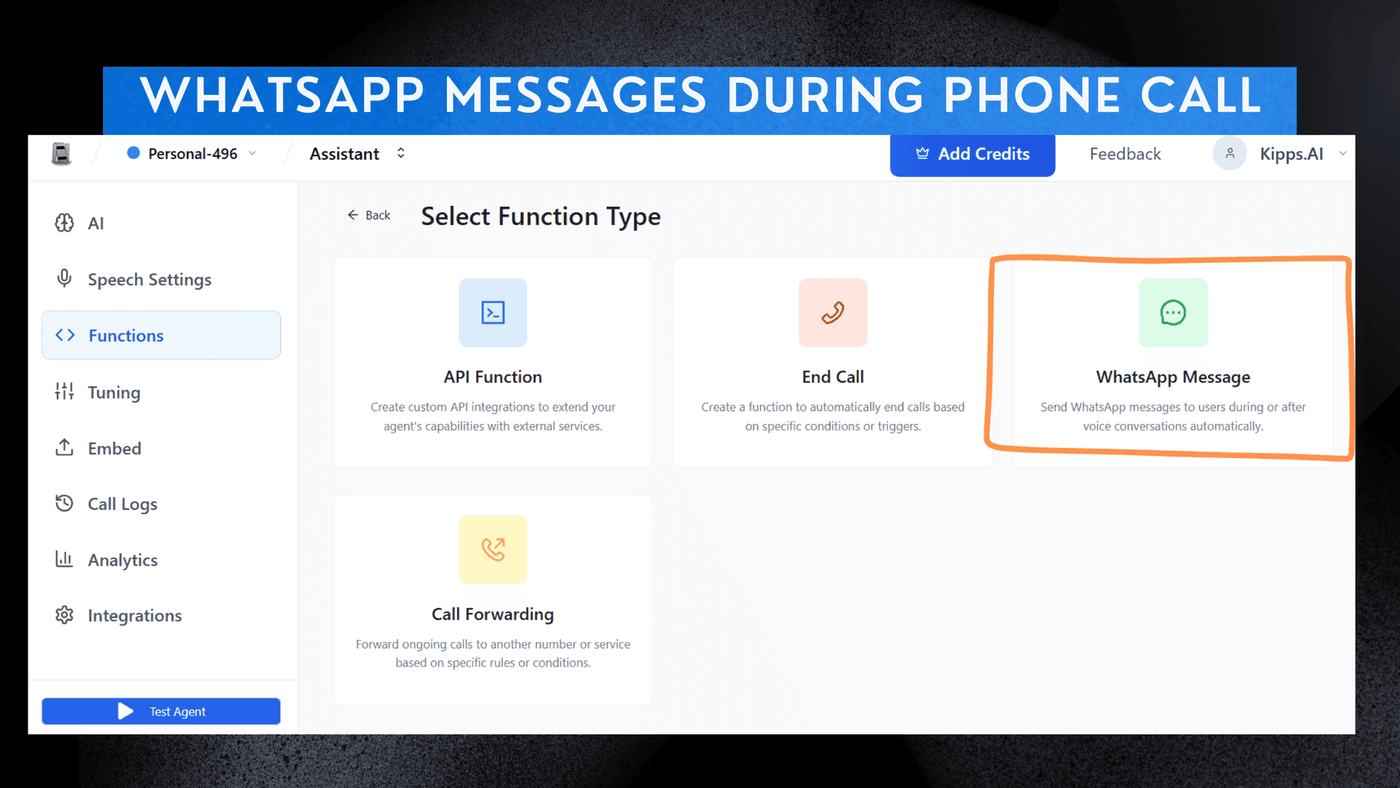
WhatsApp Messages During Phone Calls

Introduction
The WhatsApp Function Integration enables the Voicebot to send WhatsApp messages based on user intent during an active call or after call completion. It works across Web Calls, Inbound Calls, and Outbound Calls, enabling real-time WhatsApp communication driven by voice commands. This feature allows users to seamlessly transition from voice interactions to WhatsApp messaging, enhancing customer engagement and providing a more versatile communication experience. Whether it's sharing details, sending follow-ups, or providing information, the Voicebot can now leverage WhatsApp to deliver timely and relevant messages based on user intent.
Key Features
- Real-Time Messaging
Send WhatsApp messages instantly during an active voice call. - Multi-Channel Coordination
Combine voice + WhatsApp for smoother user interactions. - Context-Aware Messaging
AI sends messages based on the live conversation (e.g., “sending you the payment link now”). - Customizable Functions
Add your own WhatsApp message templates and let the AI trigger them automatically. - Improved Conversions
Great for payment reminders, demo scheduling, support flows, and verification steps.
How to Enable WhatsApp Messaging During Calls
- Select the specific Agent you wish to modify.
- Navigate to the Functions section within the agent settings.
- Open the Add Function pane.
- Choose Add WhatsApp Message.
Once integrated, the AI can autonomously trigger WhatsApp messages at the right moment during any voice call.
See Also
Related Features
Ready to try these new features?
Experience the latest improvements and see how they can enhance your workflow. Get started today or learn more about what's coming next.
More Changelog Updates
Related Blog Posts
Why WhatsApp Bot Typing Indicators Build Customer Trust
Learn how accurate typing indicators and read receipts on your WhatsApp bot build customer trust and ensure responsive conversations.
Read more
Master Your Conversational Path with Granular WhatsApp Flow Control
Learn how the Continue from previous taps setting lets you design flexible or sequential WhatsApp journeys to boost completion rates.
Read more
Why WhatsApp Flow Builder Is the Future of Customer Automation
Build interactive WhatsApp Flow agents with native forms, date pickers, and multi-step inputs for higher conversions.
Read more