Why WhatsApp Bot Typing Indicators Build Customer Trust
Learn how accurate typing indicators and read receipts on your WhatsApp bot build customer trust and ensure responsive conversations.

Share This Article
Table of Contents
Overview
We’ve all seen them: the three animated dots that signal someone is typing a reply. It’s a small, almost subconscious cue, but it’s powerful. It’s a digital promise that says, “I’ve heard you, and a response is on its way.”
But what happens when that promise is broken? When a customer sees your WhatsApp bot is “typing…” only to be met with silence, that small cue turns from a sign of engagement into a moment of frustration. It erodes trust and makes your automated experience feel broken.
In conversational AI, getting these subtle interactions right is everything. That’s why we’ve rolled out a critical platform enhancement to ensure your bot’s typing indicators and read receipts are always honest.
The Problem: When Your Bot Makes a Promise It Can’t Keep
Previously, the “typing…” indicator or blue read-receipt ticks might appear even when a bot had no response to give. This created a jarring experience for customers, leaving them wondering if they were being ignored.
This misleading feedback could happen for several common reasons:
- An Unmatched Query: A customer's message didn't match any keyword or step in your configured flow.
- A Conversational Dead End: A step in your visual Flow Builder didn't have any further connections.
- An Unassigned Number: No bot or agent was assigned to handle incoming messages.
- Exhausted Message Credits: Your organization had run out of credits to send a reply.
In each case, the bot would signal it was about to reply, creating a false expectation that damaged the customer’s perception of your brand’s reliability.
Our Solution: Intelligent, Context-Aware Indicators
To solve this, we’ve made your bot’s conversational cues smarter. The platform now verifies that a valid response path exists before showing any typing or read-status indicators. This is a fundamental improvement that is now active for all WhatsApp bots, with no setup required.
Contextual Typing Indicator
The “typing…” indicator will now only appear when your bot has successfully received a message, identified a valid response path, and is actively preparing the reply. No more false starts.
Accurate Read Receipts
Similarly, a message will only be marked as "read" with two blue ticks when a reply is genuinely being generated. This gives customers a true and accurate signal of your bot’s engagement.
Zero Configuration Required
This enhancement works automatically in the background. You don’t need to enable any settings; your bot conversations are already more reliable and transparent.
How It Works: A Real-World Scenario
Let's compare the customer experience before and after this update.
Before: A customer sends a message that doesn't trigger any of your bot’s configured flows. They see the “typing…” indicator and then the blue ticks. They wait, expecting an answer that will never arrive. The result? Confusion and frustration.
After: The same customer sends the same message. This time, they see their message was delivered (two grey ticks), but nothing else happens. No typing dots, no blue ticks. The customer immediately understands their message wasn't understood by the bot, and they aren’t left waiting for a phantom reply. The experience is clearer, more honest, and less frustrating.
The Benefits of a More Honest Bot
This automated update delivers immediate improvements to your customer communications.
- Reduces Customer Confusion: By setting accurate expectations, you prevent customers from feeling ignored or assuming your bot is broken.
- Builds Greater Brand Trust: Every interaction feels more reliable. This small detail has a significant impact on strengthening the customer relationship.
- Improves the Customer Experience: A transparent and seamless automated messaging experience leads directly to higher customer satisfaction.
Conclusion: Trust Is Built in the Details
In conversational automation, trust is the ultimate currency. Small details like the typing indicator are not just cosmetic features—they are the foundation of a positive and effective customer experience. This platform-wide enhancement ensures every signal your bot sends is an honest one, helping you build more reliable and trustworthy relationships with every message.
Frequently Asked Questions
This feature ensures that the 'typing…' indicator and read receipts (blue ticks) only appear when your WhatsApp bot is actively preparing a reply. It prevents misleading signals when no response is available, creating a more honest and reliable user experience.
An accurate typing indicator is crucial for building customer trust. When a bot signals it is typing but no message arrives, it can frustrate users and make your service feel unreliable. This update prevents that negative experience, enhancing brand credibility and customer satisfaction.
No, this is a platform-wide enhancement that works automatically for all WhatsApp bot conversations. No configuration or manual setup is required from you.
The typing indicator and read receipts will not appear if a reply is not being generated. This includes scenarios where a customer's message doesn't match a defined bot flow, a conversation reaches a dead end, no agent is assigned to the number, or your organization has exhausted its message credits.
Your customers will have a clearer, more transparent interaction. They won't be left waiting for a reply that never comes, which reduces confusion and frustration. This leads to a more positive perception of your bot and a better overall customer experience.
Related Case Studies
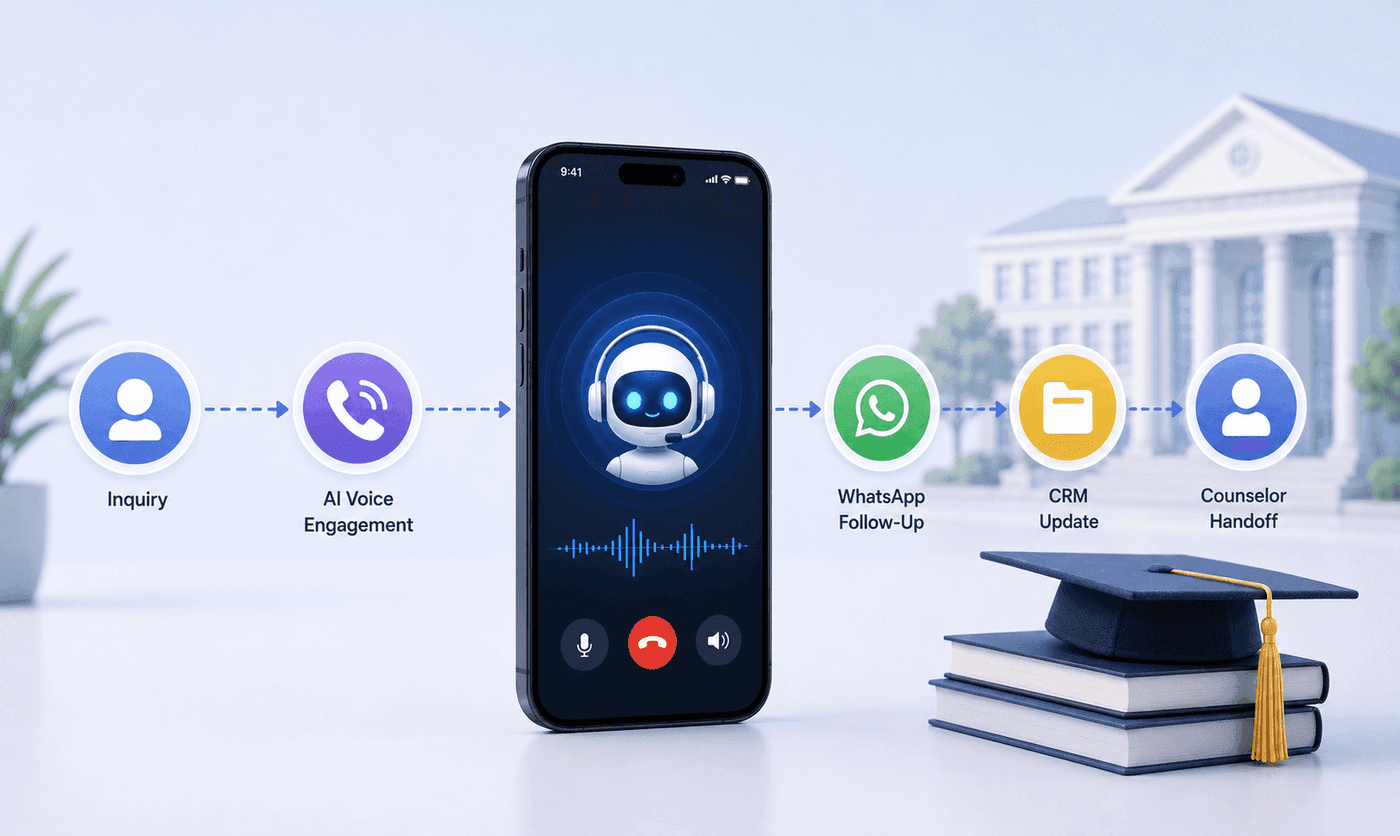
How an Executive Education Institution Automated Its Entire Admissions Workflow Using AI Voice and WhatsApp
How an executive education institution automated admissions from first call to counselor handoff with AI voice, WhatsApp, and CRM syncing.

How an EdTech Founder Reactivated a Dormant Lead Database Using WhatsApp Automation and AI-Assisted Qualification
How an EdTech founder reactivated a dormant inquiry database and acquired customers in week one using WhatsApp outreach and AI qualification.