Why WhatsApp Flow Builder Is the Future of Customer Automation
Build interactive WhatsApp Flow agents with native forms, date pickers, and multi-step inputs for higher conversions.

Share This Article
Table of Contents
Beyond the Hype: Why a WhatsApp Flow Builder is the Future of Customer Automation
The promise of WhatsApp automation is tantalizing: instant, 24/7 engagement with customers on their favorite messaging app. Yet, for many businesses, the reality falls short. We’ve all been there—stuck in a loop with a chatbot that doesn’t understand our simple request, or frustrated by an AI that offers creative but incorrect answers to a straightforward question.
For high-value, goal-oriented interactions like booking an appointment, qualifying a sales lead, or triaging a support ticket, businesses don’t need a poet; they need a pilot. They need a guided, deterministic workflow that gets the user from Point A to Point B efficiently and without error. This is where the strategic power of a rule-based approach outshines the unpredictability of open-ended AI.
This is why we built the WhatsApp Flow Builder. It’s a strategic tool designed to put business teams back in control, allowing them to create reliable, interactive, and powerful conversational workflows with a no-code, visual interface. It’s time to move from unpredictable chat to predictable results.
Why This Feature Matters: Predictability in an AI World
In an era dominated by discussions of generative AI, it’s easy to believe that more AI is always the answer. However, when it comes to core business processes, predictability is often far more valuable than personality. A customer applying for a loan or scheduling a critical repair doesn’t want a novel conversation; they want a clear, efficient, and successful outcome.
A predictable conversational workflow ensures every customer receives the same high-quality, on-brand experience. It’s auditable, easy to analyze, and guarantees that critical data is collected correctly every single time. This is the foundation of scalable customer operations.
The challenge has been that building these flows was traditionally the domain of developers. This created an operational drag, where customer-facing teams—the very people who understand the customer journey best—were powerless to make simple changes. The Flow Builder fundamentally shifts this dynamic. It empowers support, operations, and marketing teams to own, build, and optimize their customer journeys directly, turning ideas into live experiences in minutes, not weeks.
The Problem Before This Feature: When WhatsApp Automation Goes Wrong
Before a dedicated WhatsApp flow builder, businesses were trapped between a rock and a hard place, leading to several common and costly problems.
User Frustration
Users often found themselves "stuck" in rigid, poorly designed bots. If they made a mistake or changed their mind, there was no easy way to go back. Tapping an old button in the chat history did nothing, forcing them to either restart the entire process or simply give up. This friction leads directly to customer churn and lost revenue.
Engineering Bottlenecks
Imagine a marketing manager wants to add one simple question to a lead qualification bot. With older systems, this seemingly minor change would become a new ticket in the engineering backlog. It could take weeks to be prioritized, coded, tested, and deployed. This lack of agility meant that WhatsApp conversation flows quickly became outdated and ineffective.
Disconnected Systems
A conversation doesn't happen in a vacuum. A great WhatsApp Business API chatbot needs to talk to your other business systems. Without a simple way to integrate, conversations remained siloed. A bot couldn't check real-time product inventory, pull a customer's order status from a CRM, or verify a booking against a live calendar, severely limiting its usefulness.
The Bot-to-Human Gap
The handoff from an automated flow to a human agent was often clumsy or non-existent. The conversation would be transferred with no context, forcing the customer to repeat themselves. Even worse, there was rarely a way for a human to hand a conversation back to the bot to complete a structured task, creating inefficiency for support teams.
Overview of the Feature: Your Visual WhatsApp Flow Builder
The Flow Agent is a no-code WhatsApp automation tool that transforms how you build guided customer journeys. It is, at its core, a visual WhatsApp chatbot builder that uses a drag-and-drop canvas to map out conversations.
Think of it as creating a flowchart for a conversation. You start with a trigger and then connect a series of nodes, where each node represents an action: sending a message, asking a question, collecting information in a form, calling an external API, or branching the conversation based on user input.
This drag and drop chatbot builder approach makes customer journey mapping an intuitive, visual process. You see the entire WhatsApp conversation flow laid out in front of you, making it easy to design, understand, and modify complex interactions without writing a single line of code.
Key Capabilities
The power of the Flow Builder lies in its comprehensive set of tools, designed to handle real-world business complexity with simplicity.
Design Complex Journeys Visually
With a drag-and-drop canvas and over 19 distinct node types, you can build almost any conversational workflow you can imagine. These nodes cover everything from sending simple text messages and collecting user input to implementing conditional logic ("if the user says this, then do that") and setting timeouts to nudge unresponsive users.
Ensure Predictable, Consistent Customer Experiences
This is a deterministic chatbot, meaning it follows the rules you define. There's no guesswork. This ensures every user goes through the exact same process, which is critical for compliance, support triage, and lead qualification automation. You have complete control over the conversation, guaranteeing a consistent brand voice and accurate information delivery.
Go Beyond Text with Rich WhatsApp UI
WhatsApp is more than just text. Our Flow Builder lets you leverage native UI components to create a modern, app-like experience.
- Buttons and Lists: Guide users with quick-reply buttons and selection lists to prevent errors.
- Forms with Validation: Collect structured data with multi-field forms. You can validate inputs in real-time (e.g., ensure an email address is in the correct format) before the user can proceed.
- Date Pickers, Location, and Image Capture: Natively ask for a date and time, request a user's location, or have them upload an image, perfect for a
WhatsApp booking systemor support requests.
Connect to Your Business Systems in Real-Time
The API Call node is a game-changer. It allows your WhatsApp chatbot with API integration to communicate with any external system mid-conversation.
- Example: A user wants to check their order status. The flow can ask for their order number, send it to your e-commerce platform via an API call, receive the status, and display it to the user—all within seconds.
- Example: A lead provides their email. The flow can send it to your CRM via API, check if they are a new or existing contact, and tailor the rest of the conversation accordingly.
Blend Automation with the Human Touch
Automation and human support should work together, not in silos. The Flow Builder excels at this with seamless, two-way handoffs.
- Bot-to-Human: At any point in a flow, you can include a button that says "Talk to an Agent." When clicked, the flow pauses, and the conversation, along with its full history, is instantly assigned to a human in the support inbox.
- Human-to-Bot: An agent can just as easily hand the conversation back to the flow to complete a structured task, like processing a payment or filling out a standardized form.
Create Fluid, "Never-Stuck" User Navigation
One of the biggest user frustrations is getting stuck. We solved this with two key features:
- Persistent State: The flow remembers exactly where each user is in the conversation. If they leave and come back hours later, they can pick up right where they left off.
- Immediate Button Actions: If a user scrolls up in their chat history and taps a button from an earlier step—for example, to change their selected service—the flow immediately honors that choice and jumps back to the relevant part of the
conversational workflow. This makes the experience fluid and forgiving.
Step-by-Step Usage: Building Your First Conversation Flow
We designed the Flow Builder to be intuitive. Here’s a high-level look at how to create guided conversations on WhatsApp.
1. Select the Flow Agent
Navigate to your WhatsApp agent settings and simply change its type to "Flow Agent." This activates the visual builder canvas for that number.
2. Map the Conversation
On the canvas, you’ll see a "Start" node. From here, you can drag and drop various nodes from the sidebar. Connect the nodes with edges to create the logical path you want your users to follow.
3. Configure Each Step
Click on any node to open its configuration panel. This is where you'll write your message text, define the fields for a form, specify the URL and data for an API call, or set the conditions for a logical branch.
4. Set Up Entry Points
You can trigger a flow to begin when a user messages you. Even better, you can use WhatsApp Template message buttons to launch users directly into a specific part of a flow. For example, a "Track Your Order" button on an order confirmation message can drop the user right into the order status part of your support flow.
5. Publish and Go Live
Once you’re happy with your WhatsApp conversation flow, just hit "Save and Publish." Your new, interactive experience is now live and ready to engage customers.
Real-World Example: Automating Lead Qualification Without Code
Let's see how you can build a WhatsApp booking bot without code—or in this case, a powerful lead qualification bot.
-
Scenario: A prospect visits your website and scans a QR code to ask about pricing on WhatsApp.
-
Step 1 - Welcome & Triage: The flow is triggered and sends a welcome message. It presents three buttons: "Get Pricing," "Request a Demo," or "Talk to Sales."
-
Step 2 - Data Collection: The prospect clicks "Get Pricing." The flow responds with a Form node, asking for their company name, company size (from a list), and industry. Input validation ensures the data is clean.
-
Step 3 - API Integration: Once the form is submitted, an API Call node sends this data to your CRM. The CRM checks if this is an existing lead and determines the appropriate pricing tier based on company size.
-
Step 4 - Conditional Branching: The API returns the result. A Condition node now directs the flow. If it's a small business, the flow sends a link to the standard pricing page. If it's an enterprise lead, it sends a message saying, "Thanks! An enterprise account manager will be in touch shortly with custom pricing."
-
Step 5 - Seamless Handoff: If the prospect had clicked "Talk to Sales" at any point, the Handoff node would have instantly paused the flow and assigned the conversation to the sales team in the inbox, complete with all the data collected so far. This is a perfect example of
chatbot to human handoff on WhatsApp.
Benefits
Adopting a WhatsApp flow builder delivers immediate and significant business value.
- Empower Non-Technical Teams: Operations, support, and marketing managers can build, test, and iterate on conversational experiences without writing a line of code.
- Increase Conversion & Task Completion: Guided, interactive paths with clear next steps dramatically reduce user drop-off compared to confusing AI or static web forms.
- Improve Customer Satisfaction: Create intuitive, "never-stuck" experiences that are efficient and respectful of the customer's time.
- Drastically Reduce Engineering Costs: Free up your development team to work on core product features instead of building and maintaining conversational scripts.
- Ensure Compliance and Consistency: Maintain absolute control over the conversation to ensure brand voice, data accuracy, and adherence to regulatory requirements.
Best Practices
- Map Before You Build: Sketch out your
conversational workflowon a whiteboard or paper first to clarify the logic and user journey. - Keep It Concise: Use clear, simple language and avoid long blocks of text. Leverage buttons and lists to make interaction easy.
- Always Provide an Out: Ensure every flow has a clear and easily accessible option to escalate to a human agent.
- Leverage Entry Points: Use QR codes and template messages with buttons to launch users directly into the most relevant part of a flow.
- Test and Iterate: Use analytics to see where users get stuck or drop off, and continuously refine your flows for better performance.
Conclusion
For the critical, goal-oriented tasks that drive your business, a deterministic WhatsApp flow builder is not just an alternative to an AI chatbot—it's a superior strategic tool. It delivers the control, predictability, and deep integration necessary to create truly effective customer experiences at scale.
The Flow Agent empowers your business teams to design exceptional customer journeys, automate complex processes, and seamlessly blend the best of automation with the essential human touch. It’s time to stop leaving your customer experience to chance and start building conversations that convert.
Ready to build predictable, powerful WhatsApp experiences? Sign up for a free trial and create your first conversation flow in minutes.
Want to see it in action? Schedule a demo with our team.
Frequently Asked Questions
A: A typical AI chatbot uses generative AI to understand free-form text and create a response. This is great for open-ended questions. The Flow Builder is a deterministic, rule-based chatbot. It guides users through a structured, predefined path, which is ideal for tasks like bookings, data collection, and support triage where predictability and accuracy are essential.
A: Absolutely. The API Call node is designed for this. It allows you to send and receive data from any third-party system with an API, enabling real-time integration with your existing CRM, e-commerce platform, booking software, and more.
A: You can configure the flow's behavior. The flow can be set to wait for a valid input (like a button click), re-prompt the user with the options, or after a certain number of failed attempts, automatically hand the conversation over to a human or AI agent for assistance.
A: Yes. Seamless, two-way handoff is a core feature. You can place a "Talk to an Agent" option at any point in the flow. When a user selects it, the flow is paused, and the conversation is instantly routed to a live agent with the full chat history for context.
A: No. The Flow Builder is a true no-code tool. It was specifically designed for non-technical users in operations, customer support, and marketing to build and manage sophisticated WhatsApp conversation flows through a visual, drag-and-drop interface.
Frequently Asked Questions
What is a WhatsApp Flow Builder and how is it different from an AI chatbot?
A WhatsApp Flow Builder is a no-code, visual tool for creating structured, rule-based conversations. Unlike an AI chatbot that generates free-form replies, a Flow Builder guides users through a predictable, deterministic path, making it ideal for tasks like bookings, lead qualification, and support triage where accuracy and consistency are critical.
Can I connect the WhatsApp Flow Builder to external systems like my CRM?
Yes. The Flow Builder includes an API Call node that allows it to communicate with any external system with an API in real-time. You can send and receive data from your CRM, e-commerce platform, or booking software mid-conversation to create dynamic and personalized experiences.
What happens when a customer needs to speak to a human agent?
The Flow Builder supports seamless, two-way handoffs. You can place a 'Talk to an Agent' option anywhere in the flow. When selected, the conversation is instantly paused and transferred to a live agent with the full chat history, ensuring a smooth transition without forcing the customer to repeat themselves.
Do I need to be a developer to create a WhatsApp chatbot with this tool?
No. The WhatsApp Flow Builder is a true no-code platform designed for non-technical teams. Its visual drag-and-drop interface allows support, operations, and marketing professionals to build, manage, and optimize complex conversational workflows without writing any code.
How does the Flow Builder prevent users from getting stuck in a conversation?
It uses two key features to create a fluid experience: persistent state, which remembers exactly where a user left off, and immediate button actions. This means if a user taps a button from an earlier part of the chat, the flow will instantly honor the action and jump to the relevant step, preventing them from getting stuck.
Related Case Studies
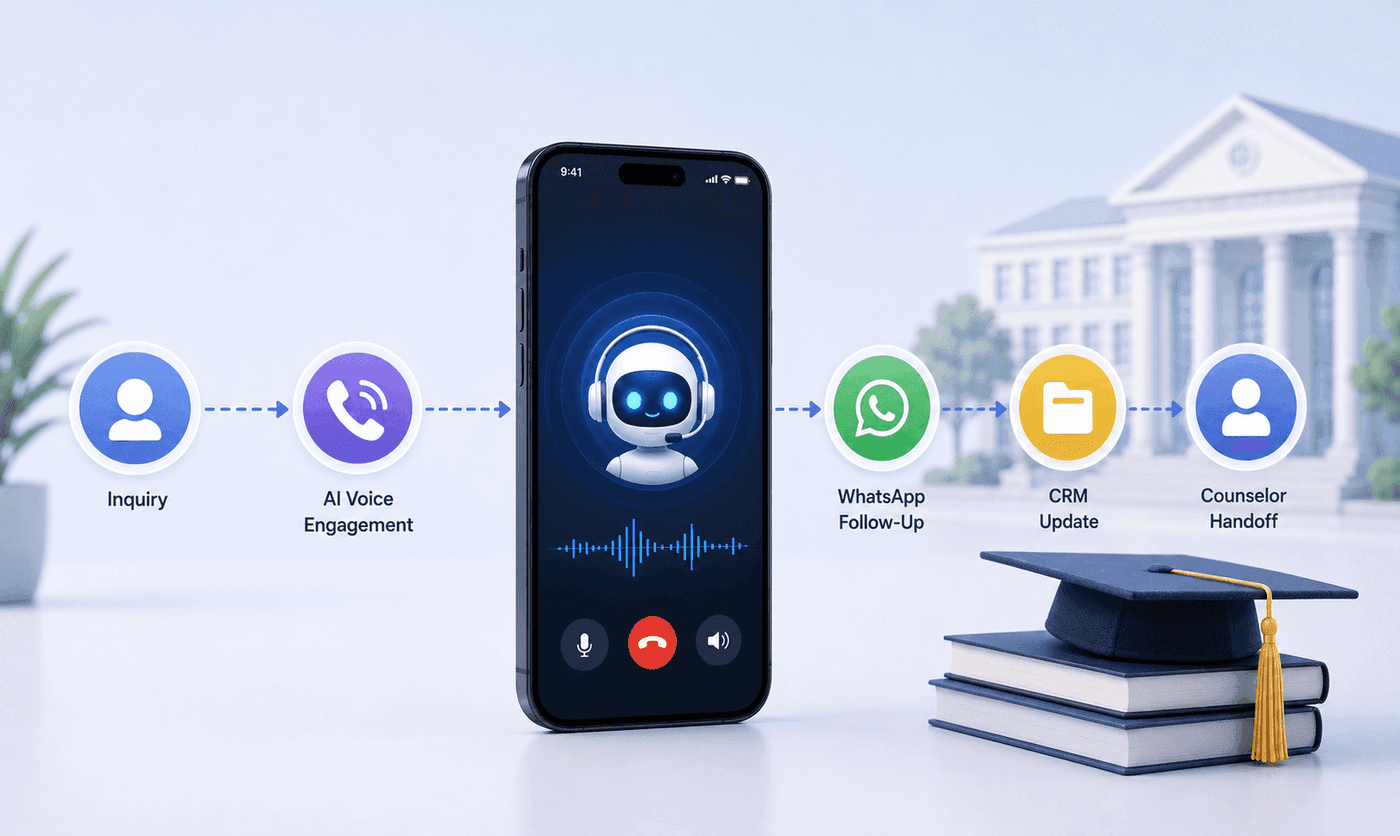
How an Executive Education Institution Automated Its Entire Admissions Workflow Using AI Voice and WhatsApp
How an executive education institution automated admissions from first call to counselor handoff with AI voice, WhatsApp, and CRM syncing.

How an EdTech Founder Reactivated a Dormant Lead Database Using WhatsApp Automation and AI-Assisted Qualification
How an EdTech founder reactivated a dormant inquiry database and acquired customers in week one using WhatsApp outreach and AI qualification.