
Whatsapp Agents Can Now Trigger Template-Based WhatsApp Messages on user request

Introduction
We’ve introduced WhatsApp Functions inside WhatsApp Agents, enabling automated, instruction-driven messaging directly from your agent workflows. This update centralizes WhatsApp communication, simplifies automation, and allows teams to send messages using natural language triggers.
Whatsapp Agents Can Now Trigger Template-Based WhatsApp Messages on user request
We’ve introduced WhatsApp Functions inside WhatsApp Agents, enabling automated, instruction-driven messaging directly from your agent workflows.
This update centralizes WhatsApp communication, simplifies automation, and allows teams to send messages using natural language triggers.
1. WhatsApp Agent Creation
What’s New
Users can now create a dedicated WhatsApp Agent designed specifically for managing WhatsApp communication and automation.
Why It Matters
- Centralizes all WhatsApp messaging logic in one place
- Simplifies automation setup and management
- Supports scalable communication workflows
2. WhatsApp Function Creation
What’s New
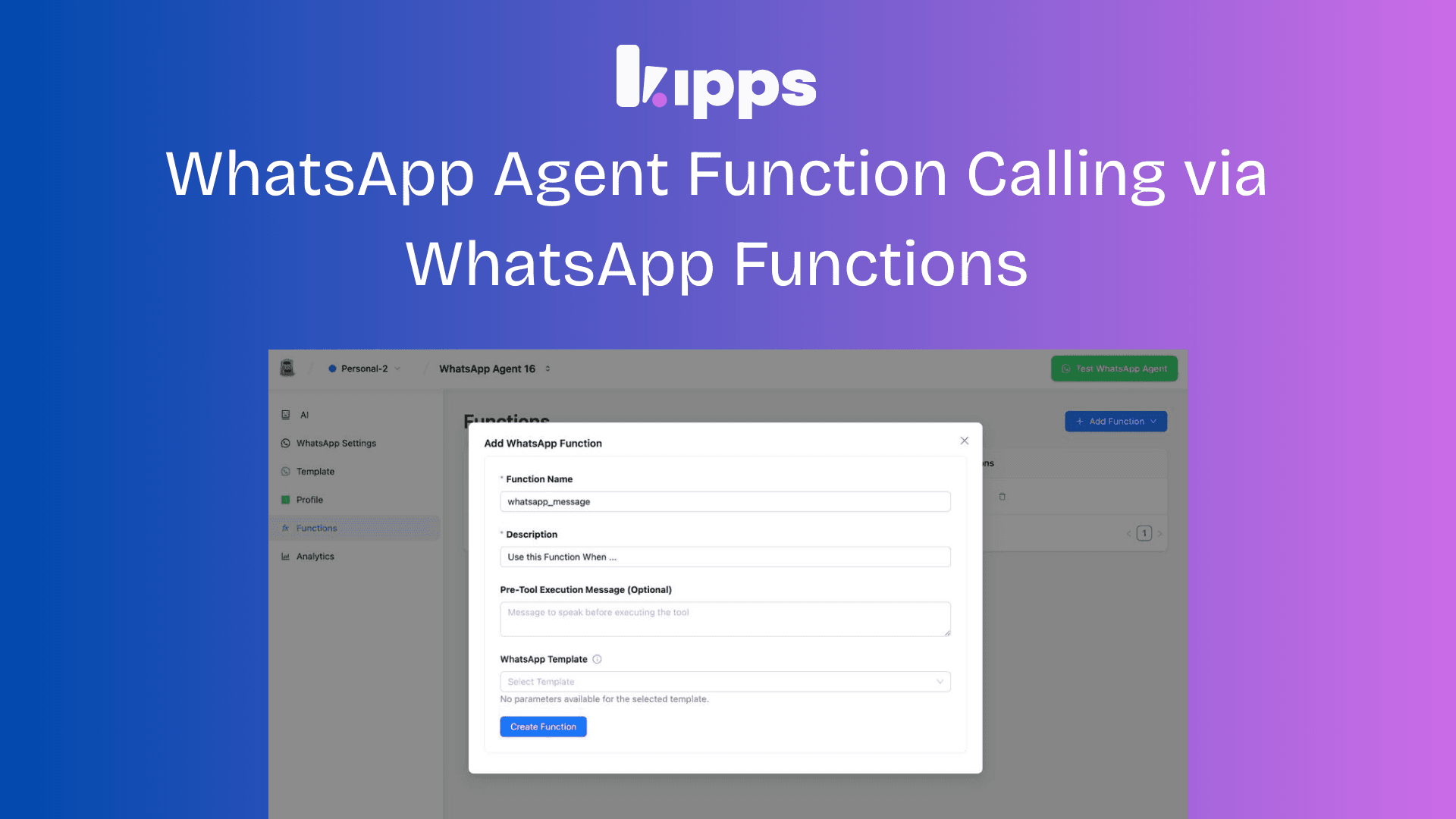
Inside a WhatsApp Agent, users can create reusable WhatsApp Functions that define how messages should be sent.
Configuration Options
-
Function Name
Assign a unique and identifiable name. -
Description
Provide a clear explanation of the function’s purpose. -
Template Selection
Choose from pre-approved WhatsApp message templates.
Benefit
Ensures messaging is consistent, compliant, and reusable across workflows.
3. Default Instruction Configuration
What’s New
Users can define default instructions that control when and how a WhatsApp Function is triggered.
Example Instruction
Send this message when a user asks about their order status.
Benefit
Enables rule-based automation without requiring manual actions.
4. User Interaction Flow
What’s New
WhatsApp messages can now be triggered using natural language commands.
Example Command
Send a message to this number.
How It Works
- The agent identifies the relevant WhatsApp Function
- Applies the selected message template
- Follows the configured instructions
- Sends the message automatically
Benefit
Removes technical complexity and allows conversational automation.
User Guide: How to Use WhatsApp Functions
Step 1: Create a WhatsApp Agent
- Navigate to Agents
- Click Create Agent
- Select WhatsApp Agent
Step 2: Add a WhatsApp Function
- Open the created agent
- Click Add Function
- Enter:
- Function Name
- Description
- Select a WhatsApp message template
Step 3: Configure Default Instructions
Define when the function should run.
Example Triggers
- On user request
- After a specific event
- Based on workflow conditions
Example
Automatically send a welcome message when a new user registers.
Step 4: Trigger the Function
When a user says:
Send a message to this number.
The agent will:
- Select the configured template
- Follow predefined instructions
- Send the WhatsApp message automatically
How This Improves User Experience
- Simplicity — Natural language replaces manual messaging steps
- Automation — Messages trigger automatically based on rules
- Personalization — Templates and instructions ensure relevant communication
- Efficiency — Faster responses with reduced operational effort
What’s New at a Glance
✅ Integrated WhatsApp messaging directly within agents
✅ Easy WhatsApp template selection and management
✅ Instruction-based automation for precise control
✅ Conversational triggers using simple user commands
Summary
The new WhatsApp Functions capability enables seamless automation and personalization of WhatsApp communication.
By combining templates, instructions, and conversational triggers inside a dedicated agent, teams can deliver timely, consistent, and scalable messaging — without relying on manual workflows or external tools.
This update empowers businesses to engage customers more effectively, enhance user experience, and drive better outcomes through intelligent automation.
See Also
Related Features
Learn More
Ready to try these new features?
Experience the latest improvements and see how they can enhance your workflow. Get started today or learn more about what's coming next.
More Changelog Updates
Related Blog Posts
Why Your WhatsApp Bot’s “Typing…” Indicator Is So Important for Customer Trust
Learn how accurate 'typing…' indicators and read receipts on your WhatsApp bot are crucial for building customer trust and preventing user frustration. This update ensures your bot only signals a reply when one is actually coming.
Read moreMaster Your Conversational Path with Granular WhatsApp Flow Control
Gain granular control over your WhatsApp conversational flows. Learn how the 'Continue from previous taps' setting lets you design either flexible, exploratory user journeys or strict, sequential paths to improve user experience and increase completion rates.
Read more
Beyond the Hype: Why a WhatsApp Flow Builder is the Future of Customer Automation
Discover why a deterministic, no-code WhatsApp flow builder is superior to AI chatbots for high-value customer interactions like bookings, lead qualification, and support.
Read more