
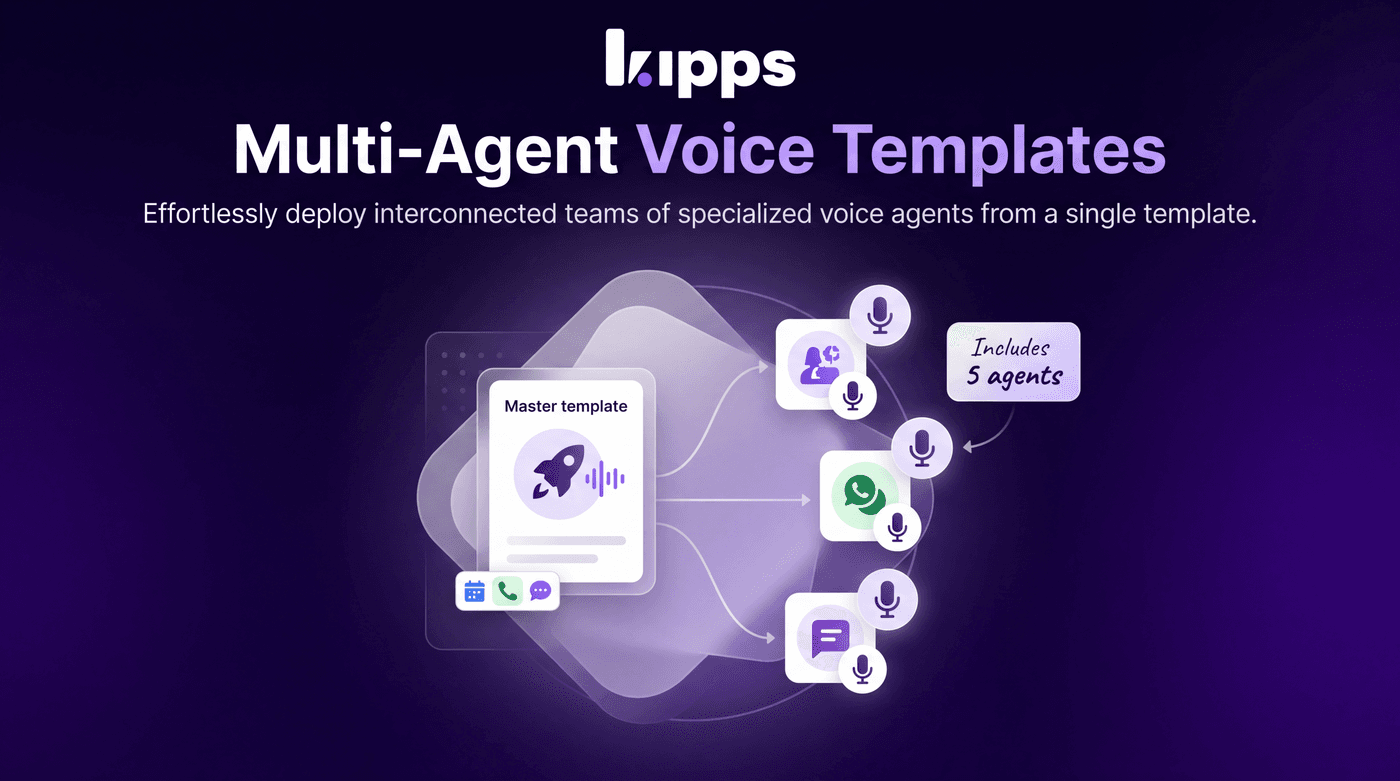
Multi-Agent Voice Templates

Introduction
We're excited to introduce Multi-Agent Voice Templates, a powerful new feature designed to streamline the deployment of complex voice agent systems. Previously, creating a team of interconnected voice agents required setting up each agent individually. This update allows you to define and deploy multiple linked voice agents from a single template, significantly reducing setup time and effort.
Feature Highlights
- Bundled Agent Creation: Select a single template to automatically create a primary voice agent along with all the specialized agents it's configured to hand calls off to.
- Integration Badges: Template cards now display badges indicating required integrations (e.g., Google Calendar, WhatsApp), providing a clear overview before creation.
- Cloned for Your Org: Each agent created from a multi-agent template receives an empty knowledge base and requires your organization's API keys, ensuring data privacy and security.
- Quota Enforcement: Plan limits are applied to the entire batch of agents being created, preventing accidental overages when deploying multiple agents simultaneously.
How to Use
- In Django admin, open a Voicebot Template and set its "Voicebot" — the root agent. Any agent that root hands calls off to (via its Agent Handoff functions) is bundled in automatically — no separate multi-select needed.
- Optionally check which integrations the bundle needs (Google Calendar, WhatsApp, Phone Number, Shopify, Calendly) — these show as badges on the template card before creation.
- In the dashboard, click "Create Agent" → "Voice" and pick that template — multi-agent templates show an "Includes N agents" badge.
- On creation, every bundled agent is cloned into your organization at once (instructions, functions, and voice settings copied). Each new agent gets an empty knowledge base (name/description only — no data) and needs your organization's own API keys added before it can take calls.
- A summary popup lists every agent created, with a one-click link to open and configure each one.
Benefits
- Streamlined Setup: Set up a linked team of voice agents (e.g., a main agent plus specialists it hands calls off to) from a single template, drastically cutting down deployment time.
- Enhanced Security and Privacy: Nothing crosses organizations: knowledge bases clone empty rather than shared, and API keys/credentials are never copied from the template's source org.
- Controlled Resource Usage: Plan limits are enforced against the whole batch being created, not just one agent, so you can't accidentally exceed your voicebot quota in one click.
Example Workflow
Imagine you need a customer service system where a main agent handles initial queries and then hands off to a billing specialist or a technical support agent. With Multi-Agent Voice Templates, you can select a single "Customer Service Hub" template. This template automatically deploys your main agent, the billing specialist, and the technical support agent, all pre-configured with their handoff logic. You then simply add your organization's specific API keys and populate their knowledge bases, and your entire customer service team is ready to take calls, saving hours of individual agent setup.
Important Notes
Each new agent created from a multi-agent template will have an empty knowledge base (name and description only). You will need to populate the knowledge base with your organization's specific data and add your own API keys for each agent before it can function fully.
Result
Users can now efficiently deploy complex, interconnected voice agent systems from a single template, significantly reducing setup time and ensuring consistent configurations across their agent teams.
See Also
- Voice Agent Templates
- Voice Agents
- Agent Handoff
Ready to try these new features?
Experience the latest improvements and see how they can enhance your workflow. Get started today or learn more about what's coming next.
More Changelog Updates
Related Blog Posts
Deploy AI Voice Agent Teams with Multi-Agent Voice Templates
Introducing multi-agent voice templates: Deploy specialized AI agents for sales, support, and scheduling in a single unified workflow.
Read more
Kipps AI vs Sarvam AI: Choice for 2026 Enterprise Voice Agents
Compare Kipps.AI vs Sarvam ai enterprise comparison. Discover key differences in voice AI, WhatsApp integration, pricing, and deployment speed.
Read more
Kipps AI vs Vapi AI: The 2026 Enterprise Decision Guide
Compare Kipps.AI vs Vapi ai enterprise platform comparison. Discover key differences in voice AI, WhatsApp integration, pricing, and deployment speed.
Read more