
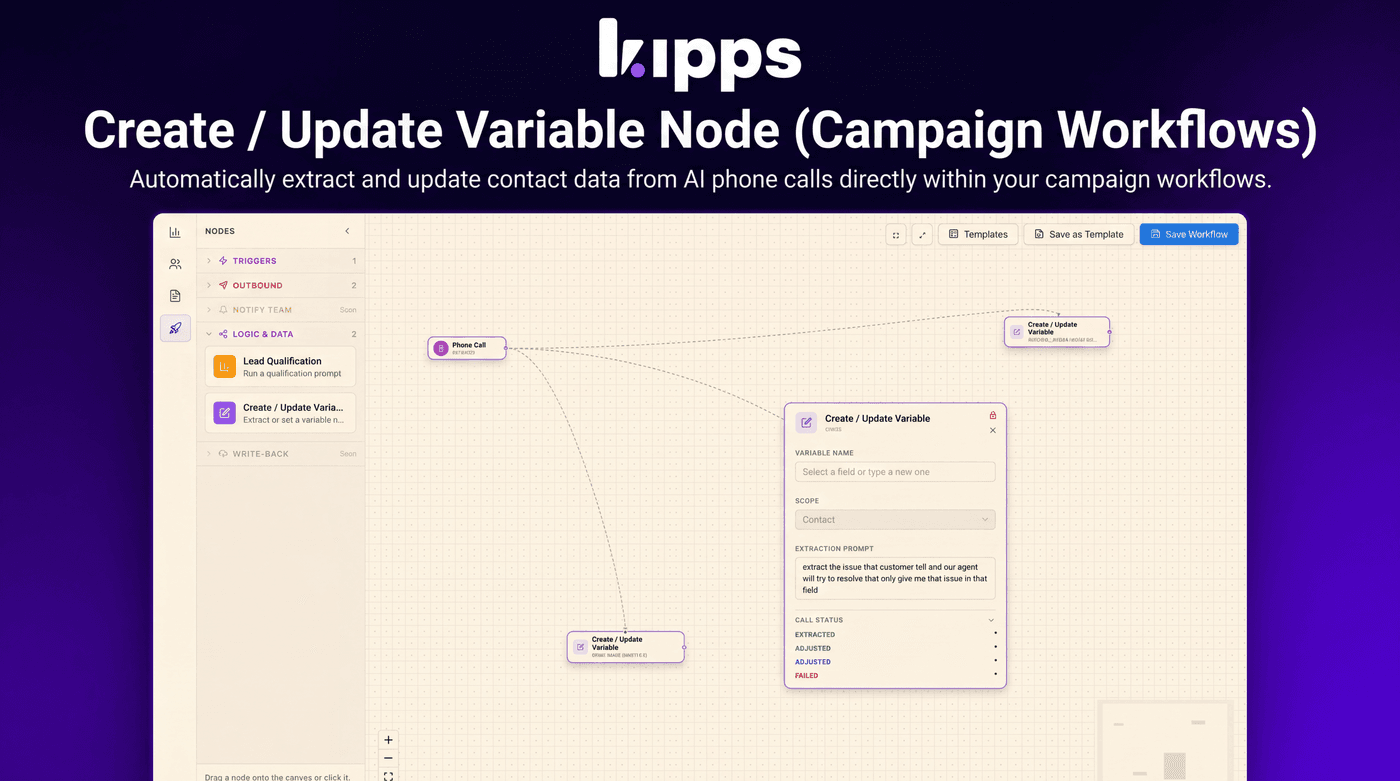
Create / Update Variable Node (Campaign Workflows)

Introduction
We're excited to introduce the new Create / Update Variable Node, a powerful addition to our Campaign Workflow Builder. This feature allows you to automatically extract specific information from AI phone calls and update corresponding contact fields, streamlining data capture and enhancing workflow automation. It solves the problem of manual data entry after AI interactions, ensuring contact records are always up-to-date with the latest conversation details.
Feature Highlights
- Automated Data Extraction: Automatically captures specific data points (e.g., budget, intent, address) from AI phone calls and writes them directly to contact records.
- Flexible Field Mapping: Supports writing extracted data to both standard contact fields (first name, last name, email, phone) and any custom fields defined for your organization.
- Dynamic Workflow Branching: Provides distinct output paths (Extracted, Adjusted, Failed) based on whether a value was found and created, updated, or not found, enabling sophisticated fallback logic.
- Concurrency-Safe Operations: Ensures that multiple Create/Update nodes processing data from a single call merge updates into contact custom fields safely, preventing data conflicts.
How to Use
- Open a campaign's Workflow Builder and expand the "Logic & Data" section in the sidebar.
- Drag the "Create / Update Variable" node onto the canvas.
- Connect a Phone Call node into it (only a Phone Call node can feed it).
- Pick a Variable Name from the dropdown — standard contact fields (first name, last name, email, phone) or any of your org's custom fields — or type a new one.
- Edit the Extraction Prompt describing what to pull from the conversation.
- Wire the node's Call Status outputs — Extracted, Adjusted, Failed — to the next steps you want each outcome to take.
Benefits
- Automated Data Capture: Automatically captures data from AI phone calls (e.g. budget, intent, address) straight onto the contact record — no manual entry.
- Comprehensive Field Support: Writes to both standard and custom contact fields.
- Robust Workflow Logic: Branches the workflow on the outcome (value found & created, value updated, or nothing found) so you can build fallback paths.
- Reliable Data Integrity: Concurrency-safe: multiple Create/Update nodes fanning out from one call merge into the contact's custom fields under a row lock instead of clobbering each other.
Example Workflow
A user wants to qualify leads based on their budget discussed during an AI phone call. They add a Phone Call node, followed by a Create / Update Variable node. In the Create / Update Variable node, they select a custom field named "Budget" and set the extraction prompt to "What is the prospect's budget?". If the budget is successfully extracted, the workflow branches to a "Send High-Priority Email" node. If extraction fails, it branches to a "Schedule Manual Follow-up" node. This ensures that leads are automatically qualified and routed appropriately based on critical information captured during the call.
Result
Users can now efficiently extract and update contact information directly from AI phone calls within their campaign workflows, leading to more accurate contact data, reduced manual effort, and more intelligent, dynamic campaign automation.
See Also
- Lead Qualification node
- Phone Call node
- Contacts custom fields
- Campaign Workflow Builder
Ready to try these new features?
Experience the latest improvements and see how they can enhance your workflow. Get started today or learn more about what's coming next.
More Changelog Updates
Related Blog Posts

HR's Guide to Employee Retirement Plan Communication
Struggling with 401k questions? This guide helps HR teams simplify employee retirement plan communication. Learn strategies to explain mutual funds, boost participation, and reduce repetitive work.
Read more
Beyond the First Message: A Guide to Smarter Chatbot Lead Forms
Learn how to configure your chatbot's lead form frequency to reduce visitor fatigue, improve conversation flow, and capture higher-quality leads. A complete guide to the new settings and best practices.
Read more
How to Automatically Write Data to Google Sheets from Your Workflow
Learn how to automatically write or update data in Google Sheets directly from your workflow using the Write Back to Sheet node in Kipps.AI.
Read more