
Easier and Faster way to Campaign Schedule

Introduction
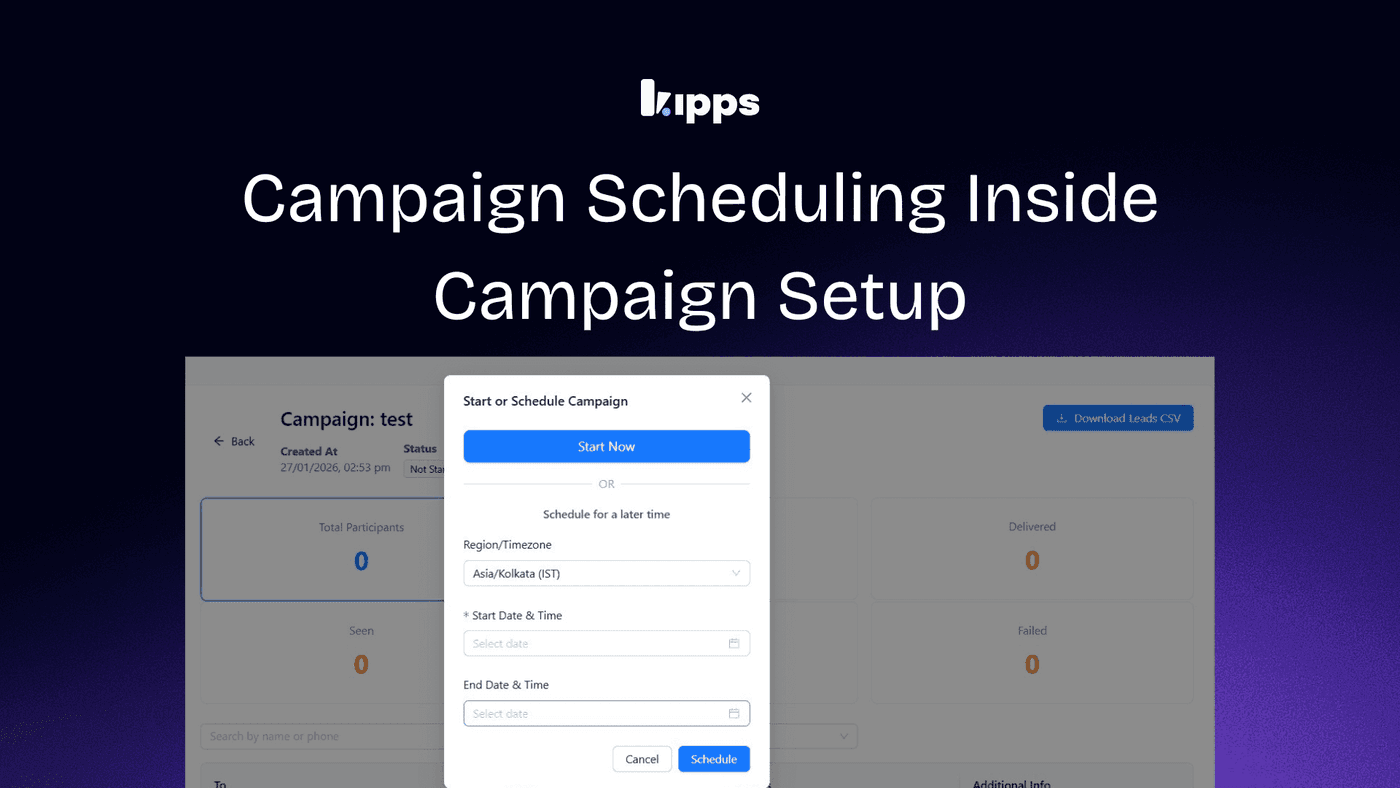
Scheduling your campaign is now easier and faster. You can set the schedule right after creating the campaign, without needing to navigate to a different page. This improvement streamlines the campaign setup process, allowing you to manage your campaign's timing more efficiently and with greater control. Whether you want to start your campaign immediately or schedule it for a later time, you can do so seamlessly within the same interface.
Feature Overview
You can now set the campaign schedule after creating the campaign.
You do not need to go to another page to set the time.
Scheduling is now not the part of setup process
Impact
Campaign setup is now easier and faster.
You do not need to move between different pages.
It is clearer when and how the campaign will run, giving you better control.
How to Access
- Create a new campaign.
- Finish the campaign setup.
- On the same screen, choose one of these options:
- Start the campaign right away.
- Set a date and time to start the campaign later.
This streamlined process allows you to manage your campaign scheduling more efficiently, ensuring that your campaigns run at the optimal time for your audience.
See Also
Related Features
Ready to try these new features?
Experience the latest improvements and see how they can enhance your workflow. Get started today or learn more about what's coming next.
More Changelog Updates
Related Blog Posts
HR's Guide to Employee Retirement Plan Communication
Struggling with 401k questions? This guide helps HR teams simplify employee retirement plan communication. Learn strategies to explain mutual funds, boost participation, and reduce repetitive work.
Read more
Beyond the First Message: A Guide to Smarter Chatbot Lead Forms
Learn how to configure your chatbot's lead form frequency to reduce visitor fatigue, improve conversation flow, and capture higher-quality leads. A complete guide to the new settings and best practices.
Read more
How to Automatically Write Data to Google Sheets from Your Workflow
Learn how to automatically write or update data in Google Sheets directly from your workflow using the Write Back to Sheet node in Kipps.AI.
Read more