
Advanced Tuning Controls for Agent Interruption & Timing

Introduction
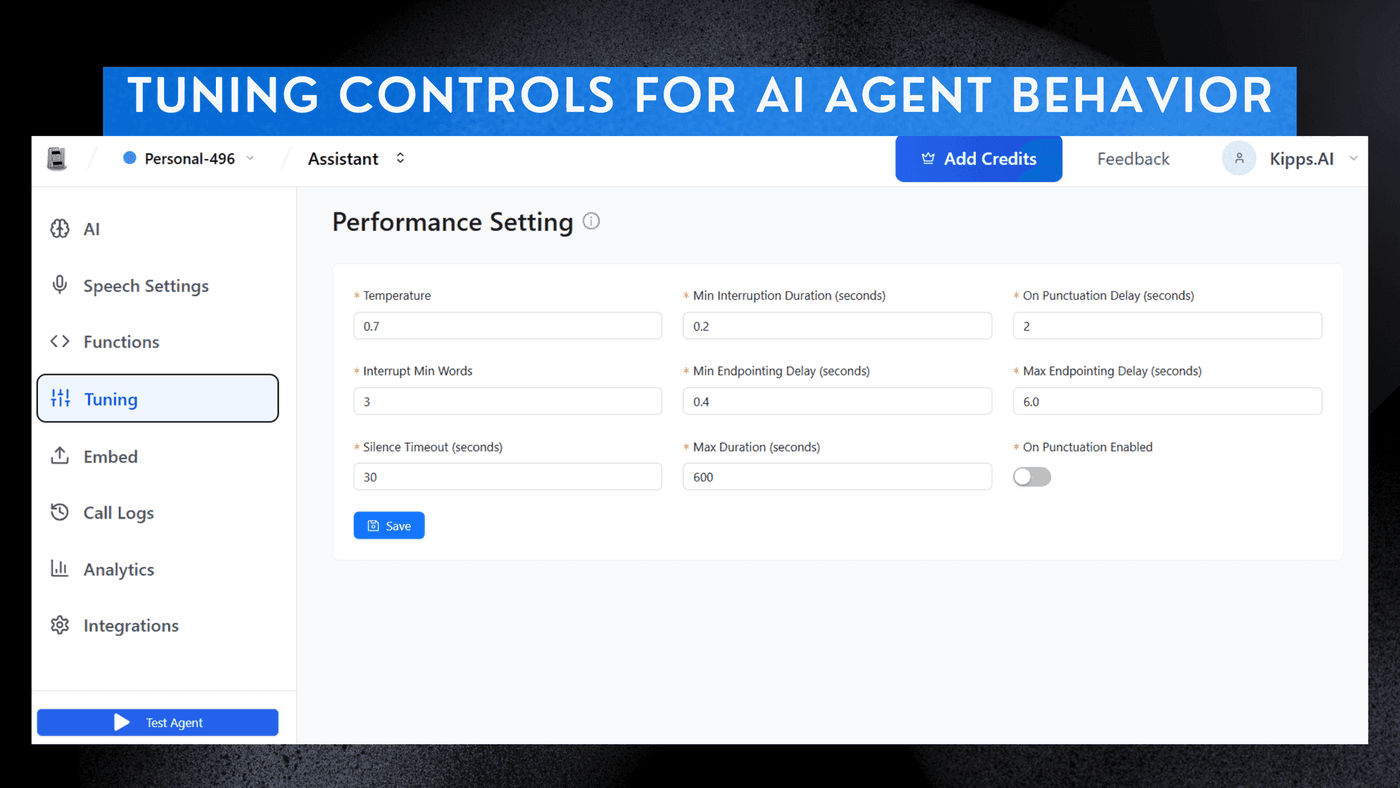
We are excited to introduce the new Tuning panel for AI Voice Agents, which gives you complete control over how your agent handles interruptions, turn-taking, and conversation flow.
With these advanced tuning controls, you can create more natural and engaging conversations that perfectly match your desired style and use case.
Whether you want a highly responsive agent that can be interrupted at any moment or a more patient agent that waits for the user to finish speaking, the Tuning panel allows you to customize these settings with precision.
This feature is designed to help you optimize the performance of your AI Voice Agents and create the best possible experience for your users.
Key Tuning Features
-
Temperature Control
Adjust the AI's predictability vs creativity. -
Optimized Voice Flow & Timing
Fine-tune how naturally the agent listens, pauses, and responds during real conversations. -
Session Control
Set silence timeouts and maximum call duration for smooth interactions.
How to Access
- Select any existing Agent you have created.
- Navigate to the Tuning section in the left sidebar.
- Adjust the settings below to perfectly match your desired conversation style.
Detailed Settings
1. Temperature
- Function: Controls creativity vs predictability of responses
- Lower (e.g., 0.2) → Focused, factual, consistent
- Higher (e.g., 0.7) → Creative, varied, natural
Speech & Audio Interaction Timing
-
Min Interruption Duration (seconds)
Minimum silence the system needs to detect before it can be interrupted while speaking. -
Interrupt Min Words
Minimum number of words the user must say before the agent is allowed to stop speaking and react. -
Min Endpointing Delay (seconds)
Extra waiting time after the user stops speaking to confirm the sentence is truly finished. -
Silence Timeout (seconds)
Maximum silence allowed before the call ends or times out. -
Max Duration (seconds)
Total maximum length of the entire conversation before the system automatically ends the call.
These controls help create ultra-natural conversations where the AI listens and responds just like a human—never talking over the user and always knowing when to wait or reply.
See Also
Related Features
Learn More
Ready to try these new features?
Experience the latest improvements and see how they can enhance your workflow. Get started today or learn more about what's coming next.
More Changelog Updates
Related Blog Posts
HR's Guide to Employee Retirement Plan Communication
Struggling with 401k questions? This guide helps HR teams simplify employee retirement plan communication. Learn strategies to explain mutual funds, boost participation, and reduce repetitive work.
Read more
Beyond the First Message: A Guide to Smarter Chatbot Lead Forms
Learn how to configure your chatbot's lead form frequency to reduce visitor fatigue, improve conversation flow, and capture higher-quality leads. A complete guide to the new settings and best practices.
Read more
How to Automatically Write Data to Google Sheets from Your Workflow
Learn how to automatically write or update data in Google Sheets directly from your workflow using the Write Back to Sheet node in Kipps.AI.
Read more