Smarter WhatsApp Automation with No-Code Flow Builder
Learn how flow-based WhatsApp agents combine structured guided buttons with natural language AI for optimal conversions.

Share This Article
Table of Contents
Overview
Customer service on WhatsApp is no longer a luxury; it’s an expectation. Customers want instant, 24/7 support on their favorite messaging app. The initial rush to adopt AI-powered chatbots seemed like the perfect solution, but many businesses are now facing a difficult reality: a pure-AI strategy comes with high, unpredictable costs from LLM calls, inconsistent answers to routine questions, and a frustrating reliance on developers for even minor updates.
There’s a smarter way. The modern solution is a "hybrid approach"—a strategic blend of the precision of rule-based automation, the flexibility of AI, and the essential empathy of human agents. This balanced model ensures efficiency without sacrificing quality or breaking the budget.
This article explains how our new Flow-Based WhatsApp Agent empowers any business user—from product managers to support leads—to build powerful, cost-effective conversational workflows without writing a single line of code.
Why This Feature Matters: Taking Control of Your Customer Experience
True customer service excellence isn't just about answering questions; it's about guiding customers to successful outcomes. While AI is fantastic for open-ended conversations, many customer interactions are goal-oriented processes. Think about checking an order status, booking an appointment, or updating account details. These are structured journeys.
A flow-based approach gives you complete control over these critical paths. It allows you to design a deterministic, step-by-step experience, ensuring every customer gets the right information, in the right order, every single time. This predictability is the foundation of a reliable and trustworthy service experience.
By mapping your customer journey mapping visually, you ensure brand consistency in tone and messaging, eliminate the risk of an AI providing an "off-script" answer to a standard question, and create a frictionless path to resolution for your most common inquiries.
The Problem Before: The Hidden Costs and Limits of an AI-Only Strategy
Relying solely on a generative AI agent for all WhatsApp communication can create significant operational challenges that bubble up as poor customer experience and spiraling costs.
Unpredictable and Soaring LLM Costs
Every time a customer sends a message to a pure-AI chatbot, it typically triggers a call to a Large Language Model (LLM) like GPT-4. This is like paying a brilliant consultant to answer the same simple questions over and over—"What are your business hours?" or "What's your return policy?" These costs add up quickly and are notoriously difficult to predict, making budget forecasting a nightmare. For high-volume, repetitive queries, this model is simply not sustainable.
Inconsistent or Off-Brand Responses
LLMs are probabilistic, meaning they can generate slightly different answers to the exact same question. While this is a strength for dynamic conversation, it's a liability for standard business inquiries. One day, the AI might provide a perfect summary of your return policy; the next, it might offer a version that is confusingly worded or missing a key detail. This variability erodes customer trust and can lead to costly support escalations.
Lack of Control Over the Conversational Path
With a pure-AI model, you can provide prompts and guidelines, but you can't truly dictate the conversational path. The AI manages the flow, which can sometimes lead customers down a rabbit hole instead of guiding them to a quick resolution. For structured tasks, you need to be in the driver's seat to create guided conversations on WhatsApp.
The Developer Bottleneck
In most AI-centric systems, building or modifying conversational logic requires technical expertise. If your marketing team wants to launch a new automated qualification flow or your support team needs to update a troubleshooting script, they often have to file a ticket and wait for an engineer. This developer dependency slows down innovation and prevents the teams closest to the customer from owning and improving the customer experience.
Overview of the Solution: Introducing the Flow-Based WhatsApp Agent
To solve these challenges, we’ve introduced the Flow-Based WhatsApp Agent. Think of it as a powerful visual flow builder designed specifically for creating structured, rule-based conversations on WhatsApp.
At its core, the feature is a no-code chatbot builder with an intuitive drag-and-drop interface. It allows non-technical users to visually map out entire conversational workflows, from the first welcome message to the final resolution. You decide the questions the bot asks, the buttons it presents, the business logic it follows, and when it should escalate to a human or an AI.
This puts the power of WhatsApp Business Automation directly into the hands of the teams who understand the customer best: Product, Customer Support, and Marketing. It’s the central component of a modern WhatsApp Chatbot Builder, enabling a more efficient and controlled approach to customer service automation.
Key Capabilities of the Visual Flow Builder
Our Visual Flow Builder is packed with capabilities designed to make your WhatsApp automation more powerful, cost-effective, and easier to manage.
Build Guided Conversations with a Drag-and-Drop Interface
The heart of the feature is its visual canvas. You can build complex, multi-step conversational workflows simply by dragging nodes (like "Send Message" or "Ask a Question") onto the canvas and connecting them. This intuitive process transforms the abstract concept of a conversational workflow into a tangible, easy-to-understand diagram.
Slash LLM Costs with Rule-Based Logic
By handling predictable queries with a rule-based chatbot, you bypass the LLM entirely for those interactions. The flow follows a predefined script, providing instant, accurate answers to common questions without making a single expensive API call. You reserve your AI budget for what it does best: handling novel, complex, and nuanced conversations. This is how you reduce WhatsApp support costs with automation.
Ensure Brand Consistency with Deterministic Responses
With a flow, you control the exact wording of every message the bot sends. These deterministic responses guarantee that your brand’s voice, tone, and critical information (like policies and pricing) are communicated consistently and accurately every time. There is zero variability and zero risk of the bot going off-brand.
Create a Seamless Hybrid Experience with Intelligent Handoffs
A flow-based agent doesn't operate in a silo. It’s a key part of a sophisticated hybrid system. You can configure rules within the flow to trigger a seamless human handoff to a live agent in your support inbox. For example, if a customer types "speak to an agent" or expresses frustration, the flow can instantly escalate the conversation. Similarly, if a query is too complex for the flow but doesn't require a human, it can be handed off to an AI agent for more flexible problem-solving.
Integrate with Your Business Systems via APIs
A truly powerful automation doesn't just talk; it does. Our Flow Builder allows you to make API calls to your external business systems. This means your WhatsApp automation can fetch real-time data from your CRM, eCommerce platform (like Shopify), or ERP. You can build flows that check order statuses, verify user accounts, or pull personalized product recommendations, delivering a deeply integrated and valuable customer experience.
Step-by-Step Usage: How to Build a WhatsApp Chatbot Without Coding
Ready to see how easy it is? Here’s a simple guide to creating your first automated workflow. This is a clear answer to the common question, "how to build a WhatsApp chatbot without coding."
Step 1: Choose the "Flow-Based" Agent Type
When creating a new WhatsApp Agent in our platform, you'll now see an option to choose the agent type. Simply select "Flow-Based" to activate the visual builder.
Step 2: Map Your Customer Journey in the Visual Builder
Once in the builder, start by mapping out the ideal conversation path. What is the customer's goal? What are the key decision points? Drag the initial "Trigger" node and start connecting subsequent nodes to create the basic structure of your conversation.
Step 3: Configure Nodes for Messages, Questions, and Actions
Click on each node to configure its specific behavior. For a "Send Message" node, you'll type the exact text the bot should send. For a "Wait for Response" node, you can define what to do based on the customer's reply, using keywords or button clicks to guide them to the next step. For an "API Call" node, you'll enter the endpoint and necessary data to connect to your other tools.
Step 4: Set Up Handoff Triggers for Complex Queries
Identify the natural exit points in your flow. These are moments when a customer's need becomes too complex for a predefined script. At these points, add a "Handoff to Agent" node. You can configure this to transfer the conversation to a specific human support team or even to a more capable AI agent. This ensures a WhatsApp bot with seamless human agent escalation.
Step 5: Assign a Number, Test, and Go Live
Once your flow is built, assign your WhatsApp Business number to the new flow-based agent. Use our testing tools to run through the conversation yourself, ensuring every path works as expected. When you're confident, set it live and watch it begin to handle customer queries instantly.
Real-World Example: Automate Order Status Updates on WhatsApp
Let's make this tangible. One of the most common support queries for any e-commerce business is "Where is my order?" Here’s how you can fully automate this process with a flow.
-
Trigger: A customer sends a message containing keywords like "order status" or "track my package." The flow is initiated.
-
Flow Action 1 (Collect Information): The bot replies with a pre-written, deterministic message: "I can help with that! To look up your order, please provide your 9-digit order number."
-
Flow Action 2 (API Integration): The customer provides the number. The flow uses an API integration to send this number to your Shopify or warehouse management system. The system finds the order and sends back the current shipping status.
-
Flow Action 3 (Deliver the Answer): The bot formats the data from the API into a user-friendly message and sends it instantly: "Great news! Your order #12345 is currently out for delivery and is expected to arrive today."
-
Handoff Point (The Hybrid Advantage): The customer is happy but replies, "I need to change the delivery address." This is a complex, sensitive request that the flow isn't designed for. The flow's logic recognizes keywords like "change address" and automatically triggers a handoff, seamlessly transferring the entire conversation history to a live support agent who can handle the request with the necessary care.
Benefits: The Business Impact of Smarter Automation
Adopting a flow-based approach to WhatsApp automation translates into significant, measurable business outcomes.
Drastically Reduce Customer Support Costs
By deflecting high-volume, repetitive inquiries away from both human agents and expensive LLMs, you can significantly lower your operational costs. Flows handle the common queries for a fraction of the cost, freeing up your budget and your team.
Increase Operational Efficiency for Support Teams
Your support team is your most valuable resource. By automating the routine, low-value queries, you empower your agents to focus on high-impact, complex customer issues that require critical thinking and empathy. This not only boosts efficiency but also improves agent job satisfaction.
Improve Customer Satisfaction (CSAT) with Instant, Accurate Answers
Customers value speed and accuracy above all else. A well-designed flow provides both, delivering the correct information instantly, 24/7. This reliability builds trust and leads to higher CSAT scores.
Empower Non-Technical Teams to Own and Iterate on Customer Journeys
With a no-code chatbot builder, your product, marketing, and support teams are no longer reliant on engineering. They can build, test, and deploy new automated experiences in hours, not weeks, allowing your business to be far more agile in responding to customer needs.
Best Practices for Designing Effective WhatsApp Flows
To get the most out of the Flow Builder, keep these design principles in mind:
- Start with high-volume, low-complexity queries. Identify the top 3-5 questions your support team answers all day, every day. These are perfect candidates for your first flows.
- Keep each flow focused on a single, clear goal. A flow designed to check an order status should do just that. Avoid trying to cram too much functionality into a single workflow, which can confuse the user.
- Always provide an "escape hatch" to a human agent. Ensure customers can easily request to speak with a person at any point in the flow. This prevents frustration and is a cornerstone of good bot design.
- Use clear, concise language in your bot's responses. Avoid jargon. Use buttons and quick replies to make it easy for users to respond without typing.
- Test your flow thoroughly before launching. Run through every possible conversational path to identify any dead ends or confusing loops before your customers do.
Conclusion: The Future of Customer Service is Hybrid
The debate over when to use a rule-based vs. an AI chatbot is settling on a clear winner: both. The most intelligent, cost-effective, and customer-centric strategy is a hybrid one. It uses precise, rule-based flows for predictable processes, powerful AI for complex conversations, and empathetic human agents for critical moments.
Our new Flow-Based WhatsApp Agent is the essential tool that enables you to build this modern, hybrid model. It gives you the control to automate with precision, the power to reduce costs dramatically, and the flexibility to create a truly seamless customer experience.
Ready to deliver instant, reliable answers and slash your support costs? Start building your first automated WhatsApp workflow today. Sign up for a free trial or book a personalized demo with our automation experts.
Frequently Asked Questions
Use a rule-based flow for structured, goal-oriented processes where the conversational path is predictable. This includes tasks like checking an order status, booking an appointment, answering FAQs, or qualifying leads. Use an AI agent for open-ended conversations that require understanding nuance, context, and a wide range of user intents.
Yes. Our system is designed for seamless transitions. A flow can hand off a conversation to a human agent. After the agent resolves the issue, they can close the ticket, and the next time the customer messages, they will interact with the bot again, creating an efficient loop.
Absolutely not. The Flow Builder was designed from the ground up for non-technical users. Its visual, drag-and-drop interface allows anyone with a clear understanding of the customer journey to build and manage powerful WhatsApp automations without writing any code.
It reduces costs in two primary ways. First, it handles routine queries without using expensive LLM API calls, which is a major cost center for pure-AI bots. Second, by automating a significant percentage of inbound queries, it reduces the number of conversations that require a paid human agent, lowering overall support headcount costs.
Our Flow Builder can integrate with any system that has a REST API. This means you can connect your flows to CRMs (like Salesforce or HubSpot), e-commerce platforms (like Shopify or Magento), ERPs, and other internal databases to pull and push customer data in real-time, creating highly personalized and effective automations.
Frequently Asked Questions
When should I use a rule-based flow instead of an AI agent?
Use a rule-based flow for structured, goal-oriented processes where the conversational path is predictable. This includes tasks like checking an order status, booking an appointment, answering FAQs, or qualifying leads. Use an AI agent for open-ended conversations that require understanding nuance, context, and a wide range of user intents.
Can a conversation switch from a flow to a human agent?
Yes, the system is designed for seamless transitions. A flow can be configured to hand off a conversation to a human agent based on specific triggers, such as keywords or user actions, ensuring complex issues are handled by the right person.
Do I need coding skills to use the Flow Builder?
No, you do not. The Flow Builder is a no-code tool designed for non-technical users. Its visual, drag-and-drop interface allows product, support, and marketing teams to build and manage powerful WhatsApp automations without writing any code.
How does a Flow-Based Agent help reduce customer support costs?
It reduces costs in two main ways. First, it automates routine inquiries without making expensive LLM API calls, a major cost for pure-AI bots. Second, by deflecting a high volume of common questions, it reduces the workload on human agents, lowering overall operational and headcount costs.
What business systems can the Flow Builder integrate with?
The Flow Builder can integrate with any system that offers a REST API. This allows you to connect your WhatsApp automations to CRMs like Salesforce, e-commerce platforms like Shopify, ERPs, and other internal databases to pull and push data in real-time for a more personalized customer experience.
Related Case Studies
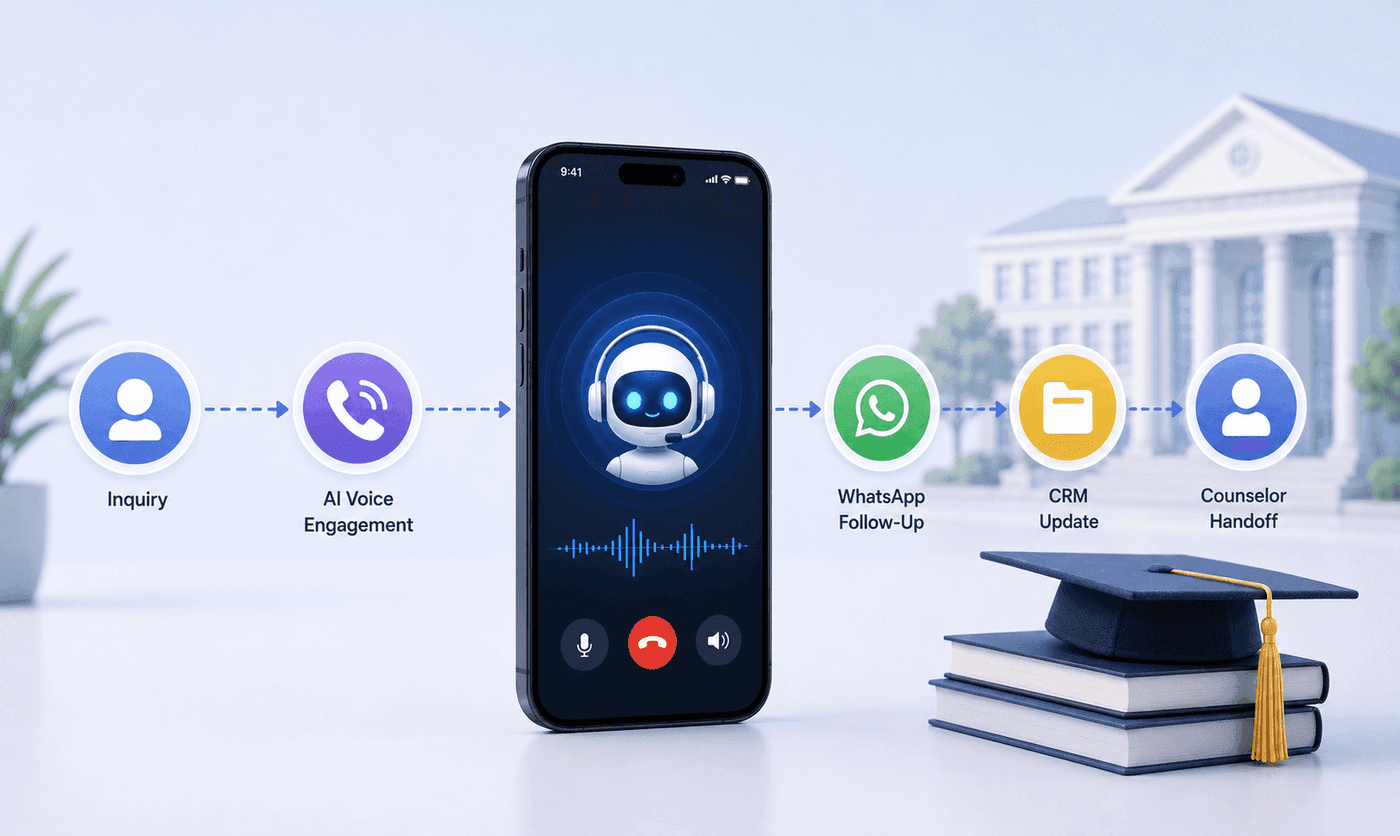
How an Executive Education Institution Automated Its Entire Admissions Workflow Using AI Voice and WhatsApp
How an executive education institution automated admissions from first call to counselor handoff with AI voice, WhatsApp, and CRM syncing.

How an EdTech Founder Reactivated a Dormant Lead Database Using WhatsApp Automation and AI-Assisted Qualification
How an EdTech founder reactivated a dormant inquiry database and acquired customers in week one using WhatsApp outreach and AI qualification.