Fix Broken WhatsApp Flows with a Smarter Visual Flow Builder
Handle button and list clicks seamlessly in the WhatsApp visual flow builder to create intuitive customer journeys.

Share This Article
Table of Contents
Overview
WhatsApp automation promised a revolution in customer communication: instant, scalable, and personal conversations. But for many businesses, the reality has been a frustrating cycle of building brittle chatbots that shatter at the first sign of unexpected user behavior. We’ve all seen it: a customer gets stuck in a loop, receives a dreaded "Sorry, I didn't understand," and abandons the conversation, taking their business with them.
The core problem isn't the ambition; it's the technology. Traditional chatbots are often rigid, linear, and unable to handle the natural, non-linear way humans communicate.
This guide introduces a new approach to WhatsApp automation. We’ll explore how a smarter, more resilient WhatsApp flow builder can help you create conversational experiences that don't just work—they adapt, guide, and convert, no matter how a user interacts with them.
Why This Feature Matters
A broken chatbot isn't just a technical glitch; it's a business problem. Every time a conversational flow fails, it has a direct impact on your bottom line. Frustrated customers are less likely to convert, more likely to churn, and will almost certainly share their poor experience.
The consequences are significant:
- Lost Leads: A potential customer trying to inquire about a product hits a dead end and moves on to a competitor.
- Poor Customer Satisfaction (CSAT): A user seeking support gets more frustrated by the bot than by their original problem, leading to negative reviews and a damaged brand reputation.
- Inflated Support Costs: When automation fails, the burden falls back on your human agents, defeating the purpose of having a bot in the first place.
Building robust WhatsApp automation is a strategic imperative. It's about creating reliable communication channels that enhance customer experience, drive revenue, and free up your team to focus on high-value interactions.
The Problem: When 'Smart' Automation Gets Stuck
To understand why so many automated conversations fail, we need to look at how they're traditionally built. Most chatbots rely on a concept called "state management." In simple terms, the bot is always in a specific "state," expecting a particular type of input to move to the next one.
The 'Sorry, I Didn't Understand' Trap
Imagine this common scenario:
- Your WhatsApp chatbot builder sends a welcome message with a menu:
[View Products],[Track Order],[Contact Support]. - The user is about to tap
[View Products]but gets a phone call. - Ten minutes later, they return to WhatsApp. In the meantime, your marketing automation has sent a new message: "Flash Sale! Tap
[Shop Now]for 20% off." - The user, intrigued by the sale, taps the
[View Products]button from the original welcome message.
What happens next? In a state-based system, the bot is now in the "flash sale" state, waiting for the user to tap [Shop Now]. Because the user tapped a different button, the bot’s logic breaks. It doesn't know what to do with this unexpected input, so it defaults to an error message: "Sorry, I didn't understand. Please choose an option from the menu."
The user is confused, the flow is broken, and a potential sale is lost. This is the fundamental flaw of state-based chatbots: they penalize users for behaving like humans.
Introducing the Visual Flow Builder: A New Paradigm for WhatsApp Automation
The solution is to move away from rigid, state-based logic and embrace a system that understands user intent. Our new Visual Flow Builder is designed from the ground up to solve this problem. It's a node-based, drag-and-drop editor that lets you build sophisticated, resilient conversations without writing a single line of code.
The core principle is simple but powerful: the flow builder doesn't care about what it expects the user to do. It cares about what the user actually does.
When a user taps a button or selects an item from a list, the system treats it as an explicit, undeniable command. It immediately routes the conversation down the path connected to that specific button, regardless of what came before. This stateless approach makes your automated conversations virtually unbreakable.
Key Capabilities of the Unbreakable Flow Builder
This new visual chatbot builder is more than just a bug fix; it’s a complete toolkit for designing intelligent, user-centric conversations on the WhatsApp Business API.
Stateless Button and List Tap Handling
This is the game-changing feature. Every interactive message component—be it a Reply Button or a List Message item—is directly tied to a specific path in your visual flow. When a user taps one, the system instantly knows where to go next. There's no state to manage and no room for confusion. It treats every tap as a direct command, ensuring the user is always in control and the conversation never stalls. This is how you prevent a WhatsApp bot from getting stuck.
Intuitive Drag-and-Drop Interface
You don't need to be a developer to create powerful automation. The drag and drop chatbot interface empowers anyone on your team—product managers, marketers, or support leads—to design, build, and deploy complex conversational journeys. Simply drag nodes like Text Message, List Menu, or Human Handoff onto the canvas and connect them to map out your ideal customer interaction. This makes creating a no-code WhatsApp bot a fast and intuitive process.
Advanced Input Validation and Timeouts
Conversations can stall for reasons other than broken logic. Sometimes, users don't reply or provide information in the wrong format. The Visual Flow Builder anticipates this with two key features:
- User Input Validation: When you need to capture information like an email address, phone number, or order ID, you can configure the
Inputnode to validate the format. If the user enters "hello" when you're expecting an email, the bot can gently prompt them to try again. - Timeouts: Define a time limit for a user's response. If they don't reply within, say, 10 minutes, you can automatically trigger another action, such as sending a reminder, offering help, or escalating the chat to a human agent.
How to Build a Resilient WhatsApp Bot in 5 Steps
Ready to see how easy it is to create reliable automated WhatsApp conversations? Here’s a simple five-step guide to building your first unbreakable flow.
Step 1: Map Your Conversation Blueprint
Start by opening the Flow Builder tab. Every flow begins with a Start node. From here, drag your initial message nodes onto the canvas. Think about the main branches of your conversation. For example, you might have paths for sales, support, and general inquiries.
Step 2: Add Interactive Menus and Buttons
To guide the user, drag Reply Buttons or List Menu nodes and connect them to your welcome message. Reply Buttons are great for 2-3 simple choices, while List Menus can handle up to 10 options, making them perfect for things like product categories or FAQ topics. Give each button a clear label, like "Explore Products" or "Speak to an Agent."
Step 3: Capture User Information
When you need to collect data, use an Input node. You can configure it to ask for text, a number, an email, and more. Connect a Text Message node before it to ask the question (e.g., "What's your order number?"). Use the built-in validation to ensure you get the data you need in the correct format.
Step 4: Define the Logic with Conditional Paths
Create truly dynamic journeys using the Condition node. This powerful feature lets you route users based on the information they provide. For instance, you could check if their input contains the word "refund" and send them directly to your support team, while all other inquiries go to a different branch.
Step 5: Connect to a Human and Publish
Automation is powerful, but it can't solve everything. Always provide an escape hatch with a Human Handoff node. Connect this to a "Talk to an agent" button in your menus. Once you've mapped out all your paths and connected every node, hit the "Publish" button. Your unbreakable WhatsApp flow is now live!
Real-World Example: Guiding a Customer Through a Product Inquiry
Let's revisit our earlier scenario to see the difference the Visual Flow Builder makes.
Before: The Frustrating, Linear Flow
A customer receives a welcome menu. They get distracted and later see a flash sale message. They ignore the sale and tap the "Product Inquiry" button from the old welcome menu. The state-based bot, which expects a "Shop Now" tap, fails. It sends an error message, the customer gives up, and the opportunity is lost.
After: The Seamless, Non-Linear Experience
With the new flow builder, the experience is completely different.
- The customer receives the same welcome menu and gets distracted.
- The flash sale message arrives.
- The customer taps "Product Inquiry" on the original menu.
- The Visual Flow Builder instantly recognizes the tap. It doesn't matter that another message was sent in the meantime. The "Product Inquiry" button is tied directly to the product inquiry path.
- The bot immediately responds with, "Great! What kind of products are you interested in?" and presents a list of categories.
The user is guided seamlessly down their chosen path, their intent is respected, and the conversation continues productively. This is the power of a truly stateless system.
The Benefits of Building Smarter WhatsApp Chatbots
Adopting a more resilient WhatsApp flow builder translates directly into tangible business results.
Eradicate Dead-End Conversations
The robust, stateless handling of button and list taps eliminates the most common failure point in automated chats. This builds user trust and confidence, as the chatbot behaves predictably and reliably every time, drastically reducing customer frustration.
Build and Iterate in Minutes, Not Weeks
The no-code WhatsApp bot interface democratizes chatbot creation. Your marketing and support teams can design and launch new campaigns, update support flows, and A/B test conversational journeys without waiting for engineering resources. This agility allows you to adapt to customer needs in real time.
Increase Conversion and Resolution Rates
By creating smooth, intuitive paths for users, you eliminate friction from the customer journey. Fewer drop-offs mean more qualified leads captured, more support tickets resolved through automation, and ultimately, higher revenue and customer satisfaction.
Best Practices for Designing Unbreakable Flows
The tool is powerful, but great design makes it unbeatable. Here are a few tips from our experts:
- Always Provide an 'Escape Hatch': Include a "Main Menu" or "Talk to an Agent" option in every interactive message. This gives users a way to reset the conversation or get human help if they feel lost.
- Keep Button and List Labels Clear and Concise: A user should know exactly what will happen when they tap a button. Use action-oriented labels like "Track My Order" instead of vague terms like "Status."
- Use Timeouts to Proactively Re-engage: Don't let a conversation die because a user got busy. Set a timeout on key input steps to send a gentle follow-up message, like "Are you still there? Can I help you complete your order?"
Conclusion: Stop Fixing Bots, Start Building Experiences
For too long, the conversation around chatbots has been about managing fragile states and debugging broken logic. It’s time to change that conversation. With the right tools, you can shift your focus from fixing bots to designing intelligent, resilient, and engaging customer experiences.
The Visual Flow Builder provides the foundation for this new era of conversational AI. By respecting user intent and eliminating rigid, stateful dependencies, it empowers you to build WhatsApp automation that finally delivers on its original promise.
Ready to build WhatsApp conversations that never fail? Try the Visual Flow Builder in a free trial today, or book a personalized demo to see it in action.
Frequently Asked Questions
While many builders offer a visual interface, our key differentiator is the stateless handling of button and list taps. Most other systems can still break if a user interacts non-linearly. Our flow builder is designed to be fundamentally more resilient by ensuring any button tap, at any time, correctly routes the user, making dead-end conversations a thing of the past.
No, absolutely not. The Visual Flow Builder is a true no-code WhatsApp bot platform. It was designed specifically for non-technical users, including product managers, marketers, and customer support leaders, to build and manage sophisticated conversational flows using a simple drag-and-drop interface.
The system is designed to handle both. While button and list taps are treated as explicit commands to navigate the flow, you can use the Input node to capture and process free-text messages. You can then use Condition nodes to analyze the text and route the conversation accordingly, giving you the flexibility to build both guided and open-ended conversational experiences.
Frequently Asked Questions
What makes this WhatsApp Visual Flow Builder 'unbreakable'?
The key is its stateless handling of button and list interactions. Unlike traditional chatbots that can break if a user acts unexpectedly, our builder treats every tap as a direct command. It immediately routes the conversation down the correct path, regardless of the previous state, making the conversational flow extremely resilient and preventing dead ends.
Do I need coding skills to create a WhatsApp bot with this tool?
No, absolutely not. The Visual Flow Builder is a complete no-code platform. It uses an intuitive drag-and-drop interface that allows anyone, from marketers to support managers, to design, build, and deploy sophisticated conversational journeys without writing a single line of code.
How does the flow builder prevent conversations from stalling if a user doesn't reply?
The builder includes configurable timeouts for input nodes. You can set a specific time limit for a user's response. If they don't reply within that window, you can automatically trigger a follow-up action, such as sending a reminder message or escalating the chat to a human agent, ensuring the conversation never gets stuck.
Can the chatbot handle both button taps and typed user messages?
Yes. While button and list taps guide the user along predefined paths, you can use 'Input' nodes to capture and process free-text messages from users. You can then use 'Condition' nodes to analyze the user's text and route the conversation dynamically, allowing for a flexible mix of guided and open-ended interactions.
What are the main business benefits of using a resilient WhatsApp flow builder?
Building resilient chatbots directly impacts your bottom line by reducing customer frustration, which leads to higher satisfaction and conversion rates. It also decreases the number of failed automated chats that require human intervention, lowering support costs and freeing up your team to handle more complex issues.
Related Case Studies
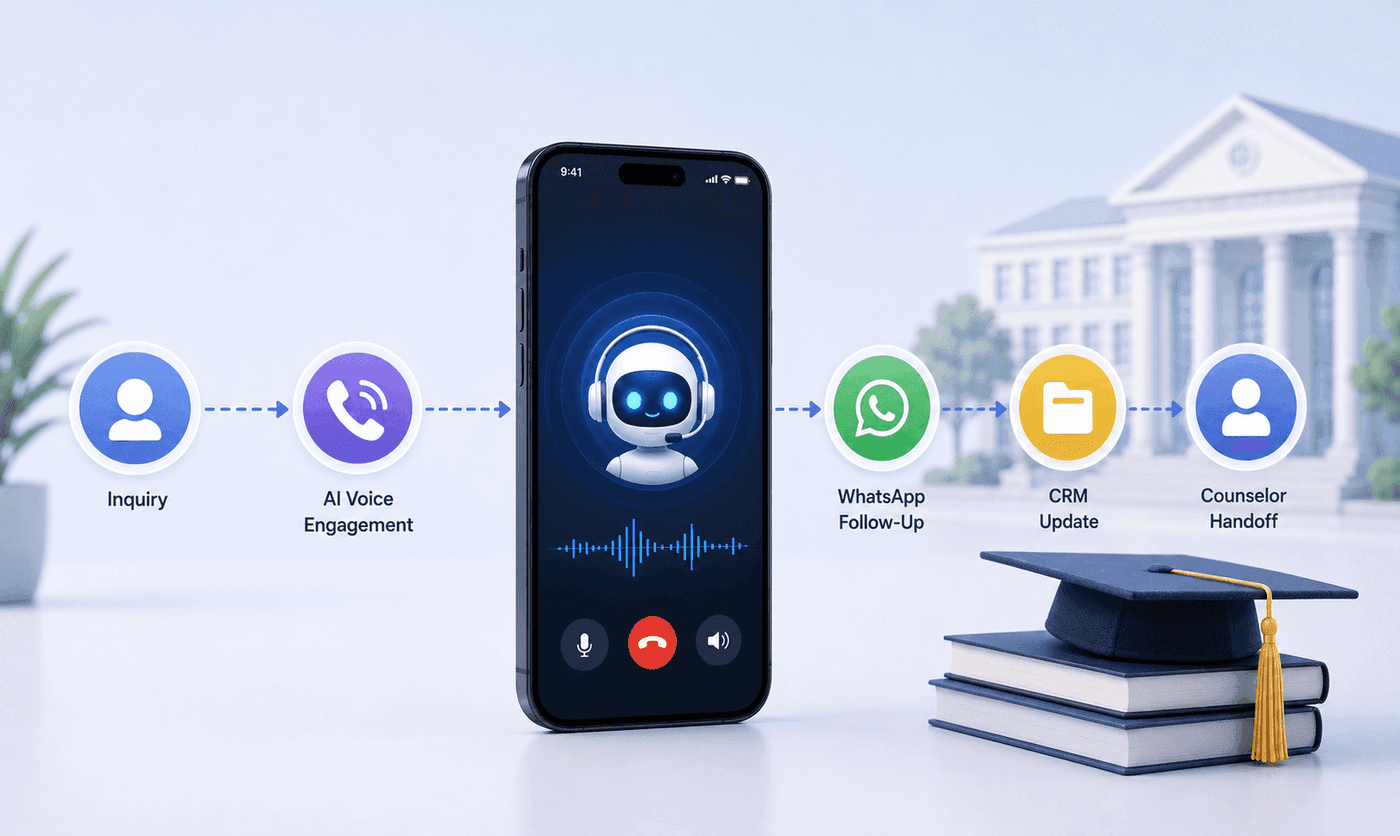
How an Executive Education Institution Automated Its Entire Admissions Workflow Using AI Voice and WhatsApp
How an executive education institution automated admissions from first call to counselor handoff with AI voice, WhatsApp, and CRM syncing.

How an EdTech Founder Reactivated a Dormant Lead Database Using WhatsApp Automation and AI-Assisted Qualification
How an EdTech founder reactivated a dormant inquiry database and acquired customers in week one using WhatsApp outreach and AI qualification.