Mastering WhatsApp Conversation Management and Reply Tracking
Learn how to transform your chaotic WhatsApp team inbox into an efficient, accountable engine for support and sales with a structured conversation.

Share This Article
Table of Contents
Overview
Is your WhatsApp team inbox a source of stress? For many businesses, it’s a chaotic stream of unanswered questions, unresolved issues, and lost sales leads. Conversations linger for days, it’s impossible to tell if a customer is satisfied, and the line between bot and human support is frustratingly blurry. This operational fog doesn't just hurt efficiency; it damages the customer experience and lets revenue slip through the cracks.
What if you could impose order on this chaos? The solution lies in adopting a structured conversation lifecycle—a clear methodology for managing every interaction from its first touch to its final outcome. This guide introduces a powerful set of tools designed to bring precision, accountability, and data-driven clarity to your WhatsApp conversation management, transforming your busiest channel from a liability into a strategic asset.
Why This Feature Matters
Effective conversation management is about more than just a tidy inbox. It’s about a fundamental shift in how you operate, impacting every corner of your business. When you can clearly define the lifecycle of every chat, you unlock significant, tangible benefits.
This structured approach directly boosts agent productivity by allowing your team to focus their energy on active, high-priority conversations instead of sifting through stale threads. It establishes clear accountability, providing a complete audit trail of who handled what and when. This visibility empowers you to measure what truly matters: actual resolution rates, agent response times, and the effectiveness of your automation.
Ultimately, this clarity translates to a better bottom line. When your WhatsApp customer support is efficient and your team can instantly identify and prioritize WhatsApp sales leads, you improve customer satisfaction and capture more revenue.
The Problem Before This Feature
If you’re using WhatsApp Business at scale, you’re likely familiar with the daily operational headaches that arise from a lack of structure. These aren’t minor inconveniences; they are significant obstacles to growth and efficiency.
The Never-Ending Conversation
One of the biggest challenges is the perpetually open conversation. A customer asks a question, gets an answer, and goes silent. Is the issue resolved? Did they find the information elsewhere? The chat remains open in your WhatsApp team inbox, cluttering the view and skewing performance metrics. Your team wastes time constantly re-evaluating these stale chats, and your analytics on "open tickets" become meaningless.
The Black Box of Handoffs
When a customer starts with a chatbot and needs to speak to a person, the transition is often invisible. An agent might jump in and start typing, but there’s no formal record of this chatbot to human handoff. Who took ownership? When did they take it? Without a clear audit trail, it’s impossible to track agent performance, understand where automation is failing, or ensure accountability if an issue is handled poorly.
The Mystery of the "Resolved" Issue
How do you know if a customer's problem was actually solved? In a traditional WhatsApp chat, the conversation simply stops. This leaves support managers guessing. Did the customer abandon the chat in frustration, or are they completely satisfied? This ambiguity makes it impossible to accurately measure support ticket resolution rates or gather reliable feedback on customer satisfaction.
The Lost Sales Lead
Your marketing team invests heavily in Click-to-WhatsApp ads to generate high-intent leads. But when these valuable inquiries land in the same inbox as general support questions, they often get lost in the noise. There's no automated way to distinguish a potential high-value customer from someone asking for a tracking number. This lack of prioritization means slower responses for your hottest leads and, ultimately, lost sales.
Overview of the Feature: Introducing the Conversation Lifecycle
To solve these deep-seated problems, we’re introducing a comprehensive conversation lifecycle management system directly within your WhatsApp inbox. This isn't just one feature, but a suite of five interconnected capabilities that work together to ensure every chat has a clear beginning, a managed middle, and a definitive end.
This new methodology provides:
- Defined Outcomes: Know exactly how every conversation concludes.
- Intelligent Auto-Closure: Automatically clean up idle chats.
- Reply Source Tracking: See precisely who—or what—sent every message.
- Clear Handoffs: Track ownership between bots and human agents.
- Automated Lead Identification: Instantly flag conversations from ad campaigns.
Together, these capabilities create a system of record for your customer communications, enabling you to manage WhatsApp chats with unparalleled efficiency and insight.
Key Capabilities
Let's break down each component of the conversation lifecycle and explore how it brings clarity to your operations.
Achieve True Resolution with Definitive Conversation Outcomes
Uncertainty is the enemy of good support. To combat this, every conversation can now be closed with one of three clear outcomes:
- Resolved: The agent manually marks the conversation as "Resolved" when the customer's query has been successfully addressed. This provides a positive, definitive endpoint.
- Unresolved: If an issue cannot be solved during the interaction, it can be marked as "Unresolved," signaling that further action or follow-up is required.
- Abandoned: If a customer stops responding for a set period, the conversation is automatically closed and marked as "Abandoned."
These outcomes eliminate guesswork and provide clean data for measuring true resolution rates. Finally, you can learn how to resolve and close WhatsApp conversations in a way that generates accurate, actionable metrics.
Declutter Your Inbox with Intelligent Auto-Closure
A cluttered inbox slows your team down. Our new auto-closure feature acts as an intelligent cleanup crew. In your settings, you can define an "idle timeout"—a specific duration of inactivity (e.g., 60 minutes). If neither the customer nor the agent sends a message within that window, the conversation will automatically close with an "Abandoned" status. This ensures your team’s queue only contains active, relevant conversations, helping them stay focused and efficient.
Gain Full Visibility with Reply Source Tracking
Have you ever looked at a conversation and wondered if a message was sent by a bot or a person? With Reply Source Tracking, that ambiguity is a thing of the past. Every single reply in your WhatsApp business chat is now automatically tagged with its origin:
- AI: Sent by a generative AI assistant.
- Flow: Sent by a structured, rule-based chatbot.
- Human: Sent by a live agent from the platform's inbox.
- WA Business: Sent from the standard WhatsApp Business mobile app.
- Template: A pre-approved message template sent by the system.
This granular audit trail provides complete conversation intelligence, making it easy to review interactions, analyze bot performance, and ensure quality control.
Streamline Teamwork with Clear Bot-to-Human Handoffs
We've redesigned the handoff process to be explicit and trackable. When an agent needs to intervene in an automated conversation, they click "Enable manual reply." This action immediately assigns them ownership of the chat, and all their subsequent messages are tagged as "Human."
Once the issue is resolved, they have two options: mark it as "Resolved" or simply "Disable manual reply" to hand it back to the automation. This creates a clear record of agent involvement, ensuring you always know how to manage WhatsApp handoff to a live agent with full accountability.
Capture Every Opportunity with Automated Sales Lead Tagging
Don't let another valuable lead slip away. The system now automatically detects when a new conversation originates from one of your Click-to-WhatsApp ads. These conversations are instantly tagged as "sales leads," allowing you to create a separate view or routing rule to prioritize them. Your sales team can engage high-intent prospects immediately, dramatically increasing the chances of conversion.
Step-by-Step Usage: Managing a Conversation from Start to Finish
These powerful capabilities are integrated seamlessly into your daily workflow. Here’s how your team can use them to manage an interaction from beginning to end.
Taking Ownership and Resolving a Chat
- Identify the Need: An agent monitors the inbox and sees a conversation where a chatbot is struggling or the customer explicitly requests human help.
- Take Ownership: The agent clicks the "Enable manual reply" button. The conversation is now assigned to them, and they can begin typing a response. Their messages will be tagged with "Human" for clear tracking.
- Solve the Problem: The agent communicates with the customer to address their needs completely.
- Mark as Resolved: Once the customer confirms their issue is solved, the agent clicks the "Mark Resolved" button. The conversation is closed and badged with a "Resolved" status, providing a clear, positive outcome.
Handing a Conversation Back to Automation
Sometimes, an agent may only need to answer a single complex question before letting the bot take over again (e.g., for collecting post-chat feedback).
- Intervene and Assist: The agent follows steps 1-3 above to take ownership and provide the necessary information.
- Step Away: Instead of marking the chat resolved, the agent clicks "Disable manual reply." This unassigns them from the conversation, and the automation (AI or Flow) becomes active again. If the customer doesn't reply further, the chat will eventually be closed automatically based on the idle timeout rules.
Configuring Your Automated Rules
Setting up your auto-closure rules is simple. As an administrator, navigate to your WhatsApp Number Settings within the platform. There, you will find the option to set the idle timeout duration. Enter the number of minutes a conversation can be inactive before it's automatically closed. This one-time setup ensures your inbox remains organized and up-to-date.
Real-World Example: Tracking a Sales Lead from Ad to Resolution
Let's walk through a complete customer journey to see how these features work together to create a seamless and trackable experience.
- The Ad Click: A prospect named Sarah is browsing Instagram and sees an ad for a new line of ergonomic office chairs. She clicks the "Send Message" button, which opens WhatsApp.
- Lead Identification: As soon as Sarah's message ("Hi, can you tell me more about the new chair?") arrives in your inbox, the system automatically detects its origin from the ad campaign and applies a "sales lead" tag.
- Initial Qualification: A chatbot with a "Flow" source immediately responds, asking Sarah a few qualifying questions about her needs (e.g., "Are you looking for a chair for home or office use?").
- Human Handoff: Sarah replies, "It's for my home office, but I have a specific question about lumbar support for lower back pain. Can I talk to someone?" A sales agent, Mark, sees the prioritized lead and clicks "Enable manual reply" to take over. His messages are now tagged "Human."
- Resolution: Mark provides detailed information, answers Sarah's questions about ergonomics, and shares a link to the perfect model. Sarah is happy and says she'll be placing an order. Mark clicks "Mark Resolved" to close the conversation with a successful outcome.
- The Alternative Path: What if Sarah had asked her question and then got distracted? After Mark's reply, if the configured 2-hour idle timeout passed with no response, the system would have automatically closed the chat and marked it as "Abandoned." Mark's team could then use this data to potentially re-engage abandoned sales chats with a follow-up template message.
Benefits
By adopting this structured approach to WhatsApp conversation management, you can expect to see immediate and lasting improvements across your organization.
Increased Team Efficiency
With auto-closure and clear outcomes, your agents no longer waste time managing a cluttered inbox. They can focus their attention on active customers who need their help, resolving more issues in less time.
Enhanced Accountability
Reply source tags and explicit handoff actions create an unambiguous audit trail. You can see exactly which agent handled a conversation and review every message sent, fostering a culture of ownership and accountability.
Accurate Performance Metrics
Move beyond vanity metrics like message volume. You can now measure what truly drives your business: true resolution rates, agent-specific performance, bot containment rates, and the time it takes to resolve different types of inquiries.
Improved Lead Conversion
Automated lead tagging ensures that no high-intent prospect is left waiting. By prioritizing and routing sales conversations to the right team instantly, you create a better buying experience and significantly increase your chances of converting leads into customers.
Best Practices
To get the most out of these new features, consider implementing these expert recommendations.
Setting the Right Auto-Closure Timeout
Your ideal timeout depends on your business model. A fast-paced e-commerce support team might set a short timeout of 30-60 minutes to keep the queue moving. In contrast, a B2B company with a consultative sales process might choose a longer timeout of 4-8 hours to give prospects more time to consider their response.
Training Your Team on New Handoff Protocols
Consistency is key. Hold a brief training session to ensure every agent understands when to use "Mark Resolved" versus "Disable manual reply." Document a clear internal policy: "Mark Resolved" should only be used when the customer's core issue has been verifiably solved.
Using Reply Source Tags for Analysis
Managers should regularly review conversations to analyze bot and agent performance. Are there common questions where the "Flow" consistently has to hand off to a "Human"? This is a perfect opportunity to improve your automation. By analyzing the source tags, you can identify patterns and make data-driven decisions to enhance both your chatbot scripts and your agent training programs.
Conclusion
The days of navigating a chaotic, unpredictable WhatsApp inbox are over. By embracing a structured conversation lifecycle, you can bring order, clarity, and accountability to your most important customer communication channel. This transformation from a reactive message-and-response process to a proactive, managed workflow empowers your team to be more efficient, accountable, and effective. You gain the conversation intelligence needed to optimize your support and the tools to ensure no sales opportunity is ever missed.
Ready to transform your chaotic WhatsApp inbox into a streamlined engine for support and sales? Start your free trial today to experience structured conversation management, or book a personalized demo to see how [Platform Name] can elevate your customer communications.
Frequently Asked Questions
If a customer sends a new message to a conversation that has already been marked "Resolved" or "Abandoned," it will automatically reopen the conversation and bring it back into the active queue for your team to address.
Currently, the system uses the standardized outcomes of "Resolved," "Unresolved," and "Abandoned." This ensures that your analytics and reporting are consistent and comparable across all conversations. We are always evaluating user feedback for future enhancements.
Reply Source Tracking dramatically enhances your analytics. You can now build more sophisticated reports that differentiate between bot-handled and human-handled interactions. This allows you to measure key metrics like bot containment rate, average human-handled resolution time, and more.
While you can still use the native WhatsApp Business app on your phone, the core conversation management features—such as marking a chat resolved, enabling manual reply for handoffs, and viewing detailed analytics—are managed within our platform's centralized WhatsApp team inbox. Messages sent from the mobile app will be correctly tagged with the "WA Business" source for full visibility.
Frequently Asked Questions
What happens if a customer replies to a 'Resolved' WhatsApp conversation?
If a customer sends a new message to a conversation that has already been marked 'Resolved' or 'Abandoned,' the system will automatically reopen the conversation. It will reappear in the active queue for your team to address, ensuring no follow-up is missed.
How do I configure the auto-closure timeout for idle WhatsApp conversations?
An administrator can easily configure this in the platform settings. Navigate to your WhatsApp Number Settings and set the 'idle timeout' duration in minutes. Once set, any conversation that remains inactive for that period will be automatically closed and marked as 'Abandoned'.
What is Reply Source Tracking in WhatsApp and how does it improve analytics?
Reply Source Tracking automatically tags every message with its origin (e.g., AI, Flow, Human, WA Business app). This enhances your analytics by allowing you to build reports that differentiate between bot-handled and human-handled interactions, measure bot containment rates, and track agent performance with greater accuracy.
How does the platform manage the handoff from a chatbot to a live agent?
The platform streamlines the chatbot-to-human handoff with a clear process. An agent clicks 'Enable manual reply' to take ownership of the conversation, which is then assigned to them. This action is tracked, and all subsequent messages are tagged as 'Human,' creating a clear audit trail for accountability.
Can I use these conversation management features with the standard WhatsApp Business app?
While messages sent from the native WhatsApp Business app will be correctly tagged in the inbox for visibility, the core management features like marking conversations as 'Resolved,' managing handoffs, and viewing detailed analytics are all handled within our platform's centralized team inbox for full control and tracking.
Related Case Studies
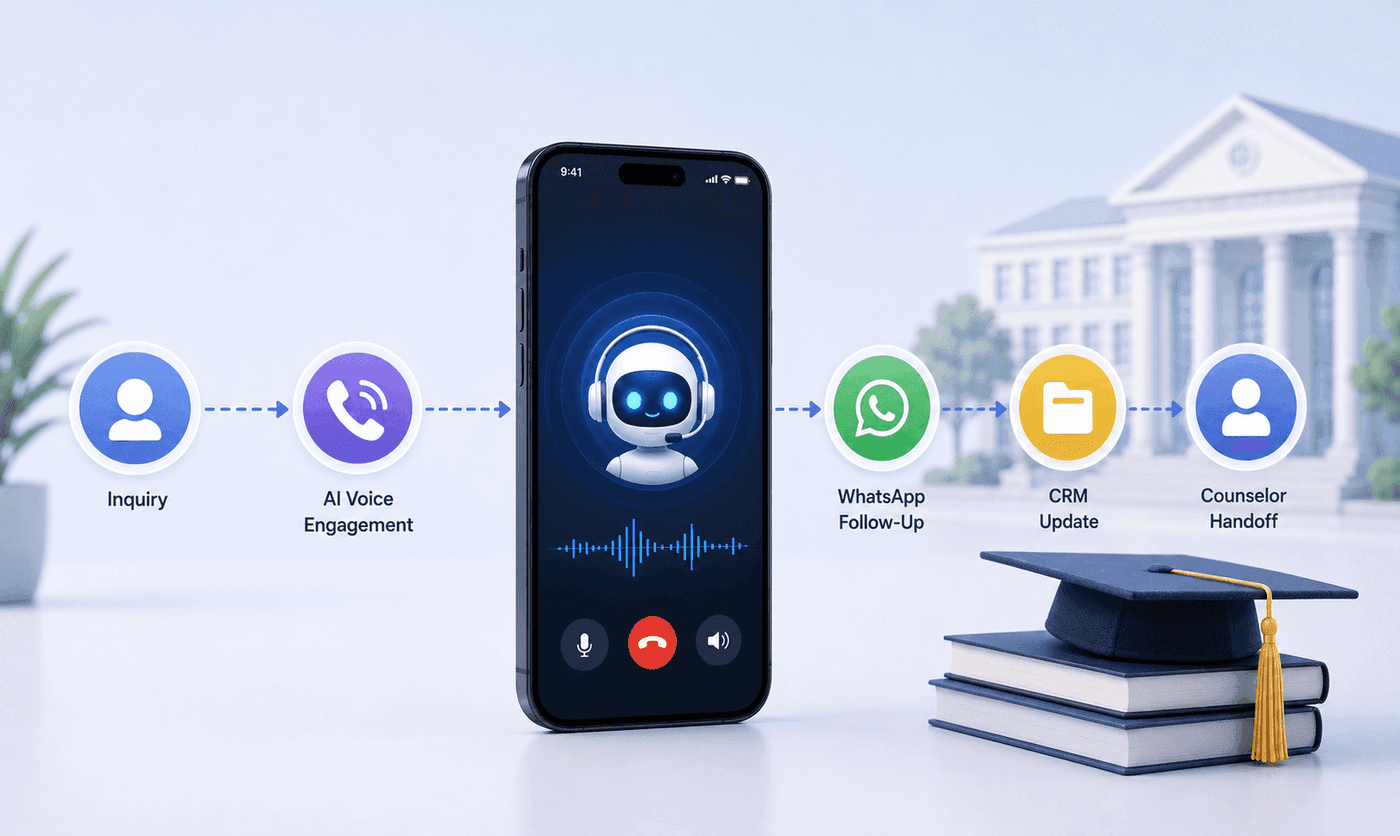
How an Executive Education Institution Automated Its Entire Admissions Workflow Using AI Voice and WhatsApp
How an executive education institution automated admissions from first call to counselor handoff with AI voice, WhatsApp, and CRM syncing.

How an EdTech Founder Reactivated a Dormant Lead Database Using WhatsApp Automation and AI-Assisted Qualification
How an EdTech founder reactivated a dormant inquiry database and acquired customers in week one using WhatsApp outreach and AI qualification.