
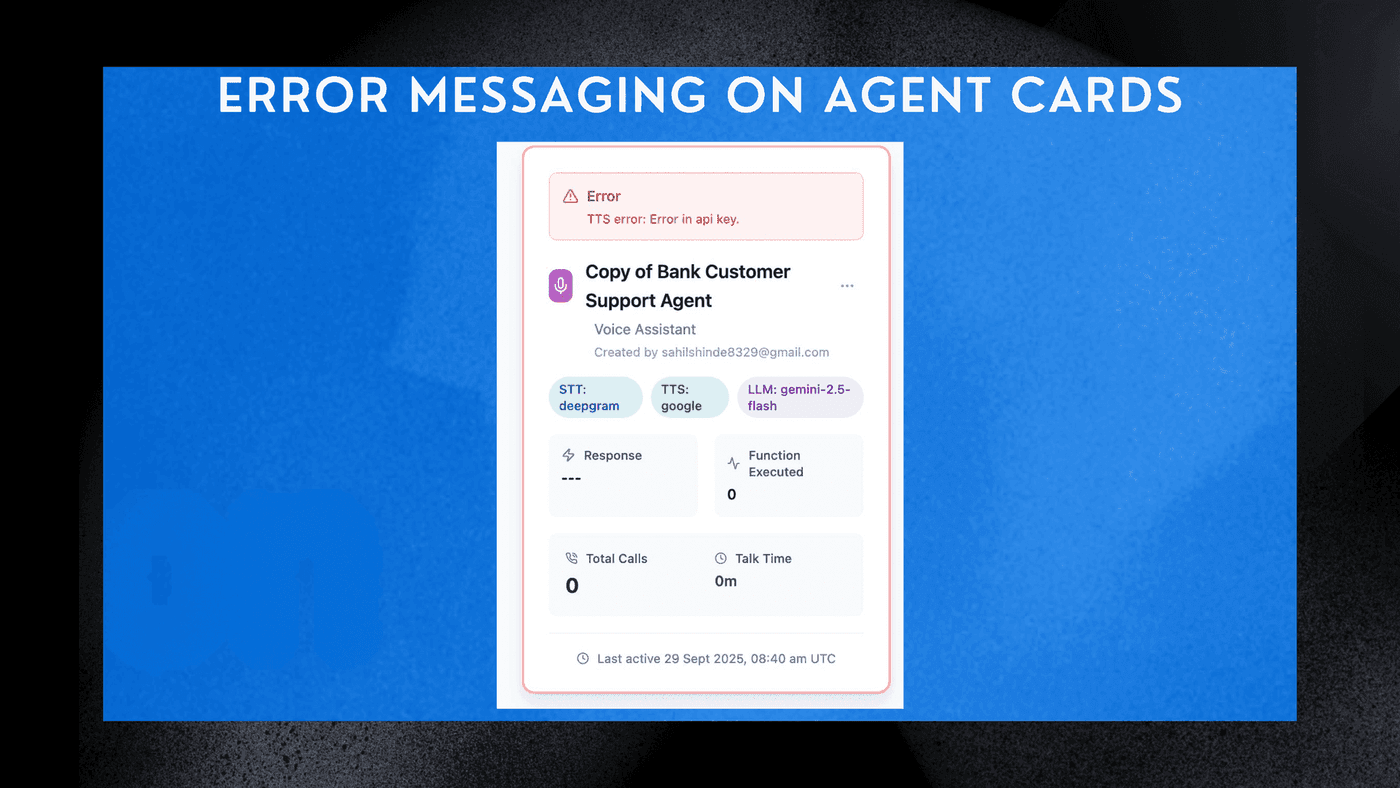
Error Messaging on Agent Cards

Introduction
Your dashboard now automatically shows errors on each agent card whenever an AI agent fails to execute a function. This helps you instantly identify which function is causing issues—without opening logs or diving into call details. With this improvement, you can quickly spot and address problems in your agents, ensuring smoother performance and better user experiences. Whether it's an API call, webhook, tool action, or workflow step that's failing, you'll see it right on the home screen, making debugging faster and more efficient.
Key Features
- Real-Time Error Alerts
See immediate error indicators directly on the agent card. - Function-Level Visibility
Quickly identify which function failed—API call, webhook, tool action, or workflow step. - Faster Debugging
No need to open call logs; errors surface instantly on the home screen. - Improved Reliability
Fix issues before they impact users or ongoing campaigns.
How to Use
- Go to the Home screen where your agent cards are displayed.
- If a function fails during any interaction, an error badge will appear on the agent card.
- Click the card to view details about the failing function and its error message.
- Fix the function or integration and the error indicator will clear automatically.
This new error messaging system empowers you to maintain high-performing agents with less downtime and quicker resolutions, ultimately enhancing the overall effectiveness of your AI-driven interactions.
See Also
Related Features
Ready to try these new features?
Experience the latest improvements and see how they can enhance your workflow. Get started today or learn more about what's coming next.
More Changelog Updates
Related Blog Posts
HR's Guide to Employee Retirement Plan Communication
Struggling with 401k questions? This guide helps HR teams simplify employee retirement plan communication. Learn strategies to explain mutual funds, boost participation, and reduce repetitive work.
Read more
Beyond the First Message: A Guide to Smarter Chatbot Lead Forms
Learn how to configure your chatbot's lead form frequency to reduce visitor fatigue, improve conversation flow, and capture higher-quality leads. A complete guide to the new settings and best practices.
Read more
How to Automatically Write Data to Google Sheets from Your Workflow
Learn how to automatically write or update data in Google Sheets directly from your workflow using the Write Back to Sheet node in Kipps.AI.
Read more