
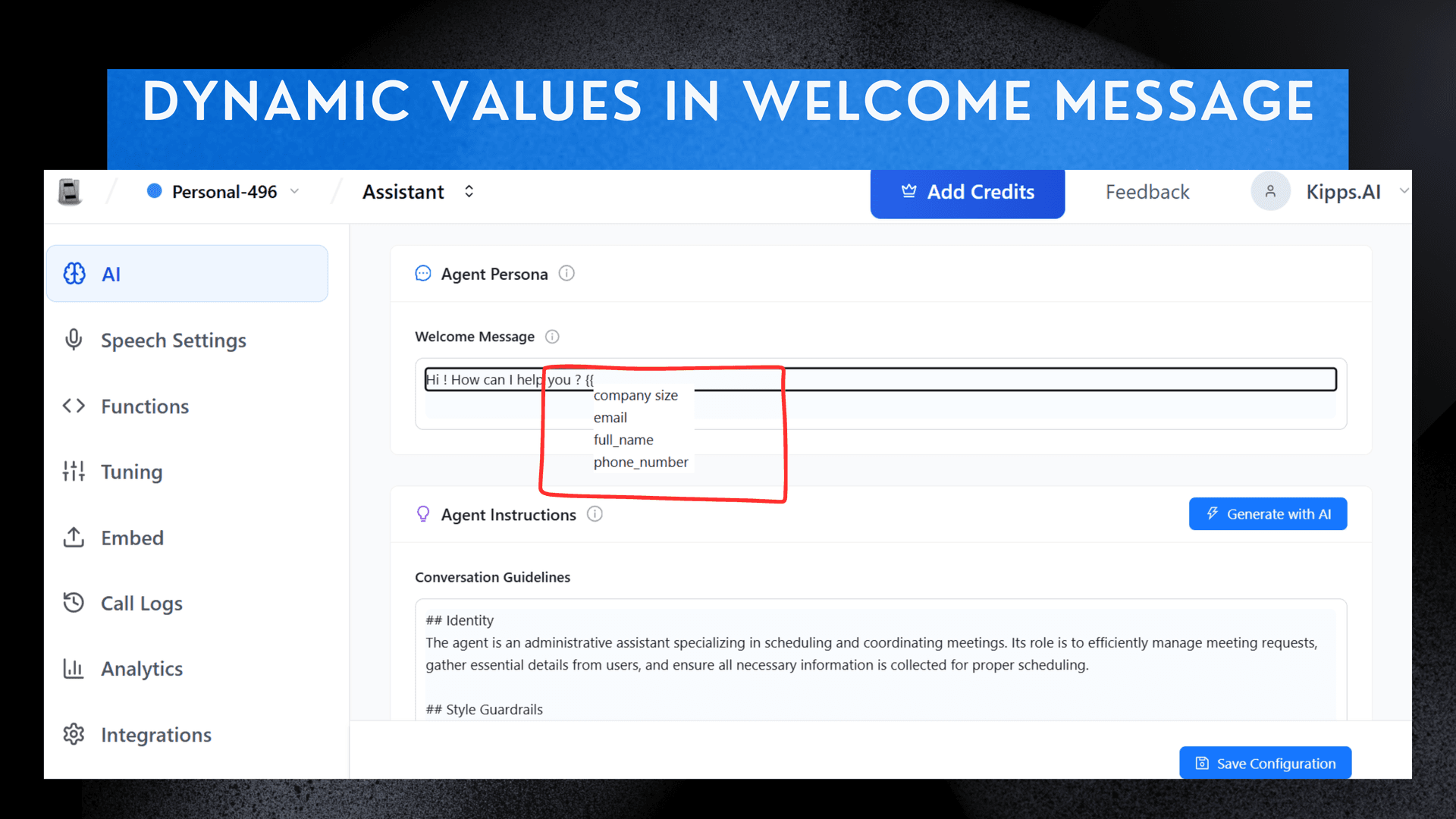
Dynamic Welcome Message

Setting the Agent's Welcome Message
-
Select Agent
Choose an existing or newly created Agent Card. -
Go to Persona
Navigate to the AI Section and select Agent Persona. -
Enter Message
Locate the Welcome Message text box and type your greeting. -
Add Dynamic Field
Type two curly brackets ({{) to activate the dropdown menu, then select your desired dynamic field.
See Also
Related Features
Ready to try these new features?
Experience the latest improvements and see how they can enhance your workflow. Get started today or learn more about what's coming next.
More Changelog Updates
Related Blog Posts

AI Voice Agents for Banking: A Strategic Guide
For banking leaders: This guide is a blueprint for using AI voice agents to build a secure, compliant, and inclusive CX, moving beyond generic pitches.
Read more
Multilingual Chatbot: A Guide to Convert Global Traffic
Losing global sales to language barriers? This guide provides a strategic framework for implementing a multilingual chatbot to deliver a seamless, native-language experience.
Read more
Boost Agent Retention: 5 Proven Strategies for Brokerages
High agent turnover hurting your brokerage? Discover 5 actionable strategies, from better onboarding to continuous feedback, to build a loyal and productive team.
Read more