Build a Healthcare WhatsApp Bot with Google Sheets
For healthcare marketers: Learn to build an AI WhatsApp bot connected to Google Sheets. Automate appointments, answer FAQs & improve patient engagement.

Share This Article
Table of Contents
Why Your Healthcare Website Needs More Than a "Contact Us" Form
The traditional "Contact Us" form is a major bottleneck in the modern patient journey. When a potential patient is seeking information—often about sensitive health concerns—they are in a high-intent, time-sensitive mindset. Forcing them to fill out a form and wait hours or days for a response creates friction and anxiety. This delay is more than an inconvenience; it's an open invitation for them to return to Google and find a competitor who offers immediate engagement.
An AI chatbot closes this gap instantly. It acts as a digital front desk, available 24/7 to engage visitors, answer initial questions, and guide them toward the right resources. This immediate interaction respects the user's urgency, builds trust from the first click, and ensures you never lose a potential patient due to slow response times. It transforms your website from a passive brochure into an active, helpful resource that converts visitors into scheduled appointments.
The High Cost of Delayed Responses
In healthcare, a delayed response can mean losing a high-value patient for good. Whether someone is researching a cosmetic procedure, seeking a specialist, or inquiring about insurance coverage, their motivation is immediate. Every minute they wait for your team to reply to an email is a minute they could be on the phone with another clinic. This "speed-to-lead" gap is where a significant portion of marketing-generated revenue is lost. An AI-powered chat bridges that gap by providing instant, automated qualification and information delivery.
Meeting Patient Expectations for 24/7 Availability
Modern consumers, including patients, are accustomed to on-demand services. Their healthcare questions don't adhere to your 9-to-5 business hours. A potential patient might be researching options late at night or early in the morning. An AI chatbot ensures your digital door is always open. It provides a consistent, reliable point of contact, offering basic information, collecting contact details, and scheduling follow-ups around the clock. This constant availability improves the patient experience and demonstrates that your practice is accessible and modern.
Capturing High-Intent Leads Instantly
Not all website traffic is created equal. A visitor actively engaging with a chatbot is signaling a much higher level of interest than someone who passively browses a page. The chatbot's role is to capture that intent in the moment. By asking a few qualifying questions—such as "What service are you interested in?" or "Are you a new patient?"—the chatbot can identify and segment hot leads immediately. This information can then be routed to the right team member for a prompt follow-up, ensuring your most valuable prospects get the attention they need right away.
Core Use Cases for AI Chatbots in Healthcare
Beyond simple greetings, AI chatbots serve as powerful tools to streamline operations and enhance the patient acquisition process. Their primary value lies in automating repetitive, high-volume interactions, which frees up your administrative and clinical staff to focus on providing high-quality care and handling complex patient cases. For marketing teams, this means a more efficient and reliable lead pipeline.
Instead of your team manually answering the same five questions about parking, insurance, or office hours all day, the chatbot handles it. This allows for a strategic reallocation of human resources toward revenue-generating activities. From pre-qualifying surgical candidates to guiding users to the correct specialist's page, the chatbot becomes a workhorse for patient engagement, ensuring every website visitor gets the immediate attention they need to take the next step in their healthcare journey.
Qualifying Prospective Patients and Booking Appointments
A chatbot can act as an intelligent patient intake coordinator. It can ask pre-screening questions to determine if a patient is a good fit for a particular service (e.g., "Have you had a consultation for this condition before?"). Based on their answers, it can then present available appointment times directly from your calendar and book the consultation in real time. This automated process drastically reduces the administrative burden of back-and-forth scheduling emails and phone calls, while simultaneously increasing conversion rates from website visitor to booked patient.
Answering Frequently Asked Questions (FAQs)
Every healthcare practice gets flooded with repetitive questions: "What are your hours?", "Do you accept Cigna insurance?", "Is parking available?". An AI chatbot can be trained on a knowledge base of these FAQs to provide instant, accurate answers 24/7. This not only improves the user experience by giving visitors the information they want without having to search, but it also reduces the number of non-critical calls and emails your front-desk staff has to manage, allowing them to focus on patients already in your care.
Guiding Users to the Right Services or Practitioners
For multi-specialty clinics or hospitals, a website can be difficult for patients to navigate. An AI chatbot can function as a personalized guide. By asking the user about their symptoms or the type of care they are looking for, the chatbot can intelligently direct them to the correct service page, doctor's bio, or educational resource on your site. This simplifies the patient journey, reduces user frustration, and ensures potential patients find the relevant information they need to make a confident decision about their care.
Choosing the Right AI Chatbot: A Marketer's Checklist
Selecting the right AI chatbot isn't just a technical decision; it's a strategic one that directly impacts your marketing and patient experience goals. Avoid getting mesmerized by complex features you may never use. Instead, focus on the core capabilities that will deliver tangible results for your healthcare practice. The ideal solution should be intelligent enough to understand user intent, secure enough to handle sensitive information, and flexible enough to integrate with the tools you already use.
Your checklist should prioritize functionality that solves your biggest communication challenges. Does it understand the nuances of patient inquiries? Can it securely connect to your patient management systems? Is it easy for your marketing team to update and manage without needing a developer? Answering these questions will help you cut through the noise and choose a chatbot that serves as a true asset rather than another piece of complicated software.
Must-Have Feature: Natural Language Processing (NLP)
The difference between a basic, frustrating chatbot and a helpful one is its ability to understand human language. This is where Natural Language Processing (NLP) comes in. You need a tool that can decipher a user's intent even if they use slang, typos, or unstructured sentences. For example, it should understand that "do u take Aetna?" and "is my Aetna plan accepted?" are the same question. A strong NLP engine ensures a smooth, natural conversation that feels helpful, not robotic.
Critical Consideration: HIPAA Compliance and Data Security
In healthcare, data security is non-negotiable. When choosing a chatbot provider, verifying their stance on HIPAA compliance is the absolute first step. The platform must have robust security measures in place, including data encryption, to protect any potential Protected Health Information (PHI) that might be shared. Always opt for a solution that will sign a Business Associate Agreement (BAA), legally obligating them to uphold HIPAA's security and privacy rules. This protects your patients and your practice.
Integration Capabilities (CRM, EMR, and Simple Tools)
An effective chatbot doesn't operate in a silo; it connects to your existing workflows. Look for a solution that offers integrations with your core systems, like your CRM or Electronic Medical Records (EMR). Even more importantly, consider tools that offer simple, no-code integrations. For instance, a solution like an AI WhatsApp Agent that connects directly to a Google Sheet can be incredibly powerful. It allows your marketing team to capture and manage new patient inquiries in a familiar format without needing complex technical setup, making lead tracking simple and efficient.
A Step-by-Step Guide to Implementing Your Website Chatbot
Deploying an AI chatbot on your website can be a straightforward process when you approach it with a clear plan. The goal is not to build a complex system that can answer every conceivable question from day one. Instead, the most successful implementations start with a narrow focus, solve a single, high-impact problem, and then expand over time. This iterative approach allows you to demonstrate value quickly and learn from real user interactions.
By following a structured, three-step process, you can ensure your chatbot launch is smooth and effective. You'll move from defining a clear objective to designing a logical conversation and, finally, to connecting your tools for a seamless go-live. This methodical approach minimizes technical headaches and maximizes the chances of a positive ROI from your new conversational tool.
Step 1: Define Your Primary Goal
Before writing a single line of dialogue, decide on the one key problem you want the chatbot to solve. Is it to reduce the number of phone calls about office hours? Is it to book more appointments for a specific, high-value service? Or is it to qualify leads for a new clinical trial? Choosing one primary goal, like "schedule more new patient consultations," will provide a clear focus for your entire implementation. This clarity makes it easier to design the conversation flow and measure success later on.
Step 2: Design the Conversation Flow
With your goal in mind, map out the ideal conversation path. Think like a user. What is the first question they will likely ask? What information do you need to collect from them? For an appointment-booking bot, the flow might look like this:
- Greeting and offer of help.
- Ask which service the user is interested in.
- Ask if they are a new or existing patient.
- Offer available time slots.
- Collect name, email, and phone number to confirm the booking. Keep it simple, clear, and direct.
Step 3: Connect Your Tools and Go Live
Once the flow is designed, you'll connect the chatbot to your essential tools. This could be linking to your scheduling software's API, integrating with your CRM, or setting up a simple automation to send lead data to a Google Sheet. After testing the flow internally to ensure it works as expected, you can deploy the chatbot on your website. Start with a soft launch on a single high-traffic page to monitor its performance before rolling it out site-wide.
Measuring Chatbot ROI: Metrics That Matter to Marketers
To prove the value of your AI chatbot, you need to track metrics that tie directly to business objectives. Vague measures like "engagement" are not enough. As a marketer, you need to demonstrate how this tool is contributing to the bottom line, whether by generating more qualified leads, lowering the cost of patient acquisition, or improving the overall efficiency of your marketing funnel.
The key is to establish a baseline before you launch the chatbot. Know your current lead volume, cost per lead, and website conversion rate. This allows you to create a clear before-and-after picture, providing undeniable proof of the chatbot's impact. By focusing on tangible outcomes, you can easily justify the investment and make data-driven decisions to optimize its performance over time. These metrics will tell the true story of your chatbot's success.
Lead Generation and Qualification Rate
This is the most critical metric. Track the number of conversations that result in a qualified lead—for example, a user who provides their contact information and confirms interest in a specific service. Compare this to the number of leads generated by your old "Contact Us" form over the same period. Also, monitor the qualification rate: what percentage of chatbot-generated leads are deemed high-quality by your intake team? An increase here shows the bot is not just creating volume, but value.
Cost Per Lead vs. Other Channels
Calculate the cost per lead (CPL) generated by the chatbot by dividing the monthly cost of the software by the number of qualified leads it produced. Compare this CPL to your other marketing channels, such as Google Ads or social media campaigns. An effective chatbot should deliver a significantly lower CPL, as it leverages existing website traffic to convert users who might have otherwise left without taking action. This demonstrates clear financial efficiency and a strong return on investment.
Engagement Rate and User Satisfaction
While not a direct revenue metric, user satisfaction is a crucial indicator of performance. Track the chatbot engagement rate (the percentage of website visitors who interact with the chatbot). A high rate suggests it is visible and inviting. Many chatbot platforms also include a simple way for users to rate the conversation (e.g., a thumbs-up/thumbs-down). Monitoring these satisfaction scores helps you identify areas in the conversation flow that may need improvement to better serve potential patients.
Related Case Studies
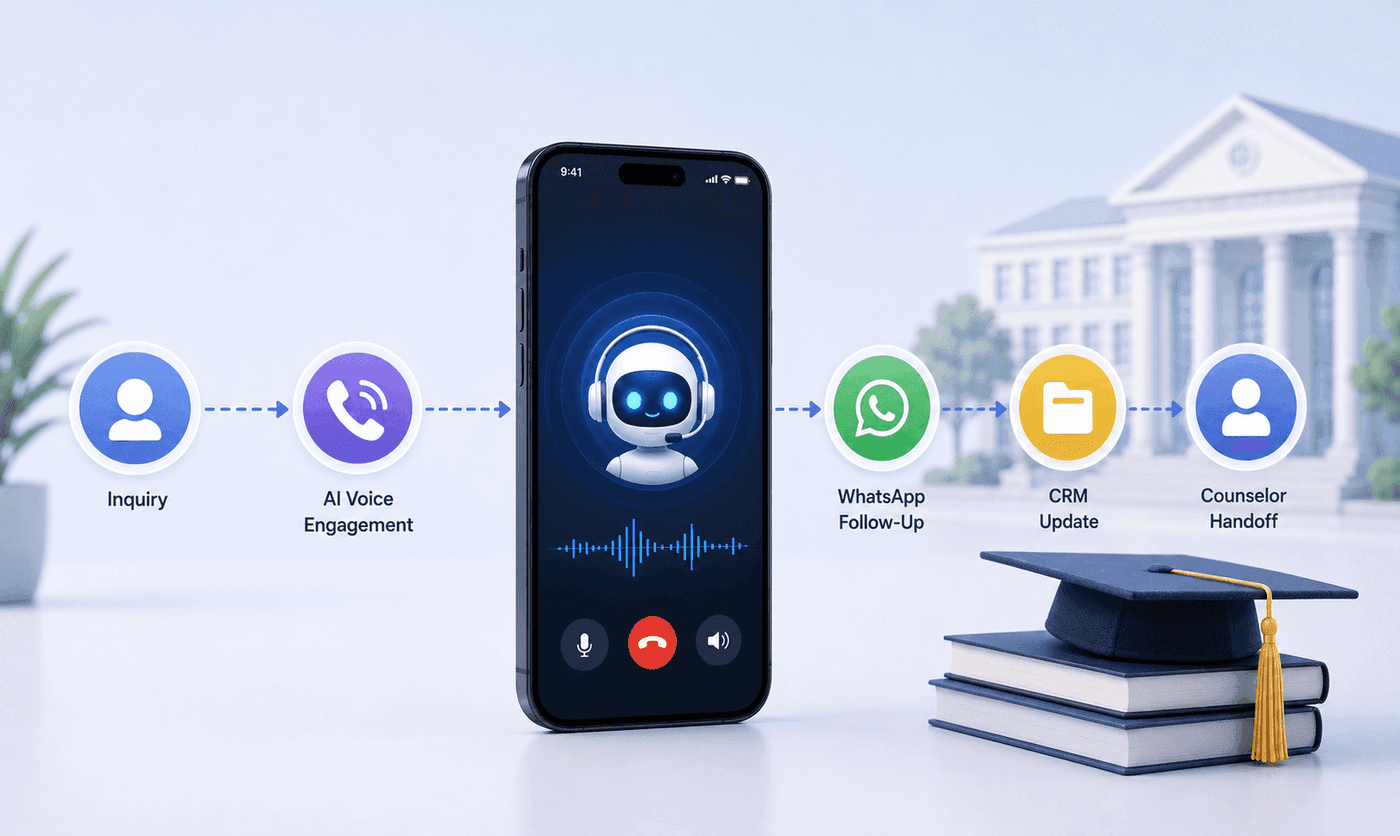
How an Executive Education Institution Automated Its Entire Admissions Workflow Using AI Voice and WhatsApp
How an executive education institution automated admissions from first call to counselor handoff with AI voice, WhatsApp, and CRM syncing.

How an EdTech Founder Reactivated a Dormant Lead Database Using WhatsApp Automation and AI-Assisted Qualification
How an EdTech founder reactivated a dormant inquiry database and acquired customers in week one using WhatsApp outreach and AI qualification.