Voice AI for Lead Qualification | Voice Agent | Kipps.AI
Use Kipps.AI to build voice-based AI agents for lead qualification. Automate calls, ask smart questions, and route hot leads instantly.

How to Make a Lead Qualification AI Agent with Phone Calls
Introduction
Voice calls remain one of the highest-intent methods for engaging and qualifying leads, despite the rise of digital channels. That's especially true in real estate, healthcare, education, and finance, where a personal connection during the first conversation shapes whether a prospect moves forward.
The problem most sales teams run into isn't a lack of leads — it's the gap between when a lead arrives and when someone actually calls them. A form submission that sits for six hours before a rep dials it converts at a fraction of the rate of one called within minutes. Multiply that gap across every lead your business generates in a week, and it adds up to a measurable amount of lost pipeline.
Kipps.AI enables you to build AI-powered voice agents that automatically call prospects the moment they come in, conduct a real qualification conversation — not a scripted survey — and gather the exact information your sales team needs, all without any coding. This guide walks through why phone-based lead qualification deserves automation, exactly how to set it up in Kipps.AI step by step, and what to watch for once it's live.
Why It Matters
Manual follow-up calls are time-consuming and prone to inconsistency. Every rep asks qualifying questions slightly differently, some skip questions under time pressure, and none of them are available at 9 PM when a lead is actually filling out your form. Automating this process with voice AI helps your business respond faster, qualify leads consistently, and reduce the manual burden on sales teams so reps spend their time talking to qualified prospects instead of chasing down every inbound form fill.
Voice AI agents deliver a natural, conversational experience — asking follow-up questions based on what the prospect actually says, not a rigid script — while maintaining the human touch and working 24/7 to capture and qualify leads the moment they arrive, including nights, weekends, and holidays when your team is offline but your leads are still filling out forms.
Integrating these AI agents with your CRM ensures seamless data flow, accurate record-keeping, and real-time updates of your sales pipeline, so a qualified lead shows up in your CRM with call notes, a lead score, and next steps already attached — not as a raw phone number your team has to chase down and re-qualify manually.
How to Get Started
Setting up a phone-based lead qualification agent in Kipps.AI involves three broad phases: creating the voice agent, uploading and configuring your audience, and building the qualification campaign itself. Each step below maps to a specific screen in the platform.
Step 1
Login/Signup to your Kipps.AI account.
Step 2
create Voice Agent

Step 3
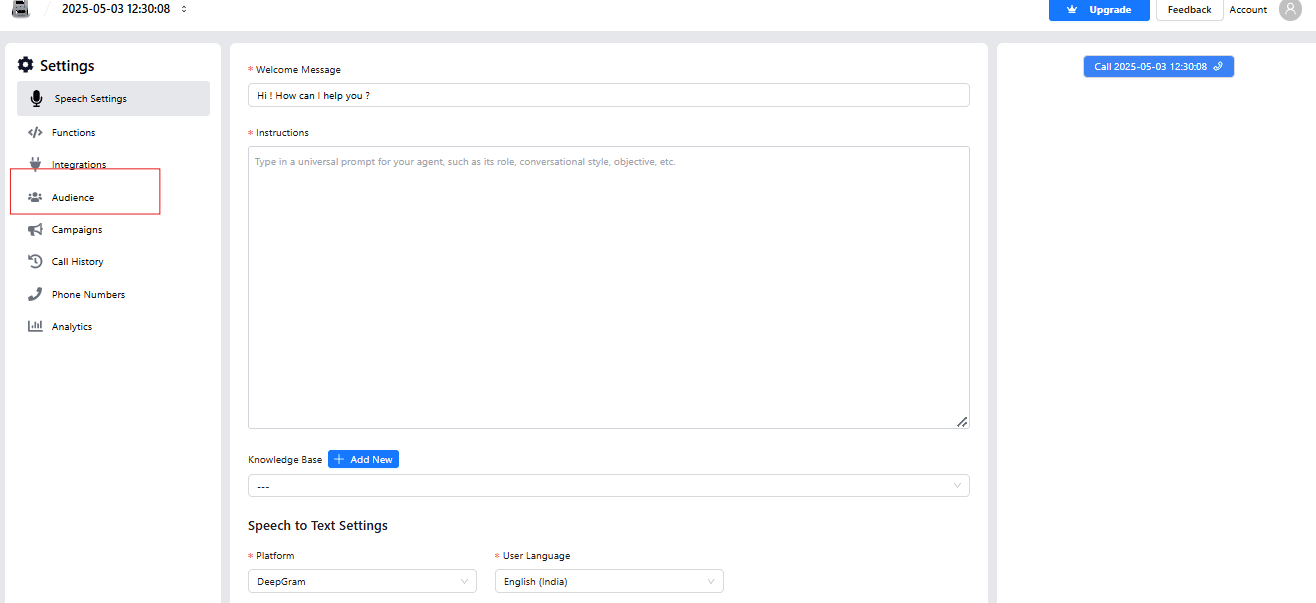
Click on Audience section
Step 4
Now, click on Create Button

Step 5
Then Click here to download the Format
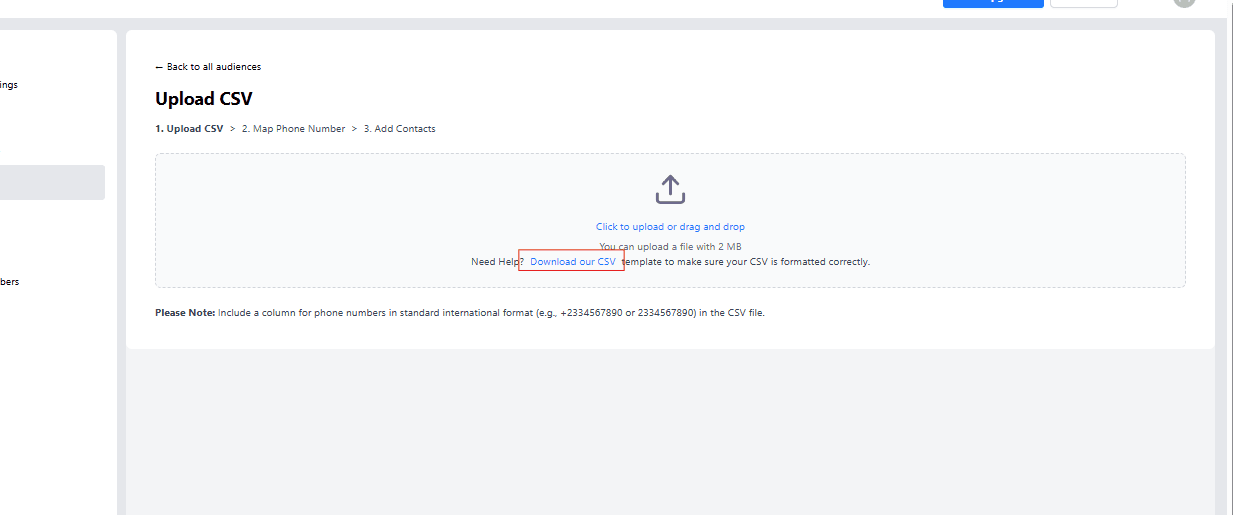
Step 6
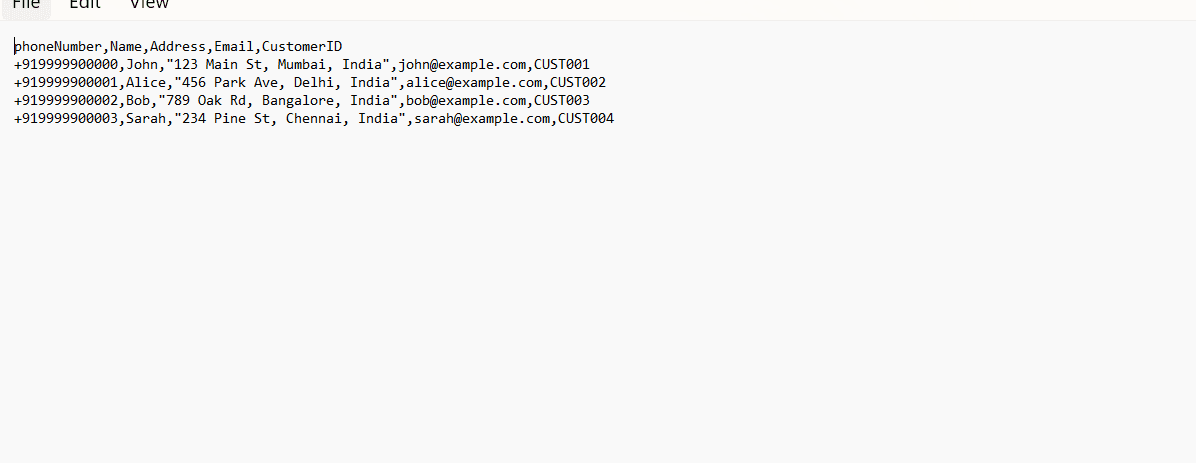
Format
Step 7
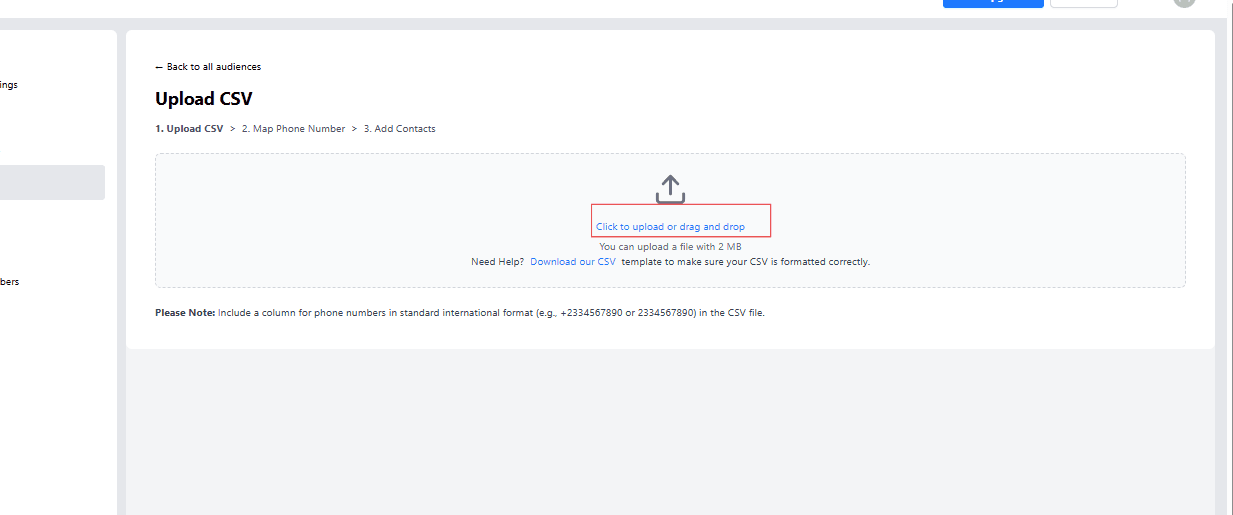
Now , Upload the CSV
step 8
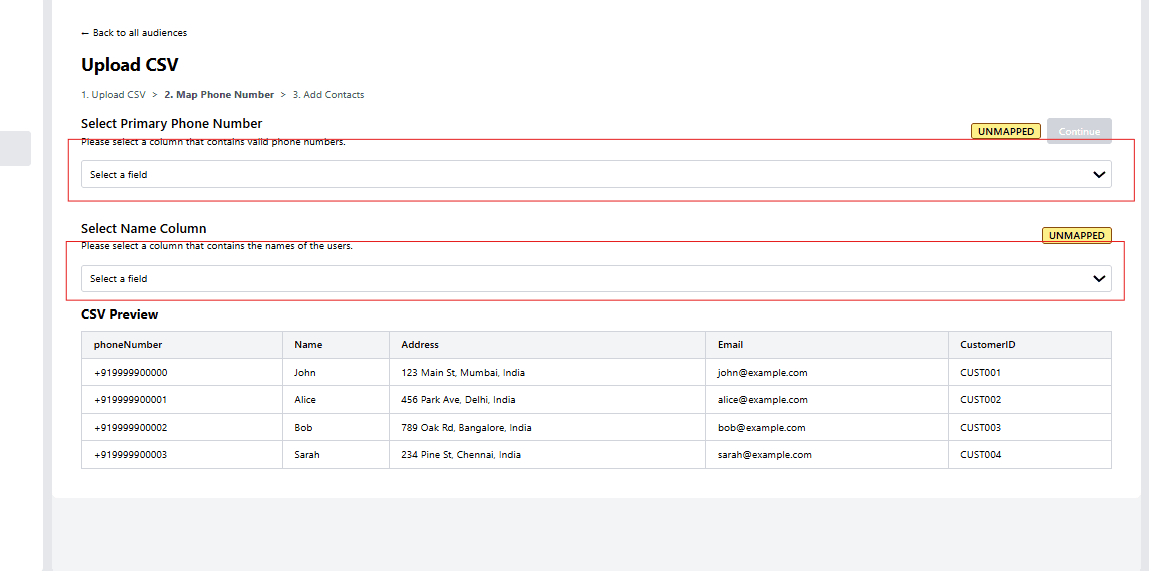
Select Phone Number and Name
Step 9
click on continue button

Step 10
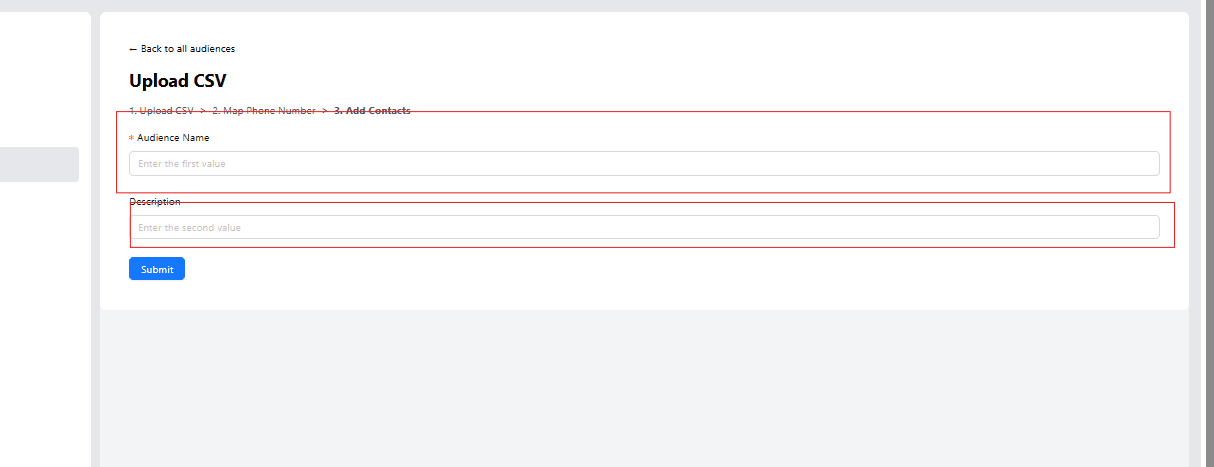
Enter the Audience and Discription
Step 11
Now ,click on Submit Button

Step 12
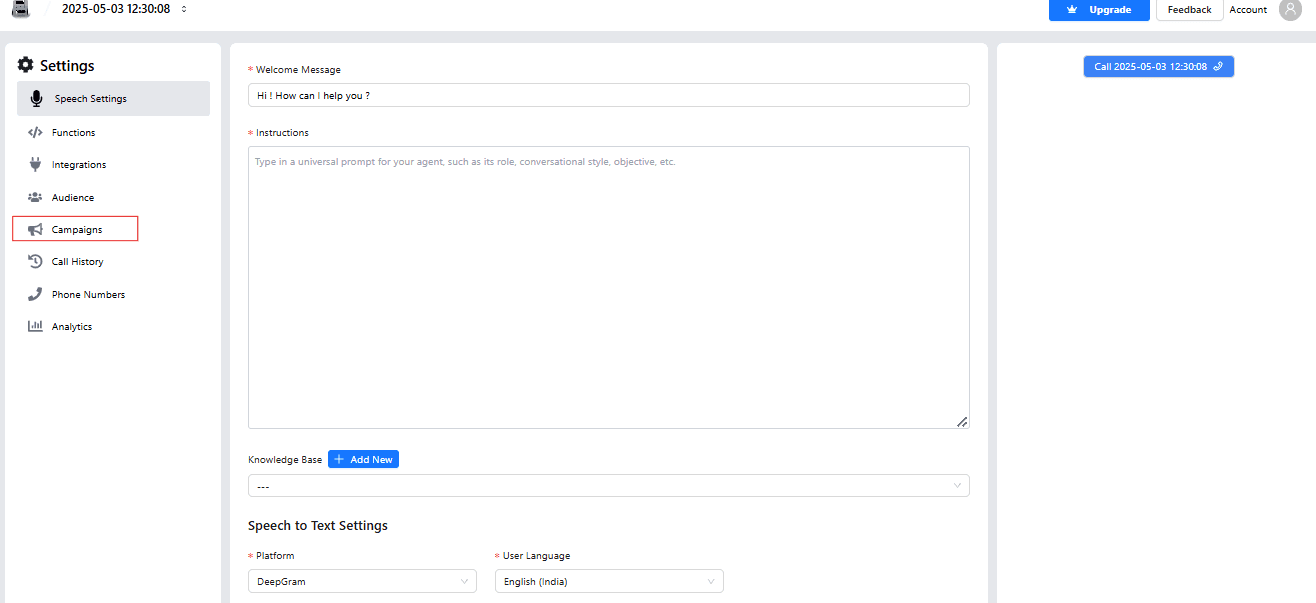
Now click on campaign section
Step 13
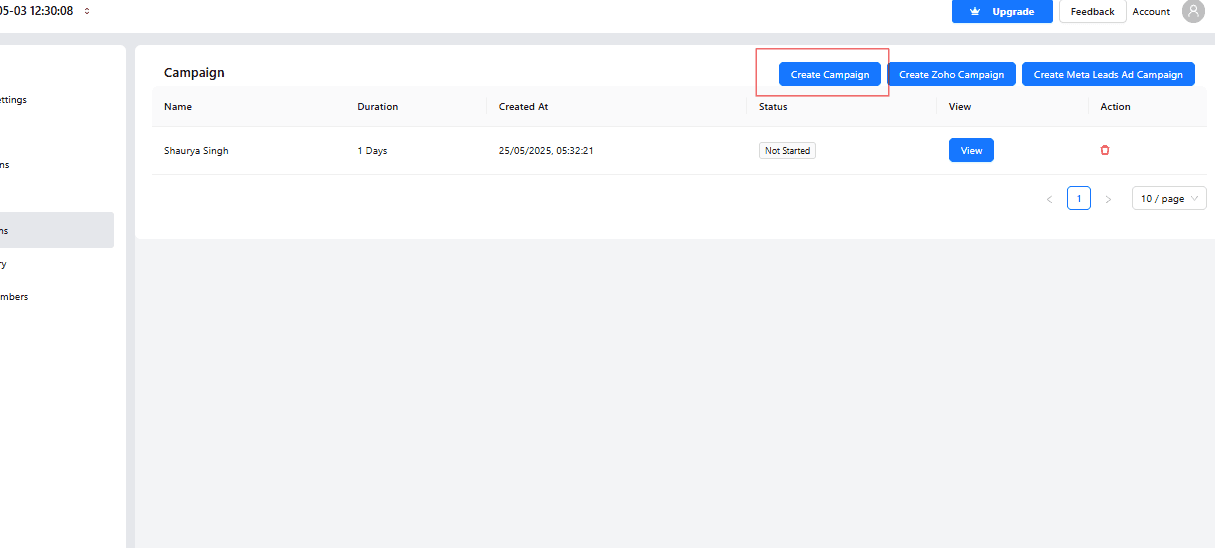
Click on Create campaign button
step
Enter the Name
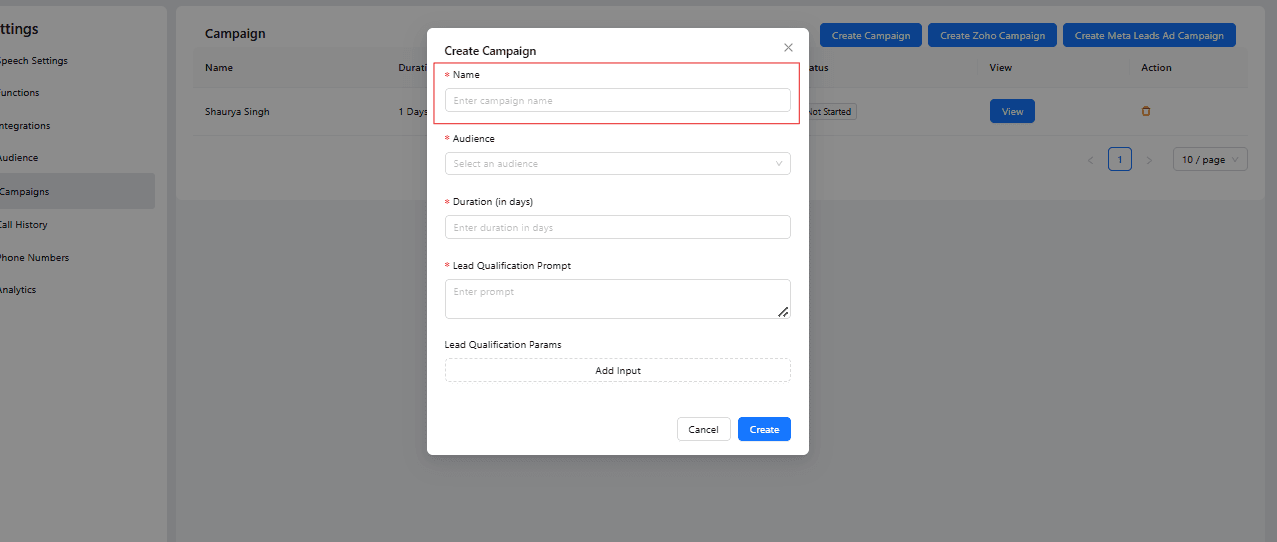
Select the Audience
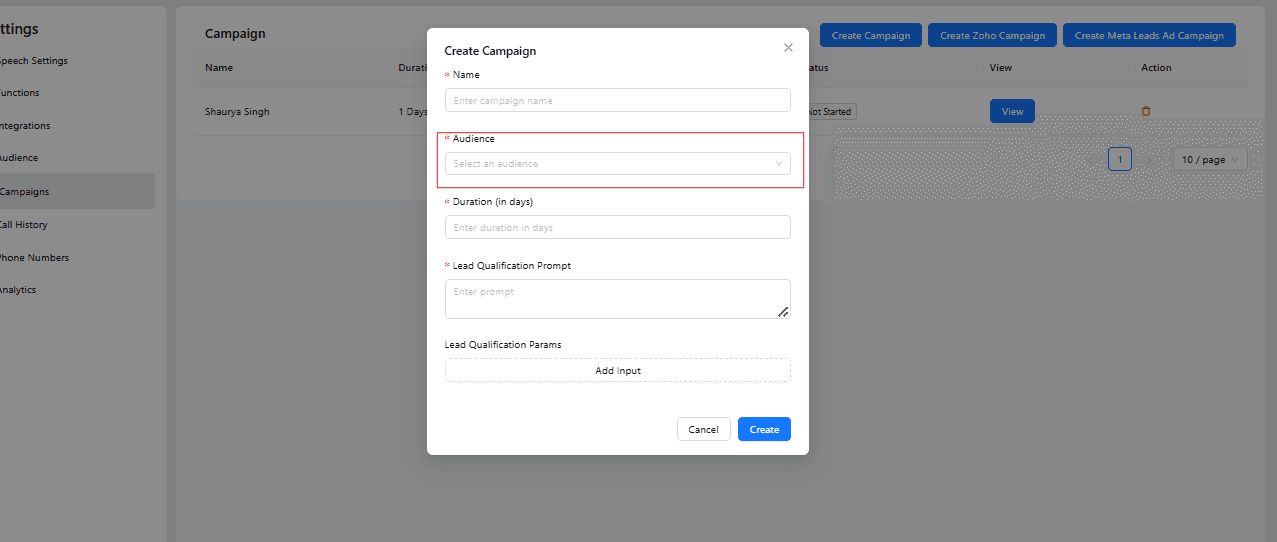
Enter the campaign duration (in days)
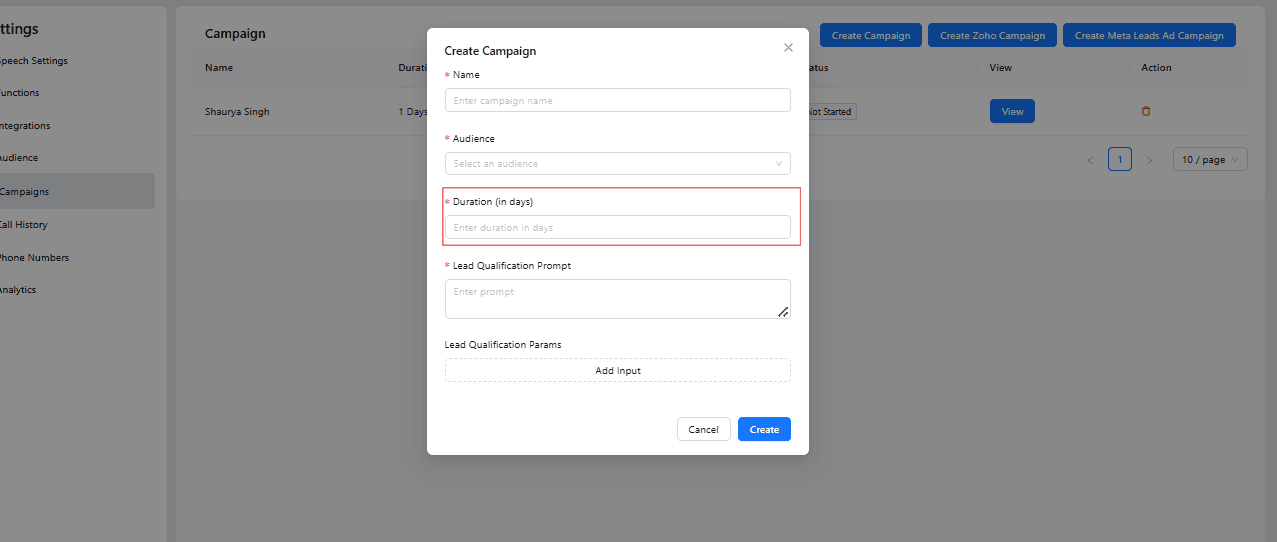
Write Lead Qualification Prompt
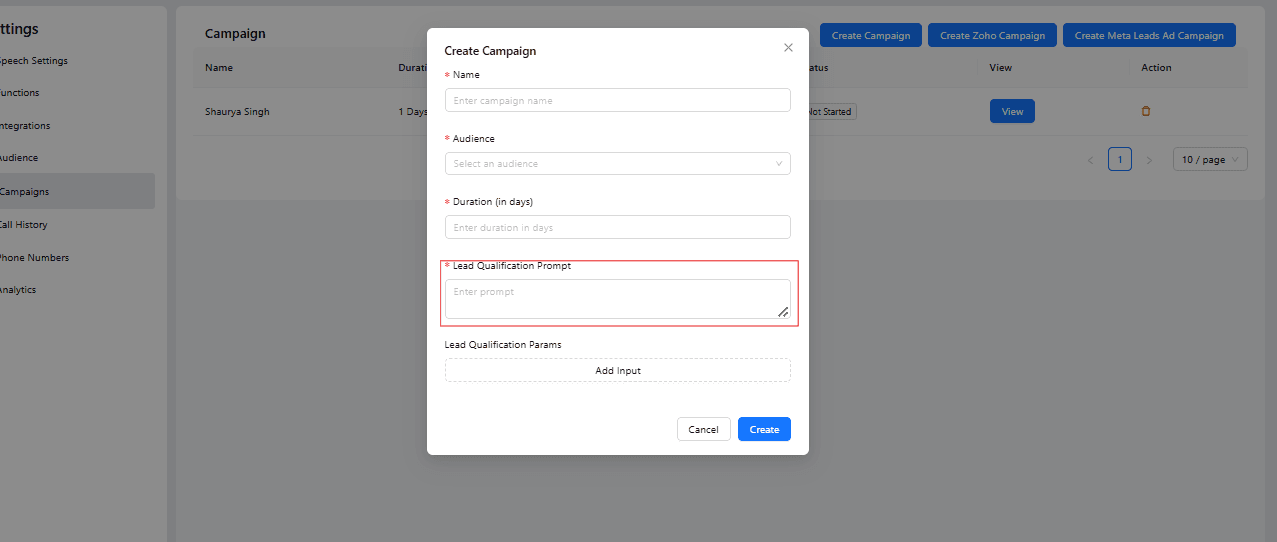 Add Lead Qualification Params
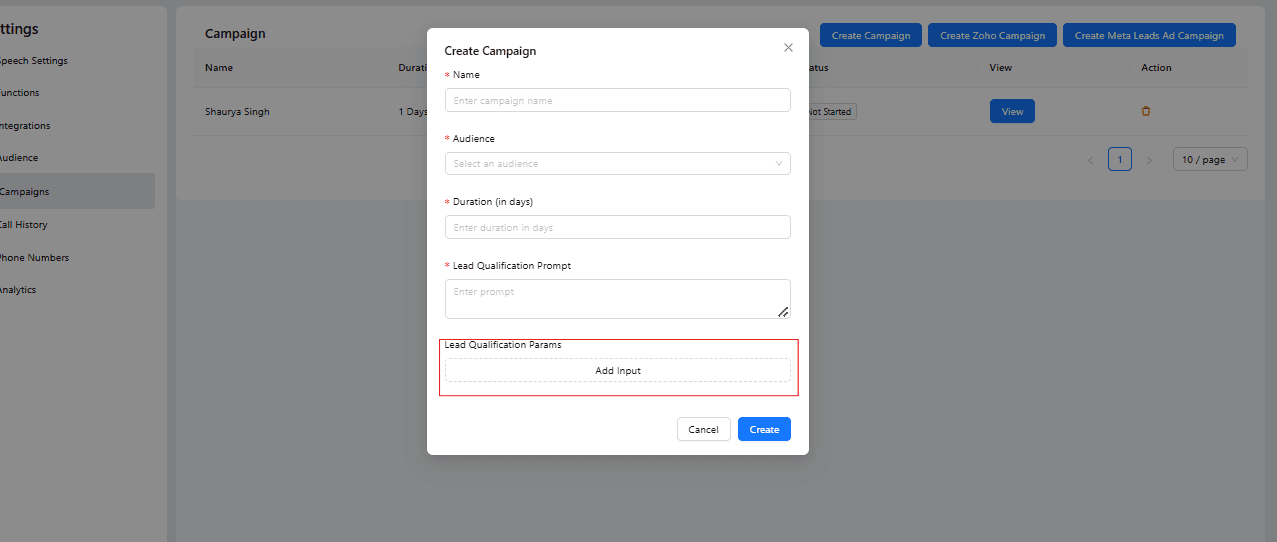
Step 8
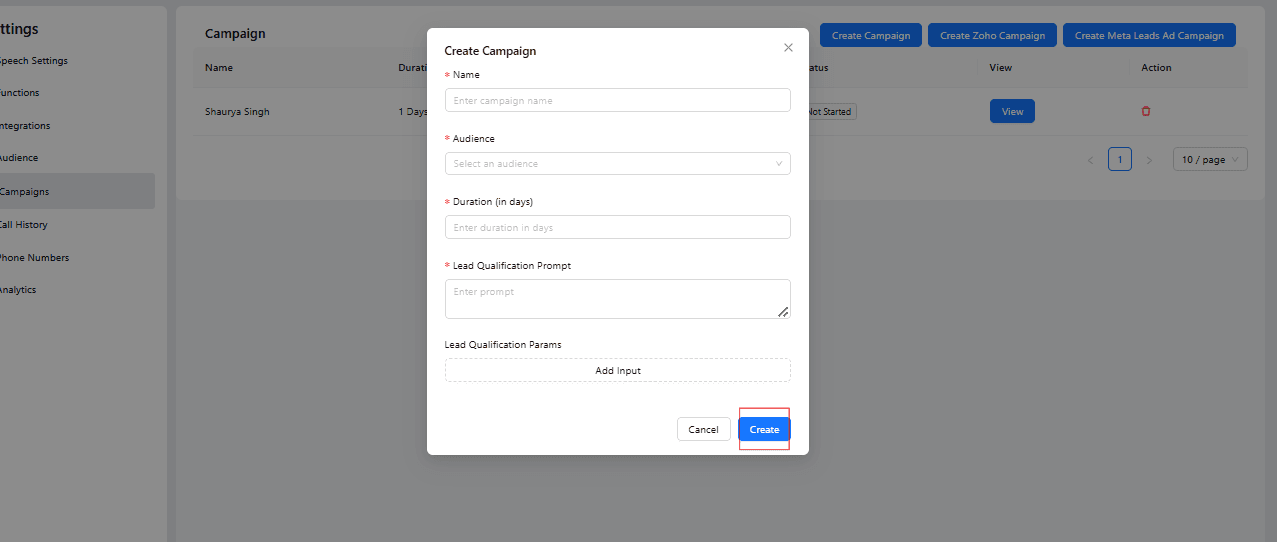
NOw Click on Create Button to create.
step
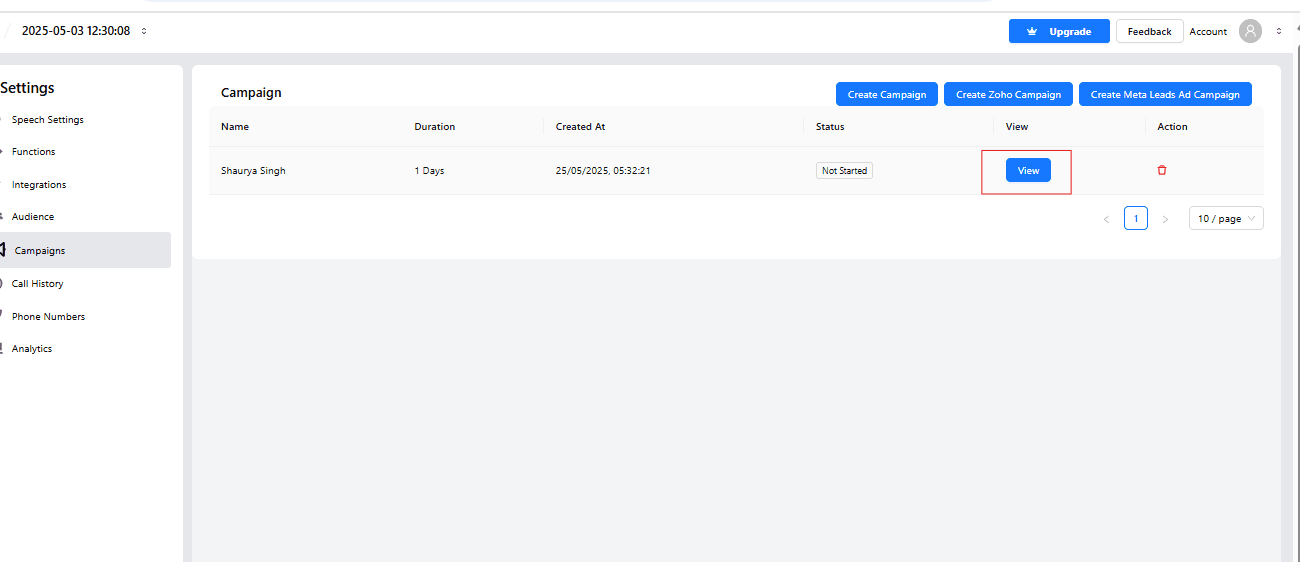
Click on view button to view your status
Writing a Qualification Prompt and Parameters That Actually Work
The steps above get the campaign live, but the quality of your results comes down almost entirely to two things you configure in Step 16: the qualification prompt and the qualification parameters.
The prompt is the instruction set the AI voice agent follows during the call — it defines the persona, the opening line, the questions to ask, and how to handle objections or off-script answers. A weak prompt reads like a rigid script and produces stilted calls; a strong prompt gives the agent a goal ("determine budget, timeline, and decision-making authority") and lets it get there conversationally, adapting the order of questions to how the conversation actually flows.
The qualification parameters are the specific data points the agent extracts and scores against — budget range, timeline to purchase, decision-maker status, or whatever criteria matters most for your pipeline. Set these to match exactly what your sales team currently asks on a discovery call, so a lead that comes through as "qualified" is genuinely ready for a rep's time.
Common Pitfalls to Avoid
A few mistakes account for most of the underperforming voice qualification campaigns:
- Overloading the call with questions. A phone qualification call that asks ten questions front-to-back feels like an interrogation. Prioritize the three or four data points that actually predict conversion, and let the rest come up naturally or get captured later.
- Ignoring the audience CSV format. The upload format in Step 6 exists for a reason — malformed phone numbers or missing name fields cause silent call failures. Always test with a small batch of 10–20 contacts before launching a full campaign.
- Setting campaign duration too short. Leads don't always answer the first call. A campaign duration that allows for a retry attempt a day or two later captures meaningfully more qualified leads than a single-attempt campaign.
- Not reviewing call transcripts early. In the first week, listen to or read a sample of calls. This is the fastest way to catch a prompt that's asking questions awkwardly or missing context a human caller would have picked up on.
Use Cases
- Automated follow-up calls after web forms or campaign responses, so no lead sits untouched for hours waiting on a rep's availability
- Dynamic qualification flows tailored to different buyer personas, adjusting questions based on the source of the lead or the product they inquired about
- Instant transfer of qualified leads to live sales reps, either through a warm handoff during the call or an immediate CRM notification
- Appointment scheduling during the call to speed up conversions, booking a demo or site visit before the prospect's interest cools
- Re-engagement of cold or stalled leads sitting in your CRM from past campaigns, giving them a second qualification pass without manual dialing
Why Phone-Based Qualification Beats Waiting on Manual Calls
The alternative to this workflow isn't "no automation" — it's a rep manually working a call list, which means leads get contacted in whatever order the rep gets to them, at whatever time their schedule allows. An AI voice agent removes that bottleneck entirely: every lead gets called within minutes of arriving, every call follows the same qualification logic, and every outcome lands in your CRM without a rep having to type up notes afterward. The result isn't just faster response times — it's a qualification process your team can actually trust to be consistent.
Conclusion
Voice AI is transforming lead qualification by combining automation with a personal touch.
Kipps.AI makes it easy to create intelligent voice agents that qualify leads, update your CRM in real time, and route hot prospects to your sales team — with none of the delay, inconsistency, or manual data entry that comes with a purely human-run calling process.
Frequently Asked Questions
No. The entire setup — audience upload, campaign creation, and qualification prompt — happens through Kipps.AI's no-code interface, as shown in the steps above.
You define qualification parameters (budget, timeline, intent, or any criteria relevant to your sales process) when creating the campaign. The agent scores each call against those parameters and routes the outcome to your CRM.
Yes. When a lead qualifies as high-intent or asks for a human, the agent can hand off the call to a live sales rep with the conversation context already captured.
Campaign duration settings allow for retry attempts across the days you specify, so leads who miss the first call still get a second or third attempt within the campaign window.
Kipps.AI offers deep integrations with popular CRMs including Zoho, Salesforce, and HubSpot, so qualified leads and call outcomes sync automatically without manual export.
About Kipps.AI
Kipps.AI is a no-code AI platform designed to help businesses build conversational agents across multiple channels, including chat, voice, and WhatsApp.
With deep integrations for popular CRMs like Zoho, Salesforce, and HubSpot, Kipps.AI empowers companies to automate customer interactions, streamline workflows, and increase sales efficiency without technical barriers.
Ready to stop losing leads to slow follow-up? Book a free demo at kipps.ai/contact-sales or explore the platform at kipps.ai.
Read Next
Related Case Studies

How a Premium Travel Company Uses an AI Voice Agent to Qualify Leads Before Expert Engagement
How a Dubai-based premium travel company deployed an AI voice agent to capture trip requirements, classify intent, and route only high-value leads to travel experts.

How an Executive Education Provider Is Using AI Voice Agents to Qualify 10,000 Leads a Month
How an executive education provider used AI voice agents to qualify thousands of leads efficiently. Learn about the challenges, implementation, and results of this innovative solution.