Build WhatsApp Lead Qualification Bot | Smart Automation | Kipps.AI
Build a WhatsApp lead qualification AI agent with Kipps.AI. Automatically filter, score, and route quality leads in real time—no human intervention needed.

How to Make a Lead Qualification AI Agent on WhatsApp
Introduction
In today's fast-paced world, qualifying leads manually is inefficient and often results in lost opportunities. A prospect messages your business on WhatsApp expecting a near-instant reply — that's the norm on the platform — and if your team can't respond within minutes, the conversation often just ends there, with the prospect moving on to whichever business did respond quickly.
WhatsApp remains one of the most widely used messaging platforms globally, offering exceptional open and engagement rates compared to email or SMS. That makes it one of the highest-leverage channels for lead qualification — but only if a business can actually keep pace with how quickly people expect a reply.
Kipps.AI enables businesses to create powerful AI agents that operate natively on WhatsApp, automating lead qualification through intelligent conversation flows. These AI bots interact with prospects instantly, ask targeted qualifying questions in a natural back-and-forth, and help you identify high-potential leads without human intervention — freeing your sales team to spend their time on prospects who are actually ready to buy.
This guide covers why WhatsApp is such a high-value qualification channel, exactly how to set up a qualification bot in Kipps.AI step by step, and the best practices that keep a WhatsApp bot from feeling robotic or spammy.
Why It Matters
WhatsApp boasts dramatically higher open and response rates compared to traditional communication channels like email, largely because people already treat it as a personal, immediate-response channel rather than something they check once a day. Automating lead qualification on WhatsApp helps businesses connect with prospects where they are already spending time and attention, instead of trying to pull them into a separate form or phone call.
By leveraging AI-powered bots, companies can engage leads 24/7 — including evenings, weekends, and the exact moment a prospect is actively thinking about the purchase — reduce response time from hours to seconds, and qualify leads consistently using predefined criteria rather than whatever a rep happens to remember to ask. This ensures sales teams only focus on serious prospects, boosting overall efficiency and conversion rates while keeping the experience feeling like a natural conversation rather than a survey.
How to Get Started
Setting up a WhatsApp lead qualification bot in Kipps.AI involves connecting your WhatsApp Business number, uploading your audience, and building a qualification campaign with the right prompt and parameters. Each step below maps to a specific screen in the platform.
Step 1
Login/Signup to your Kipps.AI account.
Step 2
Create Chatbot
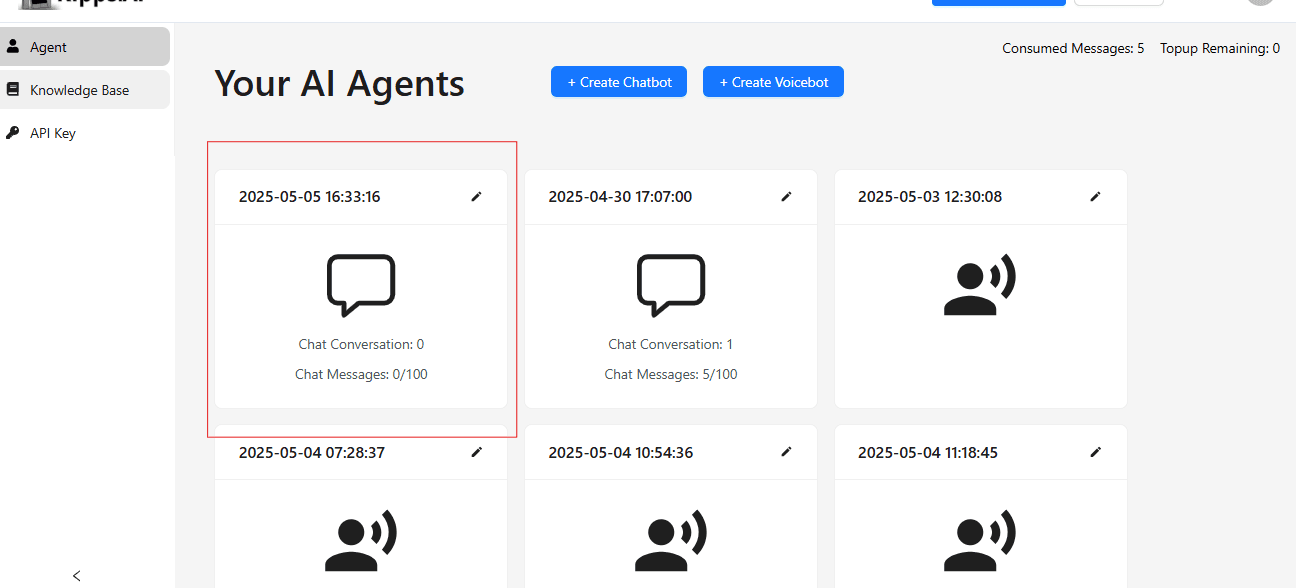
Step 3
Then, click on the Integration Section
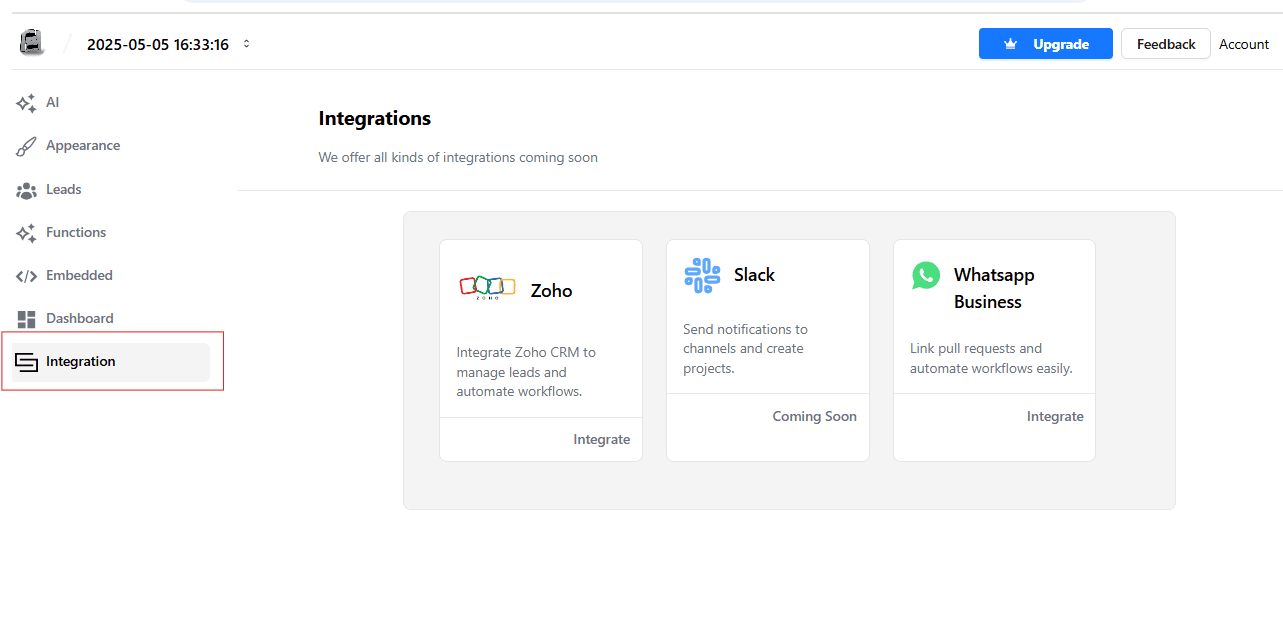
Step 4
Now,choose whatsApp bussiness and click on integration
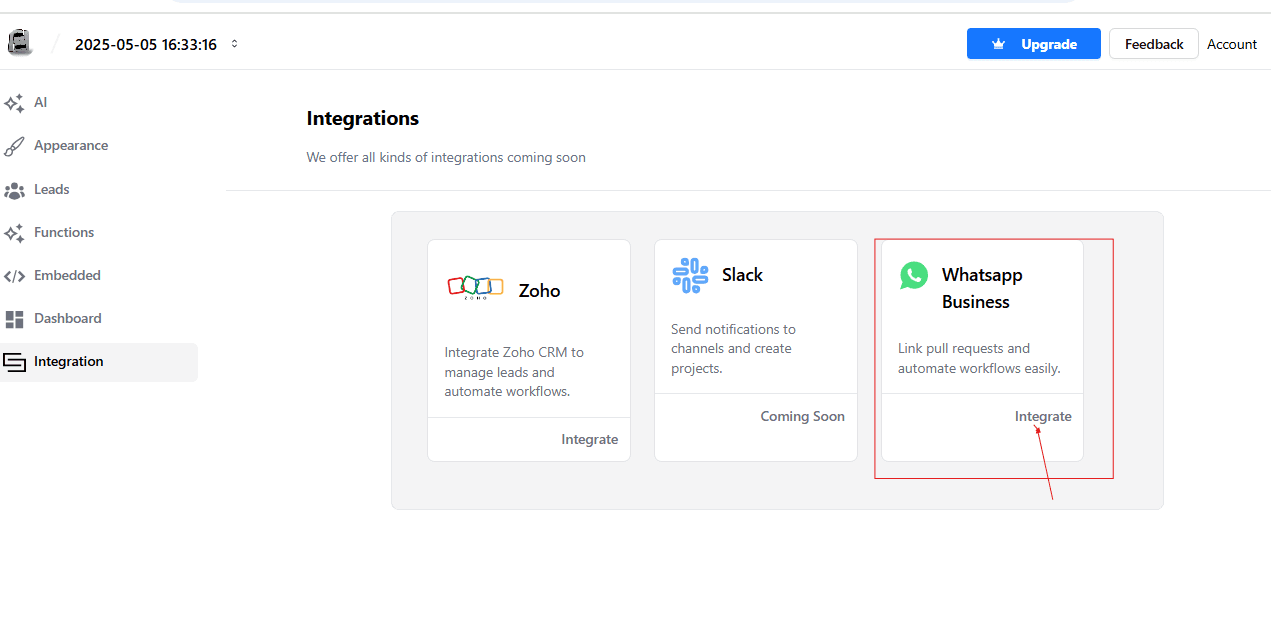
Step 5
Click on Audience section
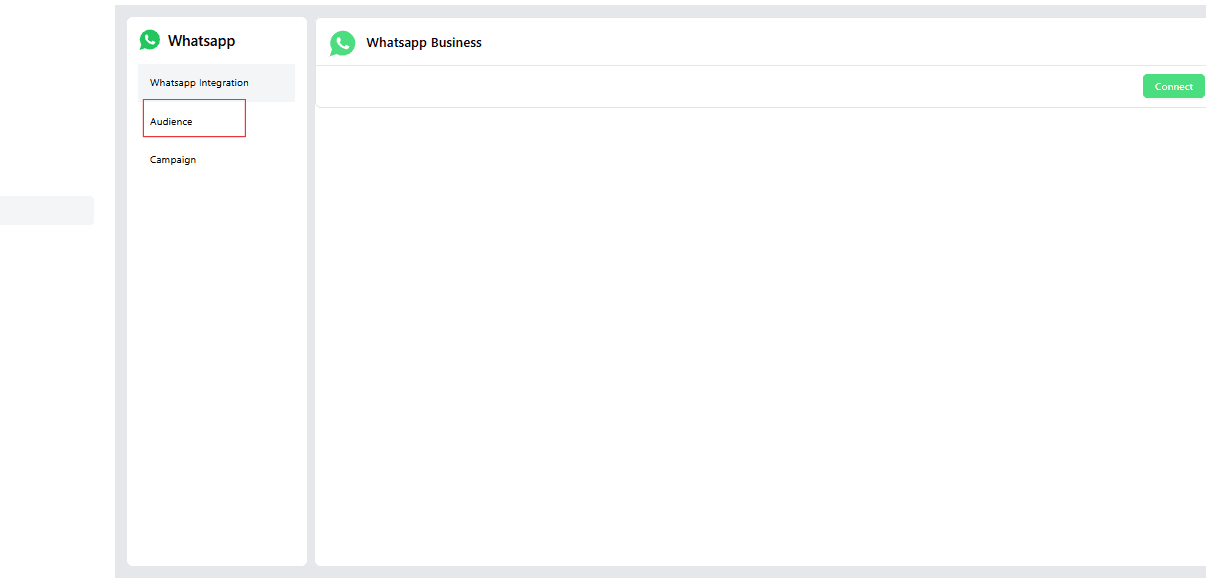
Step 6
Now, click on Create Button

Step 7
Then Click here to download the Format
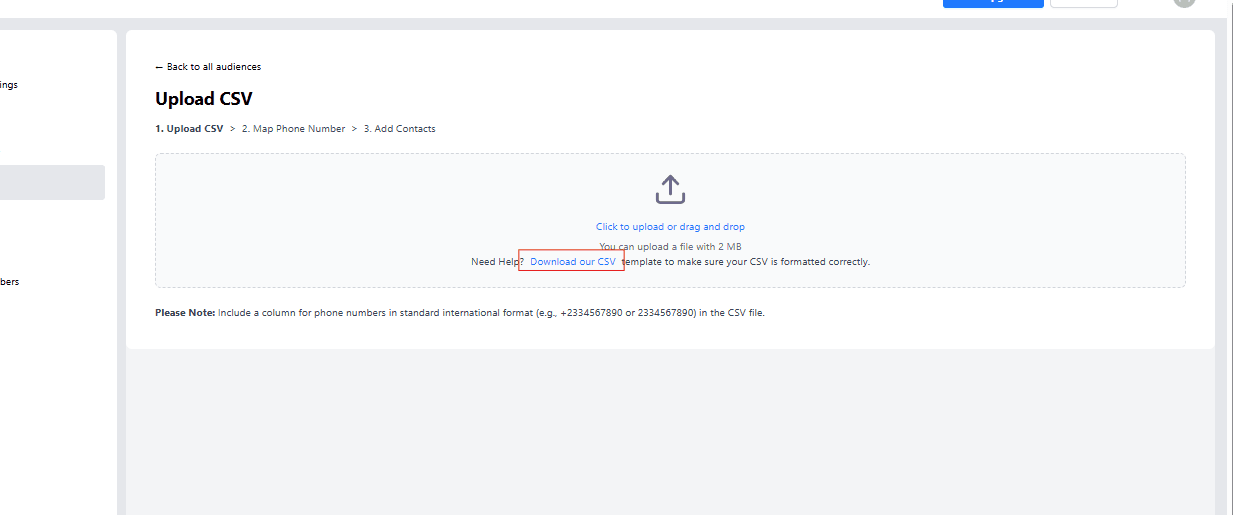
Step 8
Format
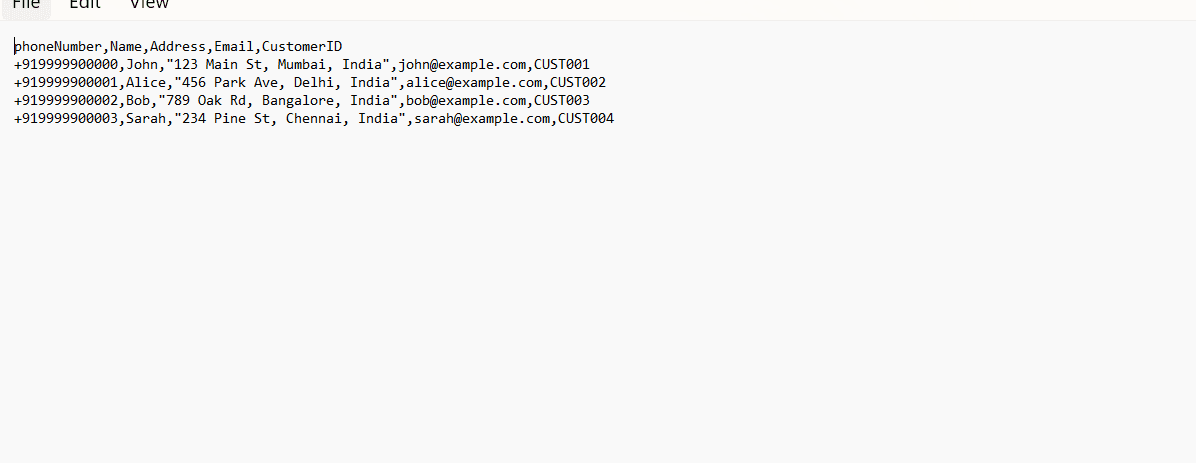
Step 9
Now , Upload the CSV
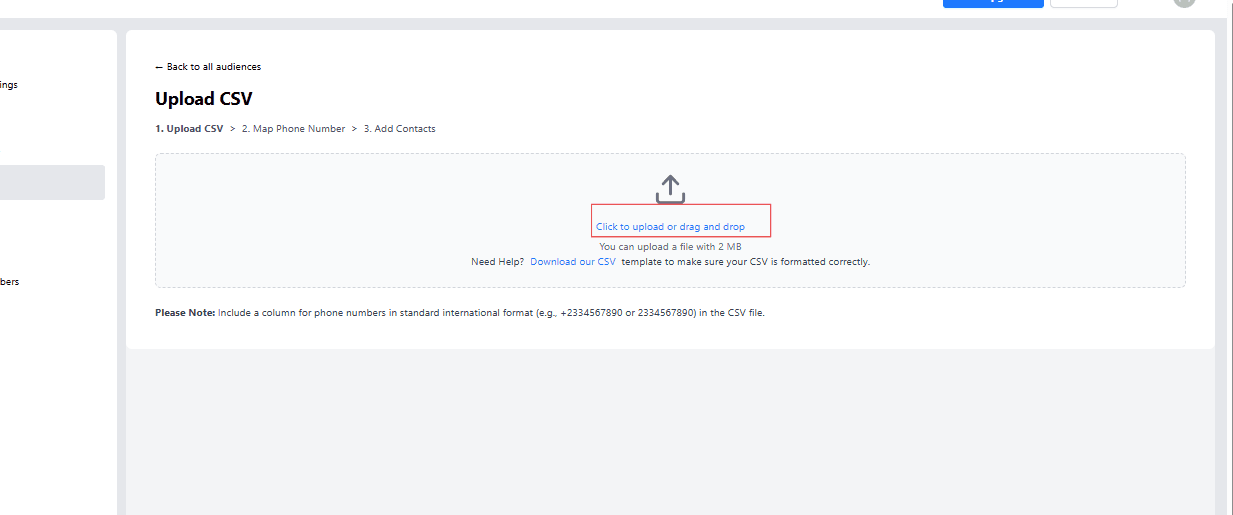
step 10
Select Phone Number and Name
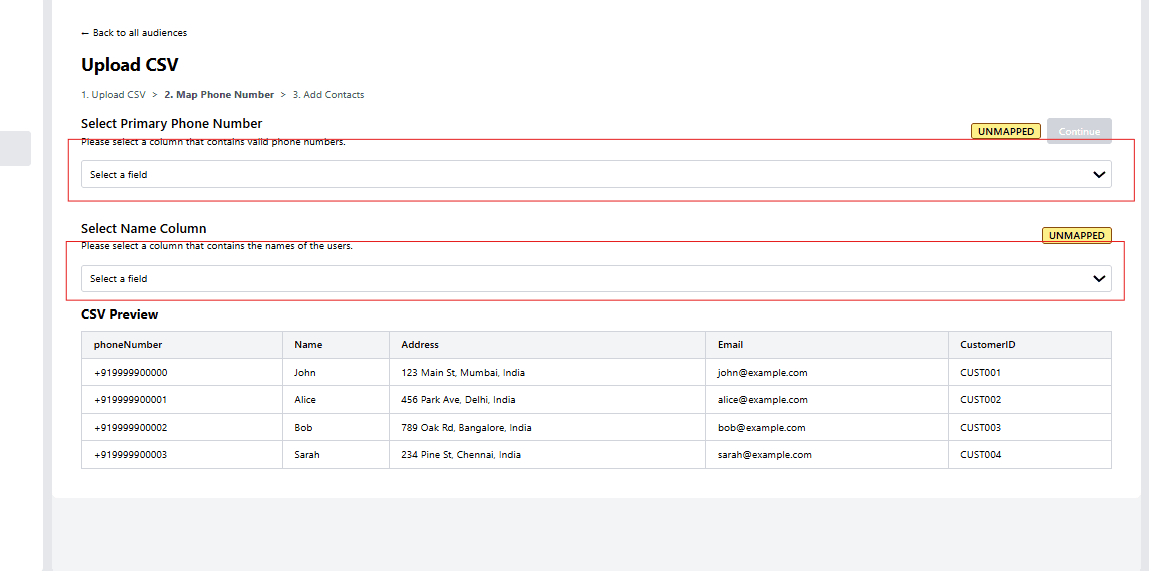
Step 11
click on continue button

Step 12
Enter the Audience and Discription
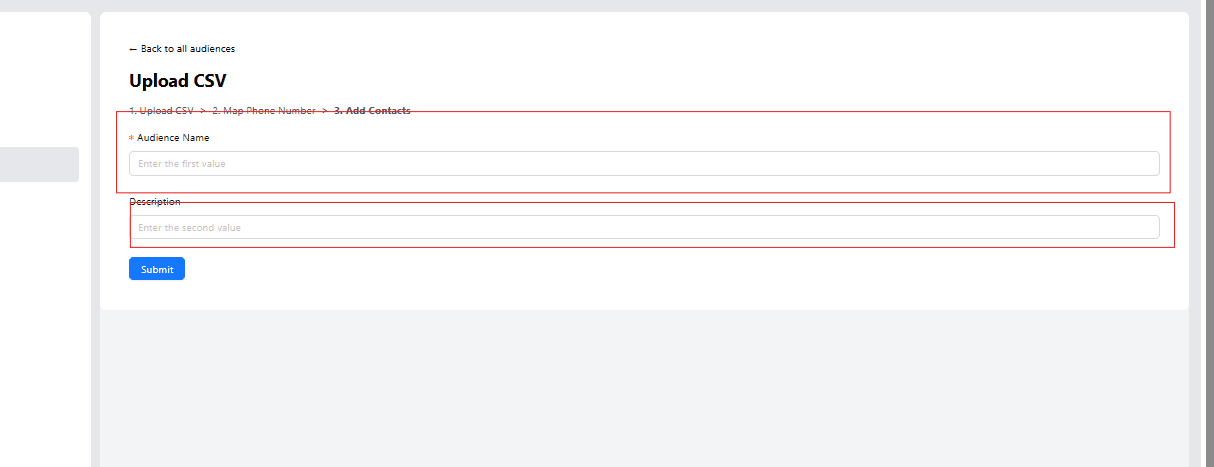
Step 13
Now ,click on Submit Button

Step 14
Then select the Campaign section
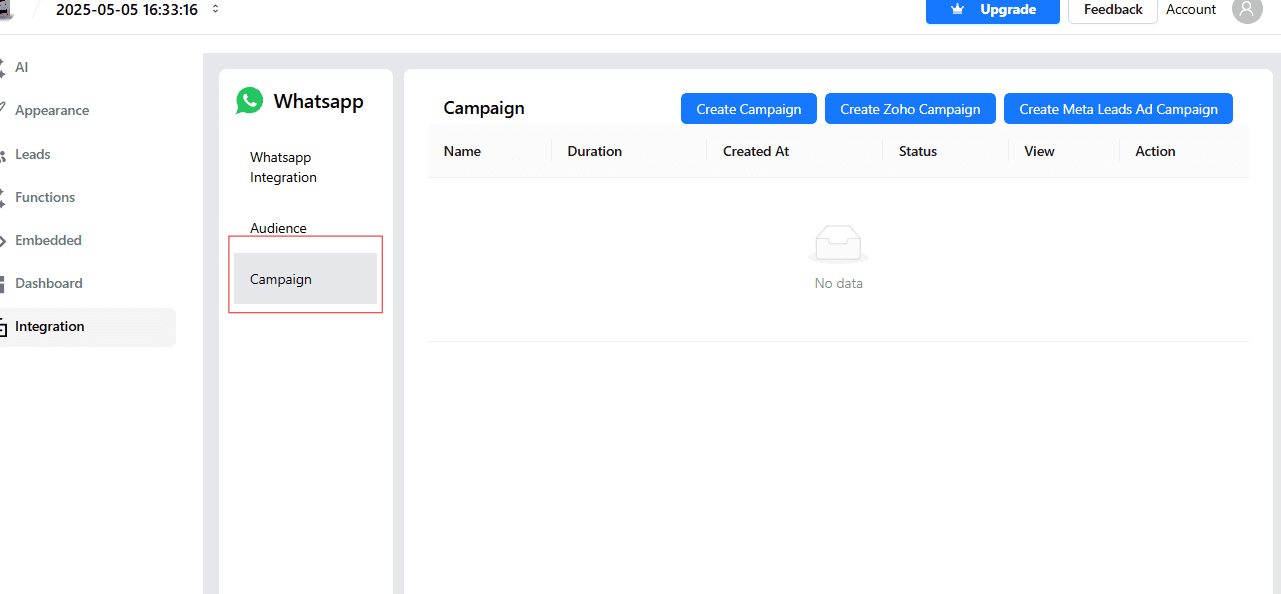
Step 15
Click on Create Campaign Button
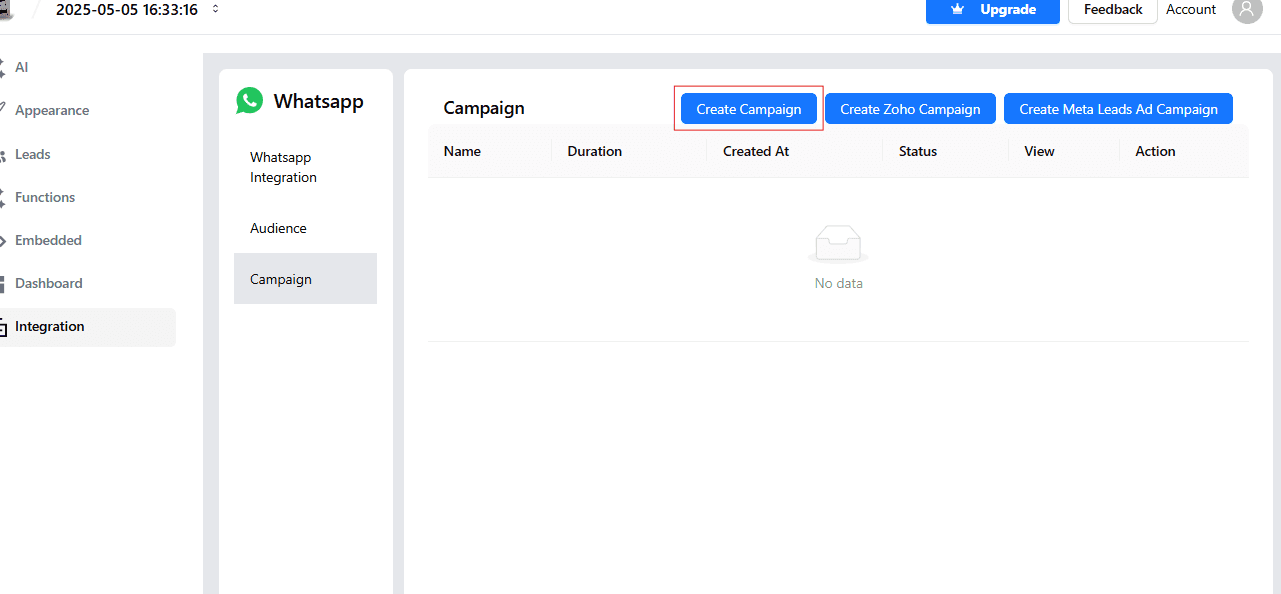
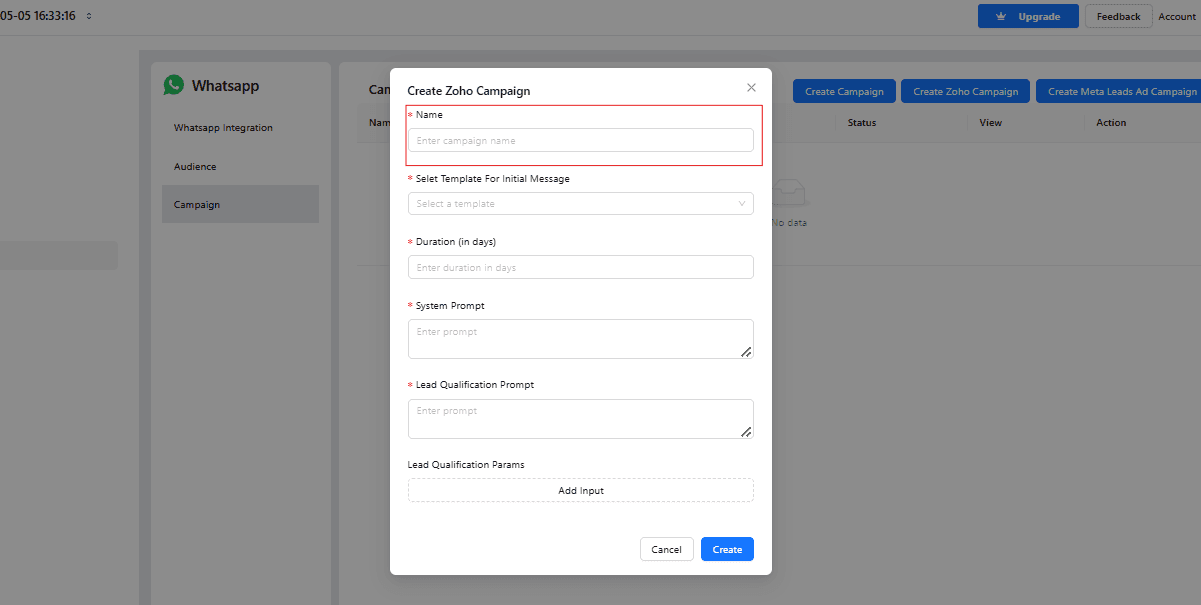
Step 16
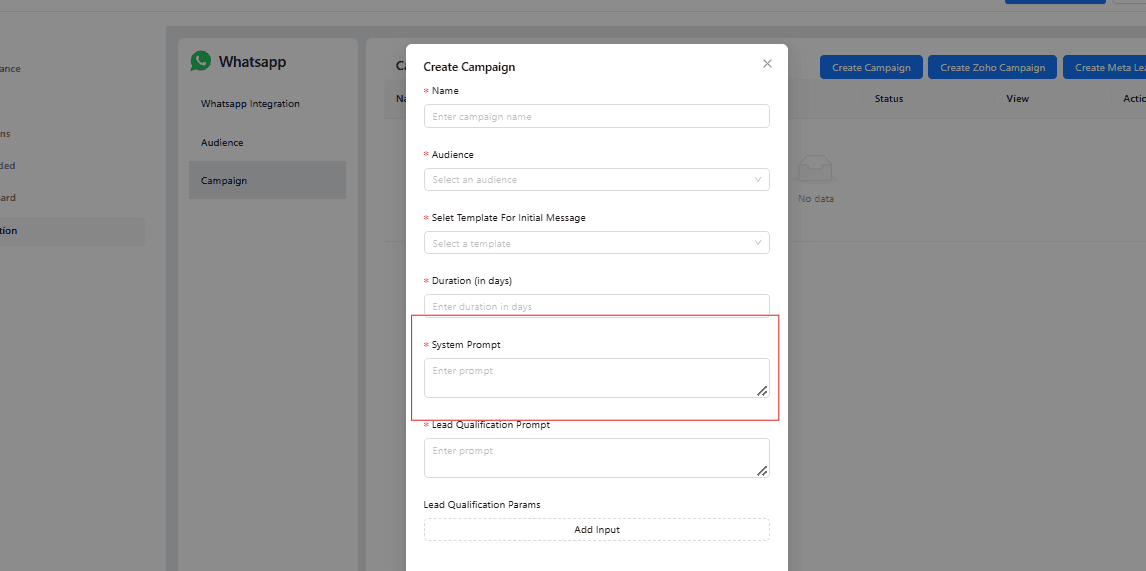
Enter the Name
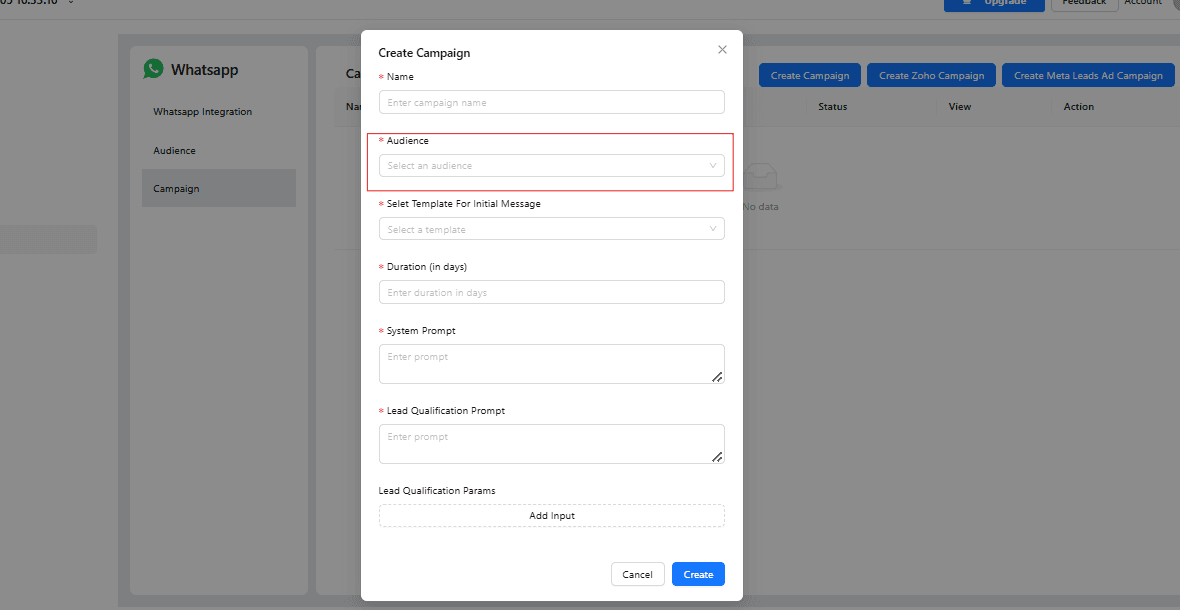
Select the Audience
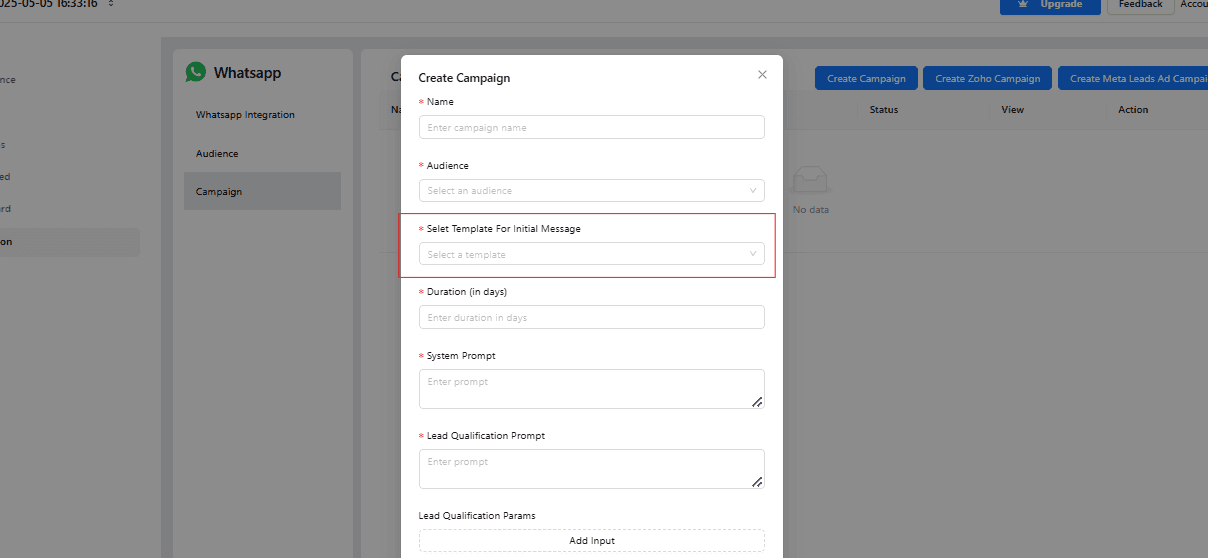
Select Template For Initial Message
Enter the campaign duration (in days)

Add your system prompt here.
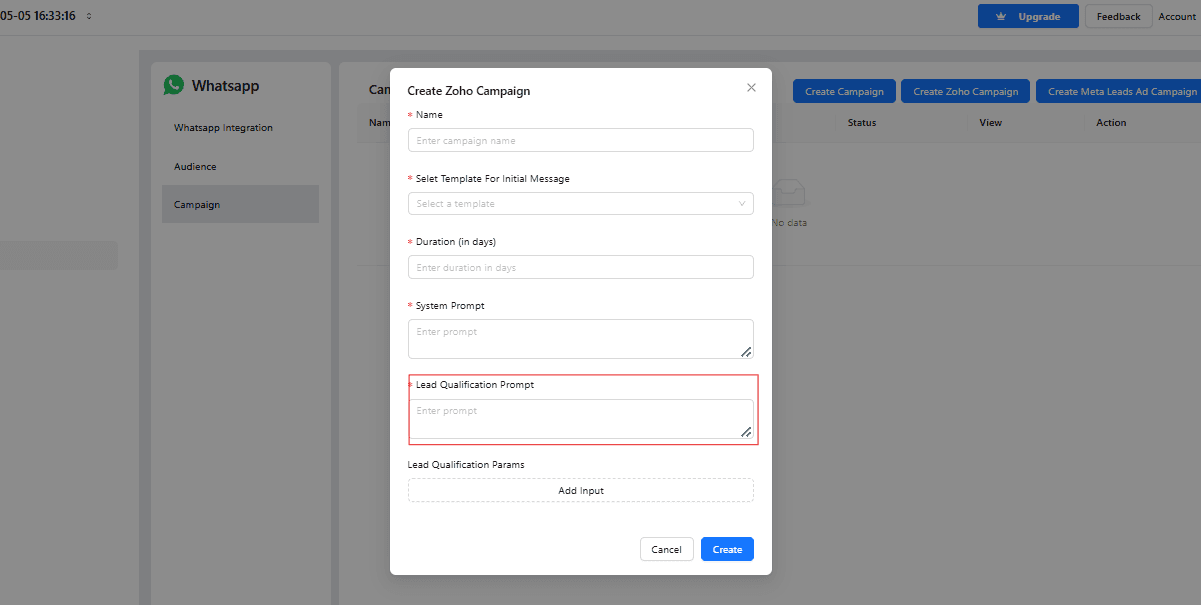
Write Lead Qualification Prompt
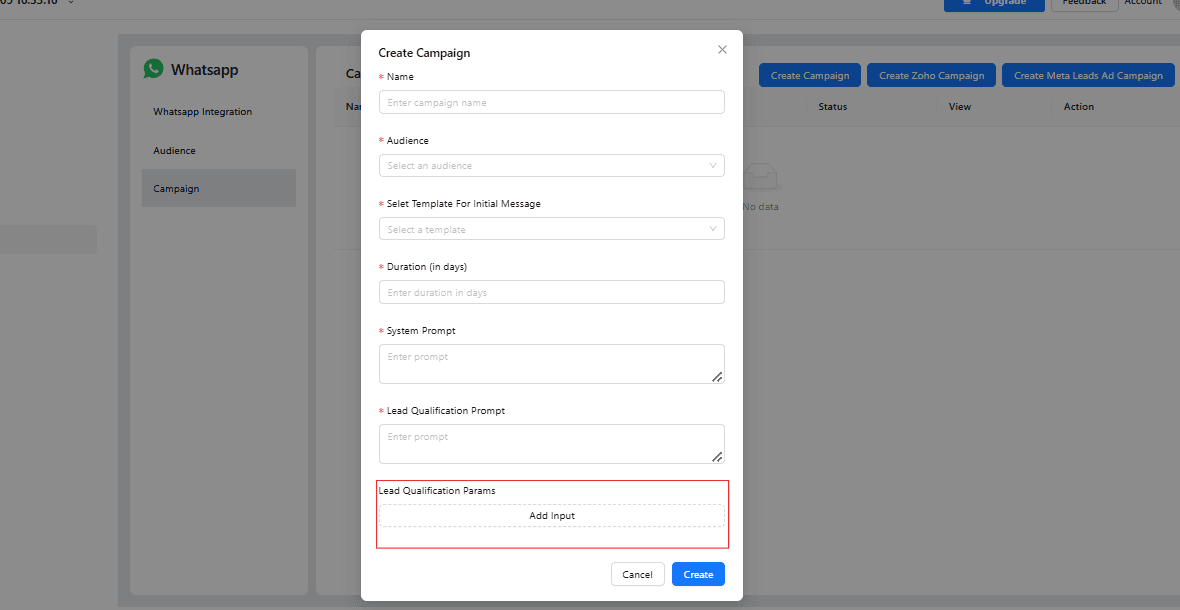
Add Lead Qualification Params
Step 17
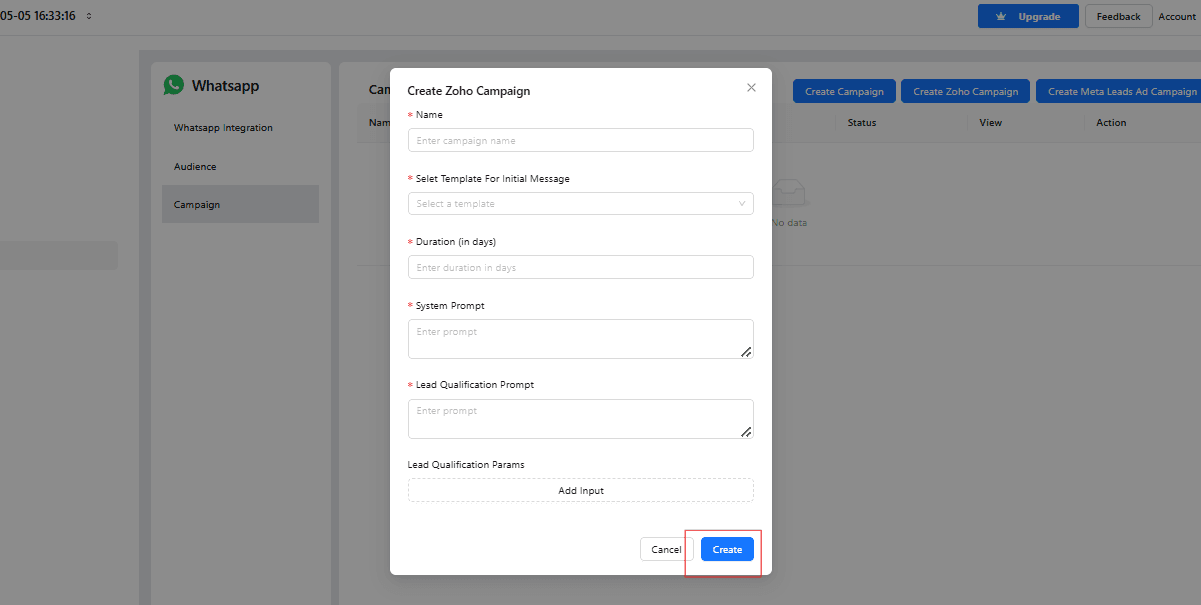
NOw Click on Create Button to create.
 .
.
Designing a WhatsApp Qualification Flow That Doesn't Feel Like Spam
WhatsApp is a personal channel, and prospects notice quickly when a bot feels transactional or pushy. A few design choices make the difference between a qualification flow that converts and one that gets ignored or blocked:
- Open with value, not an interrogation. Lead with a quick, relevant response to whatever the prospect asked or clicked on, then ease into qualifying questions rather than opening with "What's your budget?"
- Keep messages short. WhatsApp is a chat medium — long paragraphs read as out of place. Break qualifying questions into short, single-topic messages the way a person would type them.
- Respect WhatsApp's messaging policies. Use approved message templates for the first outbound contact within a campaign, and be mindful of response windows so your bot doesn't run into platform-level delivery restrictions.
- Give an easy exit. Prospects who aren't ready should be able to opt out or ask to speak to a human without friction — a bot that won't let go of a conversation damages trust in your brand, not just the automation.
Common Pitfalls to Avoid
- Uploading a poorly formatted audience CSV. As with the format shown in Step 7, missing or malformed phone numbers cause silent delivery failures. Test with a small batch before scaling to your full list.
- Writing a qualification prompt that's too rigid. A prompt that forces the exact same question sequence regardless of what the prospect says feels robotic. Let the agent adapt the order of questions to the flow of the conversation.
- Skipping the campaign duration setting. Prospects don't always reply immediately. A campaign window that allows a day or two for a response captures meaningfully more completed qualifications than a single-message attempt.
- Not reviewing early conversations. Read a sample of real conversations in the first few days to catch confusing phrasing or missing context before it affects a larger volume of leads.
Use Cases
-
Multi-step Qualification Flows: Create dynamic conversations that ask multiple questions such as budget, timeline, and requirements to evaluate lead quality comprehensively, adapting the sequence based on how the prospect responds.
-
Instant Lead Scoring: Automatically score leads based on their responses to prioritize follow-ups, so your sales team knows exactly which conversations to act on first.
-
CRM Integration: Sync qualified leads and their data directly into your CRM, enabling your sales team to take immediate action without re-entering information from a chat log.
-
Re-engagement Campaigns: Reach back out to past inquiries or stalled leads sitting in your database with a fresh, low-friction qualification conversation instead of a cold call.
-
Post-Qualification Nurturing: Route leads who aren't quite ready yet into an automated nurture sequence, keeping them warm until they meet your qualification bar.
Why WhatsApp Outperforms Other Channels for Qualification
Email qualification sequences routinely go unopened, and outbound calls increasingly go unanswered by prospects who don't recognize the number. WhatsApp sidesteps both problems — prospects already have the app open, they're used to responding quickly, and a well-designed bot conversation doesn't feel like an intrusion the way a cold call does. That combination of high visibility and low friction is exactly why WhatsApp-based qualification consistently produces faster response times and more completed conversations than channels built around interruption.
Conclusion
Building a lead qualification AI agent on WhatsApp with Kipps.AI transforms how businesses handle inbound leads. It automates the initial qualification process, filters high-quality prospects in real time, and keeps your CRM updated without manual effort — all on the channel where your prospects are already paying attention.
Start leveraging WhatsApp automation with Kipps.AI today and convert leads faster, smarter, and at scale.
Frequently Asked Questions
No. The qualification bot runs on your existing WhatsApp Business number, so prospects simply message or reply as they normally would — there's no separate app or download required.
A website chat widget only reaches visitors who are actively on your site. A WhatsApp bot reaches prospects wherever they are, with the higher open and response rates WhatsApp is known for, and supports proactive outbound qualification campaigns, not just inbound chat.
Yes. When a prospect asks for a human or the conversation falls outside the qualification flow, the bot can escalate to a live agent with the conversation history intact.
No. The entire setup — chatbot creation, WhatsApp Business integration, audience upload, and campaign configuration — is done through Kipps.AI's no-code interface, as shown in the steps above.
Kipps.AI's WhatsApp integration is built to work within WhatsApp Business API guidelines, including use of approved message templates for initial outreach. Businesses should still review their specific use case against current WhatsApp policies, particularly for outbound campaign messaging.
Kipps.AI is a no-code AI platform designed to help businesses build intelligent agents across multiple channels like chat, voice, and WhatsApp. These AI agents automate routine conversations, streamline workflows, and integrate deeply with business tools such as CRMs.
With Kipps.AI, creating a WhatsApp lead qualification bot requires no coding knowledge, allowing marketing and sales teams to deploy smart automation quickly. By combining AI and seamless CRM integration, Kipps.AI empowers businesses to scale their lead management and improve conversion rates effectively.
Ready to put WhatsApp to work for your pipeline? Book a free demo or explore the platform at kipps.ai.
Related Case Studies

How an Executive Education Institution Automated Its Entire Admissions Workflow Using AI Voice and WhatsApp
How an executive education institution automated admissions from first call through counselor handoff using AI voice, WhatsApp automation, and CRM orchestration.

How an EdTech Founder Reactivated a Dormant Lead Database Using WhatsApp Automation and AI-Assisted Qualification
How an early-stage EdTech founder reactivated a dormant inquiry database and acquired customers in the first week using WhatsApp-first outreach and AI-assisted qualification.

How a Premium Travel Company Uses an AI Voice Agent to Qualify Leads Before Expert Engagement
How a Dubai-based premium travel company deployed an AI voice agent to capture trip requirements, classify intent, and route only high-value leads to travel experts.