Connect your Plivo number to Kipps.AI voice agent for Incoming calls
Connect your Plivo number to Kipps.AI to handle incoming calls with an intelligent AI voice agent. Deliver 24/7 automated support without adding headcount.

Introduction
Kipps.AI is a no-code platform for building and deploying AI agents — Chat Agents, Voice Agents, and WhatsApp assistants — without writing code. If your business runs on Plivo for telephony, you can connect your existing Plivo number directly to a Kipps.AI voice agent and let AI handle every incoming call: understanding natural speech, answering from your knowledge base, and escalating to a human when a request genuinely needs one.
This guide walks through connecting a Plivo number for incoming calls — calls a customer places to your Plivo number, which Kipps.AI then answers. It's written for support and operations teams who already have a Plivo number provisioned and want AI-driven call handling live in minutes, not weeks. If you instead want your AI agent to place calls out to customers, see our companion guide on outbound Plivo integration.
Traditional voice support is costly and limited by human availability, while customers increasingly expect an immediate, consistent response regardless of the hour. Connecting your Plivo number to Kipps.AI answers incoming calls in real time with a context-aware agent trained on your business data — faster resolution, lower support costs, and no added headcount.
Plivo is frequently the telephony layer of choice for teams that need reliable global coverage and competitive per-minute rates at volume, which makes it a natural pairing once a voice agent deployment grows beyond an initial pilot. None of that underlying infrastructure needs to be managed directly for this integration — Kipps.AI handles the call-control layer, so your part of the setup is limited to registering the number and pointing it at the right destination.
Prerequisites
Before starting, make sure you have:
- An active Plivo account with billing enabled and sufficient balance, since call handling and any associated charges run through your Plivo account.
- A Plivo phone number with voice capability already purchased, provisioned for the country and use case you need.
- A Kipps.AI account (sign up here) with a voice agent already configured — persona, knowledge base, and escalation logic should be built and tested in the simulator before you attach a live number.
- Admin access to your Plivo console, since the integration typically requires pointing your number's voice application settings at Kipps.AI.
- Time to run test calls after setup, from more than one phone and network, to confirm the agent answers correctly and sounds natural.
How to Get Started with Plivo Incoming Calls on Kipps.ai
Step 1: Log in to Kipps.AI
Log in (or sign up) at Kipps.AI. Have your voice agent already built, so the integration attaches a live number to conversation logic that's already been tested.
Step 2: Start the Plivo integration
Begin the flow to integrate your Plivo incoming number from your voice agent's dashboard.
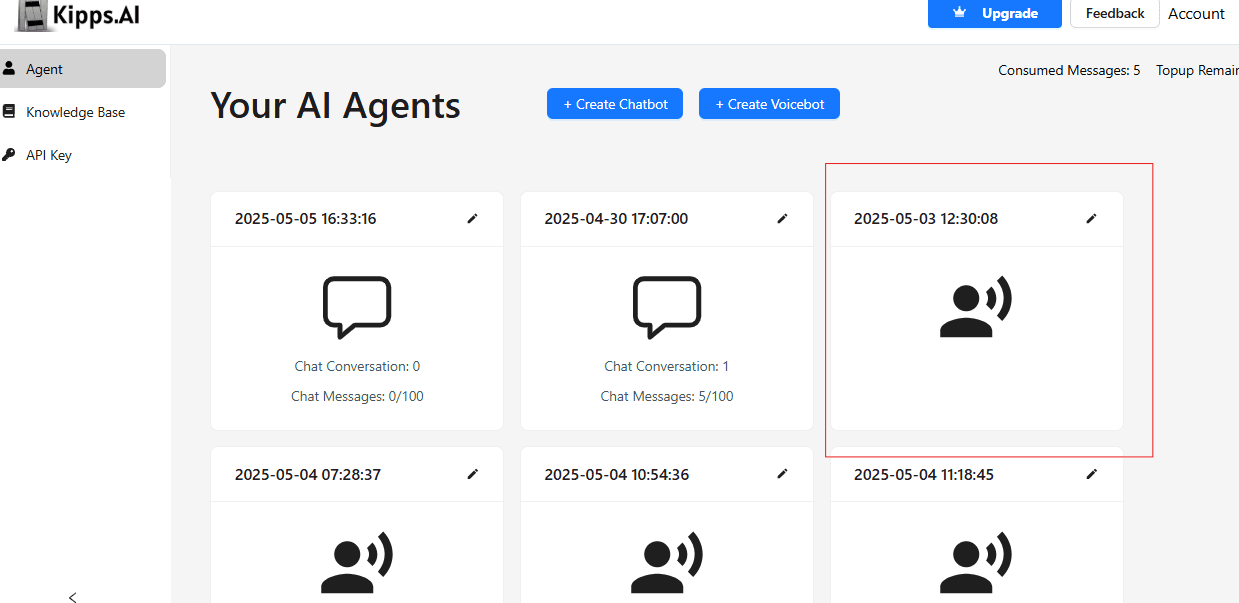
Step 3: Go to the Phone Number section
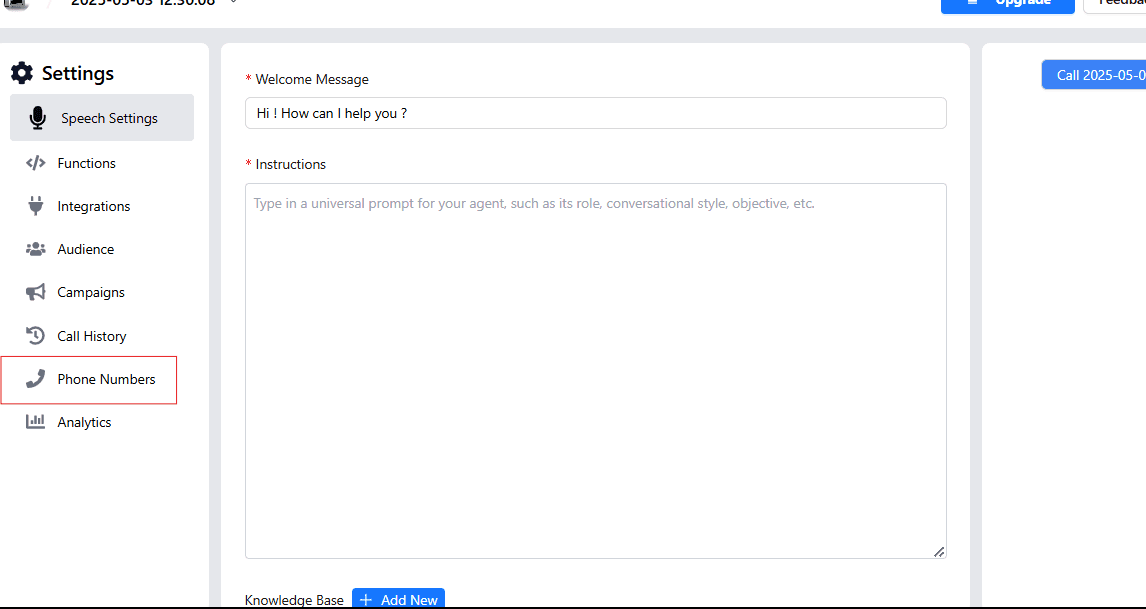
This is where every connected number lives — you'll come back here later to check status, reassign an agent, or disconnect a number.
Step 4: Click "Connect phone number"
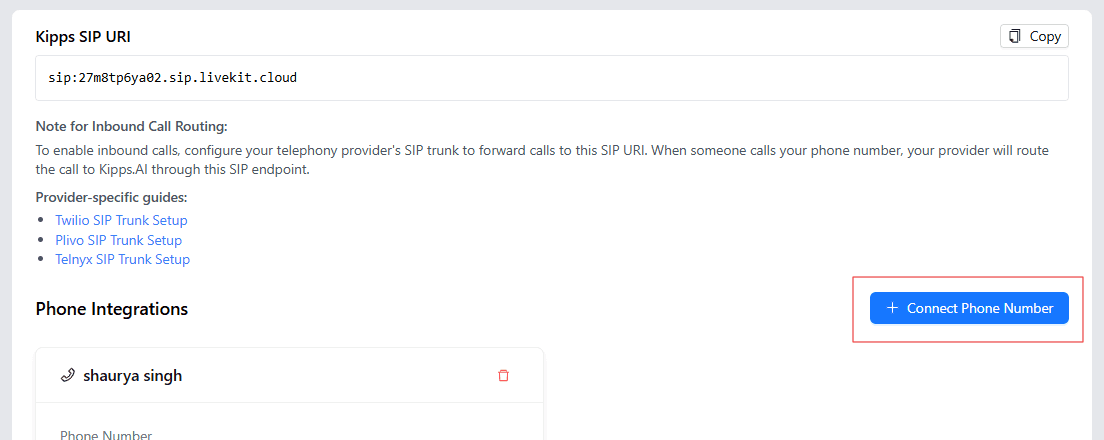
Step 5: Enter a nickname and your Plivo number
Enter a clear nickname and your Plivo number in E.164 format (with country code).
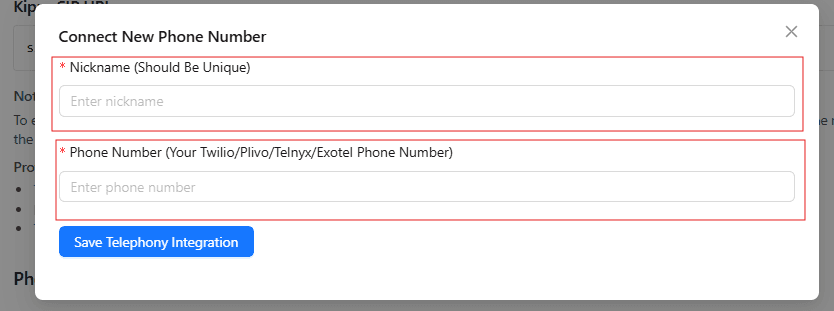
A descriptive nickname (by region or purpose) saves confusion once you're managing several numbers.
Step 6: Save the telephony integration
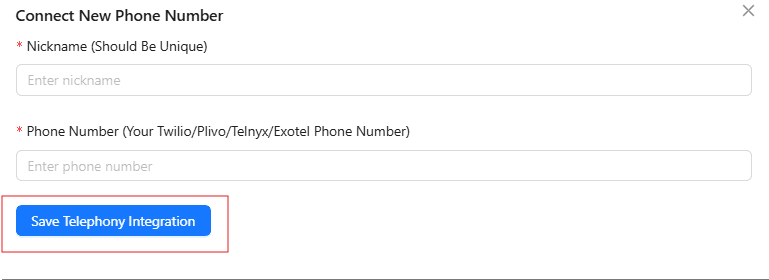
This generates the configuration Kipps.AI needs, typically a webhook or application endpoint you'll reference in your Plivo number's voice settings so Plivo knows to route calls to Kipps.AI.
Step 7: Enable inbound calls
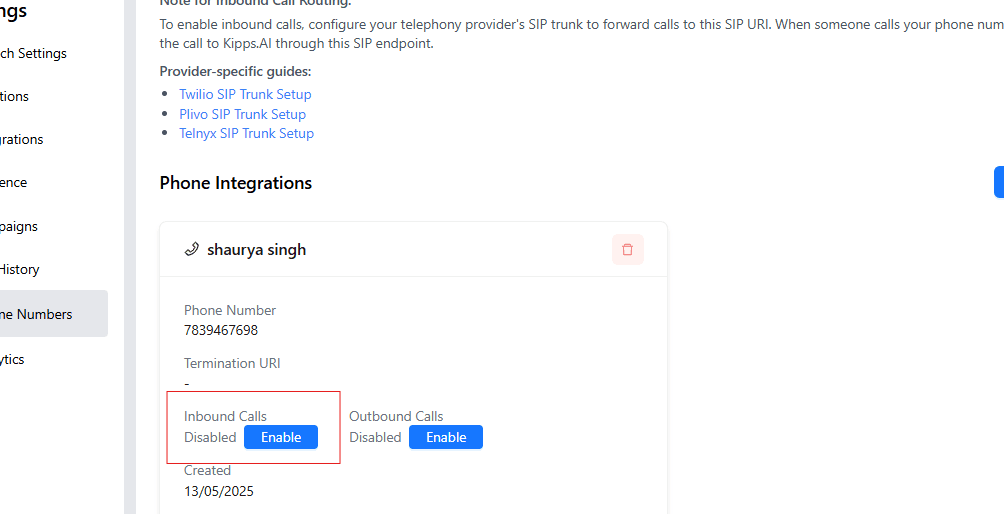
Enabling this makes the integration live. Place a test call right away to confirm the agent answers and responds as expected.
Troubleshooting
- Calls don't reach the AI agent. Check that your Plivo number's voice application or webhook configuration points to the exact endpoint Kipps.AI generated in Step 6.
- The call connects but the agent doesn't respond. Confirm the voice agent behind this number is published and active, not sitting in draft.
- Calls fail or hit a Plivo error before reaching the agent. Check your Plivo account balance and number status — an unfunded account will fail before the call reaches Kipps.AI.
- Audio is choppy, delayed, or drops out. Usually a network or codec issue rather than a Kipps.AI setting. Test on a stable connection and, if it persists, contact support with a recent call ID.
- Authentication or signature errors in your logs. Typically a stale or mistyped webhook reference — re-save the integration and update the reference in Plivo.
- The number shows "connected" in Kipps.AI but calls still don't route. Check for a conflicting application still attached to the number in your Plivo console — it can take priority over the Kipps.AI configuration.
If the issue persists, contact kipps.ai/contact-sales with your account details and the approximate time of the failed call.
Best Practices
- Test with a secondary number first if this is replacing a live support line, so you can validate behavior without affecting current customers.
- Review call transcripts regularly, especially in the first few weeks, to catch phrasing or requests your knowledge base doesn't yet cover.
- Define a clear escalation path for requests the agent shouldn't resolve alone, and make sure a human is actually reachable when a handoff happens.
- Plan for provider-side incidents with a documented fallback, like call forwarding to a backup line.
- Watch call-volume and duration trends, not just individual calls — sudden shifts are often the earliest sign something upstream needs attention.
- Keep your number and agent inventory organized as you scale across regions or use cases.
- Set up basic monitoring or alerting on call failures. Even a lightweight check — a daily glance at call logs, or an alert on a sudden failure spike — catches problems long before a customer complaint does.
Frequently Asked Questions
No. The integration is handled entirely in the Kipps.AI dashboard — you configure your number's voice settings to point at Kipps.AI, without custom code.
Yes. Numbers are managed independently in the Phone Number section, so different numbers can route to different agents.
A properly configured agent recognizes when a request needs human judgment and escalates the call with context, so the caller doesn't have to repeat themselves.
Connecting the number itself takes a few minutes. Plan additional time to test the agent thoroughly with real calls before directing customer traffic to it.
Return to the Phone Number section in Kipps.AI and reassign the number to a different agent, or disconnect it entirely.
Yes, but wait until the number shows as fully active and voice-enabled in your Plivo console before connecting it — newly provisioned or ported numbers can take a little time to activate for voice, and connecting too early can cause intermittent call failures.
No. You keep your existing Plivo number and account as-is — the integration only changes how incoming calls are routed once Plivo receives them, it doesn't require porting the number elsewhere.
Get Started
Connecting your Plivo number to Kipps.AI takes only minutes, and once live, your AI voice agent handles calls smartly and consistently — reducing response time and improving satisfaction, without adding headcount. Talk to our team for help planning your rollout, or explore the platform at kipps.ai.